Real-Time Financial Infrastructure for Payments, Stablecoins, and Tokenized Assets
Build institution-controlled financial applications with real-time settlement, privacy, compliance controls, and access to global onchain liquidity.
Espresso is a blockchain purpose-built to serve as settlement infrastructure for other applications and blockchains. Each integrated system keeps its own execution environment, sequencer, and compliance rules. Espresso finalizes their transaction output through decentralized Proof of Stake consensus and makes that finality verifiable by other connected applications & blockchains through zero-knowledge proofs.
This documentation covers what Espresso is, what you can build on it, how it works, and how to integrate.
Note
Ready to build? Talk to Espresso
Where to Start
- What is Espresso?
- Use Cases
- Evaluate Espresso for Your Business
- Nitro / Orbit, OP Stack, Besu: Integrate a Chain
- RPC node: Reading from Espresso
- Espresso API: API Reference
- Mainnet, Decaf Testnet: Networks & Contracts
- Node operators: Run an Espresso Node
- Earn ESP Staking Rewards
- Live on Espresso
- Performance Benchmarks
- Changelog
What Can I Build?
Espresso is designed to support institution-grade financial applications including:
- Stablecoins: dedicated issuance environments with custom compliance rules, privacy controls, and access to onchain liquidity including USDC, USDT, and other Ethereum-issued assets
- Payment networks: application-specific environments with custom fee models, gasless end-user experiences, and crosschain settlement
- Tokenized assets and RWA: high-performance environments with full compliance controls, DeFi compatibility, and privacy-preserving ownership records
- Collateral management: real-time crosschain position monitoring secured by zero-knowledge proofs, without trusted intermediaries
Key Properties
- Control: each environment defines its own rules for compliance, fees, ordering, and asset support; no shared state with other applications on Espresso
- Privacy: transaction data can be encrypted before submission; Espresso finalizes the encrypted sequence without decrypting it; only authorized participants holding the appropriate access keys can derive application state
- Real-time settlement: finality through decentralized Proof of Stake consensus, not sequencer confirmations or multisig coordination
- Interoperability: state finalized by Espresso can be verified by Ethereum and other connected chains through zero-knowledge proofs, without trusted intermediaries
Espresso for Enterprise
For institutions digitizing assets, payments, and financial infrastructure. Run dedicated execution environments on your own rules, settled through Espresso and connected to broader onchain markets.
Companies and blockchains like Celo, ApeChain, Gate, Litecoin Foundation, and others have already chosen Espresso for the architectural freedom and native interoperability no monolithic chain can match.
Enterprise deployments on Espresso get:
- Dedicated environments: sovereign execution with custom rules for fees, ordering, compliance, and asset support
- Privacy-preserving settlement: dedicated environments can keep transaction data encrypted, with only authorized participants able to derive application state
- Shared finality: a common finality layer that coordinates state across systems in real time
- Security by consensus: crosschain coordination secured by zero-knowledge proofs and decentralized Proof of Stake finality, reducing reliance on trusted intermediaries
- Liquidity access: state finalized by Espresso can be verified by Ethereum and other connected chains, so dedicated environments can stay connected to onchain liquidity including USDC, USDT, and other Ethereum-issued assets without giving up architectural control
Note
See institutional deployments in action. Example Solutions
Example Solutions
Espresso is designed to support institutional applications such as collateral management, stablecoins, tokenized assets, and payment networks.
Collateral Management and Margin Monitoring
Real-time crosschain collateral with cryptographic proof of position across systems.
Real-time collateral management requires a reliable, unified view of positions across multiple systems. Espresso’s shared finality provides that foundation. Multiple collateral environments can run in parallel, scaling throughput linearly, while crosschain coordination secured by zero-knowledge proofs allows assets on one environment to serve as collateral in agreements on another.
- Parallel environments: multiple collateral application instances run concurrently, each scaling independently
- ZK-secured crosschain coordination: positions and collateral state are verifiable across environments without re-executing source logic or relying on trusted intermediaries
- Real-time settlement: Espresso finalizes a unified transaction sequence across all environments, giving risk systems a consistent, timely view of positions
A live Digital Assets Summit 2026 demo showed crosschain collateral management concepts at scale.
Stablecoin Issuance
A stablecoin that behaves like a traditional fintech payment platform, with blockchain settlement underneath.
- Dedicated execution environment: an application-specific environment with custom rules and settlement through Espresso
- Interoperability: connect to supported DeFi and blockchain ecosystems without making users manage bridge mechanics directly
- Gas abstraction: applications can abstract fee payment from end users where the product design supports it
- Privacy: transaction data remains private to authorized participants; only those with appropriate access can derive balances and activity
Modern stablecoins operate as full applications, combining fast crosschain movement, compliance controls, and DeFi interaction. Espresso provides the infrastructure to deliver this as a dedicated, institution-controlled product.
Asset Tokenization and RWA
Tokenized assets on a high-performance, customizable environment with full compliance controls, interoperable with the broader blockchain ecosystem.
- Dedicated infrastructure: institutions retain control over issuance rules, compliance requirements, and access permissions
- DeFi-compatible: tokenized assets can be listed, traded, and used as collateral across DeFi
- Privacy-preserving: sensitive transaction data and ownership records can remain private to authorized participants
Payment Service Provider Applications
A dedicated application environment for enterprises building onchain payment networks: neobanks, payment processors, and fintech platforms.
- Custom fee models: flat, percentage-based, or zero, aligned with existing pricing structures
- Gasless end-user experiences: applications can remove gas fees entirely for end users; fee handling is a configuration decision at the execution environment level, not a network constraint
- Compliance controls: enforce access rules, transaction limits, and asset restrictions at the environment level
- Crosschain settlement: connect payment flows to broader blockchain markets through secure interoperability
How It Works
Settlement and execution are separated. Each application environment has its own sequencer that orders transactions and streams them to Espresso. Espresso finalizes that stream through decentralized Proof of Stake consensus, establishing a definitive record of what happened. Each application then executes its own deterministic logic against that finalized transaction stream. For private applications, this includes decrypting transactions using access keys held only by authorized participants. Because Espresso’s consensus ensures all clients observe the same finalized sequence, all authorized clients derive identical state.
Crosschain coordination uses cryptographic proofs. Applications that need to verify state or pass messages across environments do not reconstruct the full source state. Instead, coordination servers attach zero-knowledge proofs to crosschain messages, allowing destination environments to verify correctness without re-executing the source logic. This removes the need for trusted intermediaries in crosschain settlement.
Execution scales horizontally. Espresso does not execute transactions. Each environment runs its own execution logic, which means Espresso is not the throughput bottleneck. Multiple dedicated environments run in parallel, each scaling independently, and Espresso finalizes their output. Institutions can run high-throughput financial workloads across many parallel environments without any single execution environment becoming the constraint.
Espresso for Chains
For teams building dedicated chains across payments, consumer apps, DeFi, and application-specific deployments. Get settlement, security, and crosschain connectivity out of the box.
Chains built on Espresso get:
- Control: a dedicated environment built around your own requirements
- Configurability: design the system around the product, not the other way around
- Connectivity: native interoperability with every other chain on Espresso
- Performance: fast finality on Mainnet today; the ability to scale to millions of transactions per second
How to Work With Espresso
Each environment is fully customizable: fees, transaction ordering, VM extensions, compliance controls, and privacy configuration. Organizations benefit from the security of Espresso’s validator network and connectivity to the broader blockchain ecosystem. Deployments can be built directly on Espresso or designed and operated by Espresso Systems.
The network offers fast finality on Mainnet today, with the ability to scale to millions of transactions per second. Crosschain collateral management use cases have been demonstrated live at Digital Assets Summit 2026.
Note
Exploring asset digitization, digital payments, or tokenized financial products? Talk to the team
About
Espresso Systems builds digital asset infrastructure for enterprises that demand speed and customizability without sacrificing architectural control. We believe the future of finance is multichain, and build with that thesis in mind. We design and operate production-grade applications on Espresso, a high-performance blockchain providing real-time settlement, fast finality, and the ability to scale to millions of transactions per second.
Espresso Systems was founded in 2021 by Ben Fisch, Benedikt Bünz, Charles Lu, and Jill Gunter, and is backed by more than $50 million from Andreessen Horowitz, Sequoia Capital, Greylock Partners, Paxos, Gemini, and Coinbase Ventures.
The network is used by Offchain Labs (Arbitrum), Celo (Valora, MiniPay), Yuga Labs (ApeChain), Bitget (Morph Chain), Rarible (Rari Chain), and Litecoin (LitVM).
Get Started
Espresso is a strong fit if you’re building:
- Stablecoin platforms
- Payment infrastructure
- Tokenized asset platforms
- Private financial networks
- Regulated digital asset infrastructure
Evaluating Espresso for Your Business
What You Get
- Dedicated execution environments tailored to your business and regulatory requirements
- Real-time settlement through decentralized Proof of Stake consensus
- Configurable compliance and privacy controls without sacrificing interoperability
- Secure crosschain connectivity through cryptographic proofs rather than trusted intermediaries
Next Steps
- Schedule an architecture review with the Espresso team.
- Explore example financial use cases.
- Review configurable execution environments.
- Discuss your deployment and integration strategy.
Integrating an Existing Chain
If you already operate a chain or application environment, Espresso can add decentralized settlement and fast finality without requiring a new execution stack.
What You Get
- Fast settlement on Mainnet, backed by a decentralized validator set, with the ability to scale to millions of transactions per second
- EVM compatibility: Espresso integrates with EVM execution clients including Besu, so existing teams can integrate without adopting a new execution stack
- Horizontal scaling: teams running Besu can deploy multiple parallel instances on Espresso, scaling throughput linearly while finality latency stays bounded
- Full integration support: kick-off call, devops assistance, async support, and 24/7 monitoring through each stage of the integration
Next Steps
- Review integration paths, prerequisites, and timelines.
- Schedule a kick-off call with the Espresso team.
- Discuss your deployment architecture and go-live timeline.
What is Espresso?
Real-time settlement for institution-grade financial applications without sacrificing privacy, control, or architectural sovereignty.
Espresso is a blockchain that serves as a decentralized settlement layer that enables institutions and developers to build payment networks, stablecoins, tokenized assets, and other financial applications with real-time settlement, configurable execution, and secure interoperability.
Espresso combines decentralized Proof of Stake consensus with zero-knowledge proof systems: consensus establishes a canonical, final record of transactions across all connected environments, and zero-knowledge proofs make that finality efficiently verifiable across environments without re-executing source logic or exposing private data.
Built for a future where onchain finance spans many independent networks, Espresso lets integrated systems build on their own stack, keep their architecture, and rely on fast settlement backed by a decentralized validator network.
Integrated systems can use Besu or other EVM clients, define their own rules, and make state finalized by Espresso verifiable by other chains and applications that need to interoperate with them. For institution-grade use cases in detail, see Use Cases.
Note
Who this page is for
- Heads of digital assets and product leads: Start with Use Cases.
- Technical evaluators: Start with What makes this possible, then read How Espresso Fits and Configurable Execution Environments.
- Diligence and risk teams: Networks lists contract addresses, validator information, and operator material.
At a Glance
Available today on Mainnet
- Settlement: Real-time settlement backed by a decentralized validator network
- Finality: Fast finality on Mainnet
- Throughput: Can scale to millions of transactions per second
- Validator set: Permissionless, top 100 by delegated stake
- Token: $ESP (ERC-20, Ethereum)
- Crosschain readability: State finalized by Espresso can be verified by Ethereum and other connected chains, keeping dedicated environments connected to onchain liquidity including USDC, USDT, and other Ethereum-issued assets
- Privacy architecture: the Espresso design supports private execution through encrypted block submission and authorized client decryption; only participants holding the appropriate access keys can derive application state
- Live chain integrations: See Live on Espresso for current integrated chains and applications
- Staking and delegation: Available via the staking UI and
staking-cli
What Makes This Possible
The use cases in Use Cases rest on a small, deliberate set of capabilities:
- Decentralized Proof of Stake consensus. Permissionless validator set; stake delegated via the $ESP token. No single sequencer, multisig, or operator can reorder or censor finalized blocks.
- Fast finality. Real-time settlement on Mainnet today.
- Scalable throughput. The ability to scale to millions of transactions per second. Because Espresso does not execute transactions, each environment runs its own execution logic and Espresso is not the throughput bottleneck. Multiple environments run in parallel, each scaling independently, while Espresso finalizes their output.
- Configurable execution environments. Each integrated chain or application defines its own execution rules (fees, ordering, compliance, asset support) while sharing Espresso’s settlement guarantees.
- Secure interoperability. State finalized by Espresso can be verified by chains and applications that need to rely on that settlement, so applications, bridges, and counterparties can confirm Espresso finality without relying on intermediaries.
- Privacy at the application layer. Public settlement layer; private execution environments can prove validity without revealing the underlying data.
Technical Architecture
The consensus protocol underlying Espresso’s Proof of Stake finality is called HotShot, based on the HotStuff family of BFT consensus protocols. Compromising Espresso-finalized ordering would require an adversary to control at least one-third of staked $ESP. Data availability uses erasure coding, known as Verifiable Information Dispersal (VID), so individual nodes only need to store a fraction of each block rather than the full data, and a block is only finalized once enough chunks are confirmed recoverable across the network. See Protocol documentation for protocol-level detail.
Why the design works for private financial applications
Espresso separates consensus from execution. Each application environment has its own sequencer that orders transactions and streams them to Espresso. Espresso finalizes that stream through decentralized Proof of Stake consensus, establishing a definitive record of what happened. Each application then executes its own logic against that finalized transaction stream. This separation is what makes privacy possible on a public settlement layer.
For private applications, transaction data can be encrypted before it reaches Espresso. Espresso finalizes the encrypted transaction sequence without decrypting it. Only authorized participants, those holding the appropriate access keys, can decrypt and execute the application logic to derive state such as account balances, positions, or ownership records. Because all authorized participants observe the same finalized sequence and run the same deterministic logic, they all derive identical state, without any participant needing to reveal private data to the settlement layer.
Why consensus and zero-knowledge proofs are both necessary
Consensus and zero-knowledge proofs solve two different problems.
Consensus answers: what happened, and is it final?
Each application environment has its own sequencer that orders transactions. Espresso’s Proof of Stake consensus finalizes the sequencer’s output, giving every participant a single, agreed-upon record of what happened. Without consensus, there is no guarantee of finality. Anyone could present a conflicting version of events, and no one could prove which was correct. Consensus is what makes settlement real: a finalized transaction cannot be reversed or censored by any single party.
Zero-knowledge proofs answer: how do I act on state from another environment without re-executing it or seeing private data?
Once consensus has established what happened, separate environments still need to coordinate. A destination environment cannot always reconstruct the full state of a source environment. Doing so could be expensive, and for private applications it would require access to encrypted data the destination is not authorized to see.
Zero-knowledge proofs solve this. A coordination server for the source environment attaches a succinct proof to a crosschain message. The destination environment verifies the proof, confirming that the state or message is correct, without re-executing the source logic and without decrypting private data.
Why you need both:
Consensus alone tells you a transaction is final but gives you no efficient way to verify what that means for state on a separate environment. Zero-knowledge proofs alone let you prove state transitions efficiently, but without consensus there is no authoritative record of which state is canonical. A proof could be constructed against a disputed or non-final sequence. Together, consensus establishes finality and zero-knowledge proofs make that finality efficiently verifiable across environments, including private ones.
Zero-knowledge proofs and multiple proof systems
When applications on separate environments need to coordinate, they cannot always reconstruct full source state. Espresso supports zero-knowledge proof systems to make crosschain coordination efficient and privacy-preserving.
Coordination servers for a source application attach succinct proofs to crosschain messages. A destination application can verify message correctness using the proof alone, without re-executing the source logic or accessing private data. Multiple proof systems are supported, including ZK SNARKs and trusted execution environment (TEE) attestations, so teams are not required to adopt a single proving stack. This is how Espresso removes the need for trusted intermediaries in crosschain settlement while preserving the privacy of each application’s internal state.
Where to Go Next
- For institution-grade use cases: Use Cases.
- For chains and application teams evaluating dedicated environments: Configurable Execution Environments.
- For an architectural view of how Espresso fits into existing stacks: How Espresso Fits.
- For integrators reading state from Espresso: Reading from Espresso.
- For network contracts, endpoints, and validator information: Networks.
- For protocol implementation details: espresso-network.
- For ESP token holders: Delegate $ESP.
Use Cases
Institution-grade use cases for Espresso, including tokenized assets, stablecoins, payments, and collateral management.
Institutions moving financial assets onchain face the same tradeoff: public general-purpose chains offer liquidity and interoperability but limit control and predictability; private systems preserve control but fragment the application from broader onchain markets. Espresso is designed to bridge that gap.
Across the use cases below, Espresso provides the same foundation: each application runs its own dedicated execution environment, settles through Espresso’s decentralized Proof of Stake consensus, and stays connected to broader onchain markets, including Ethereum liquidity where supported, without inheriting a general-purpose chain’s rules.
Every use case below rests on that same foundation. What differs is which part of the control/connectivity tradeoff matters most for that workflow:
- Tokenized Assets and Stablecoin Issuance
- Payment networks
- Tokenized money market funds and collateral management
- Privacy-preserving settlement workflows
- 24/7 financial workflows
- Application-specific financial systems
- Gasless application experiences
- Secure crosschain settlement
- Institutional liquidity workflows
For a network overview, see What is Espresso?.
Tokenized Assets and Stablecoin Issuance
Who it’s for. Institutions issuing tokenized bonds, securities, structured products, stablecoins, deposit tokens, or other regulated digital assets.
The tradeoff. Issuers need control over issuance, redemption, transfer eligibility, compliance rules, and asset lifecycle events. Public general-purpose chains provide market access but force issuers to inherit chain-wide fees, ordering assumptions, and public execution. Fully private systems preserve issuer control but can isolate tokenized assets and stablecoins from wallets, counterparties, liquidity, and DeFi integrations.
How Espresso fits. Issuers can run a dedicated environment for issuance, redemption, eligibility checks, freeze and blocklist controls, NAV updates, and transfer restrictions. Espresso is a good fit because it separates execution from settlement: the issuer keeps control over asset logic, while Espresso provides a finalized settlement record that Ethereum and other connected chains can verify. That helps issued assets maintain connectivity to onchain liquidity without requiring the issuer to inherit a general-purpose chain’s rules.
Payment networks
Who it’s for. Payment networks needing fast finality, predictable cost, and continuous 24/7 operation across counterparties and chains.
The tradeoff. General-purpose chains can deliver throughput but with variable fees and ordering risk. Bilateral or closed networks offer control but limited reach. Fully private networks also cut off access to major onchain liquidity sources like USDC and USDT, which limits utility for real-world payment flows.
How Espresso fits. Payment applications can define their own fee logic e.g. no fees for certain amounts, counterparty rules, supported assets, and compliance checks in an application-specific environment. Espresso is useful here because fast Proof of Stake finality gives payment systems a stronger settlement basis than a single operator’s confirmation, while the execution environment keeps payment-specific rules separate from network-wide congestion and fee dynamics.
Tokenized money market funds and collateral management
Who it’s for. MMF issuers and collateral managers moving fund interests, NAV updates, and collateral movements onchain.
The tradeoff. Public general-purpose chains expose every NAV update and redemption to chain-wide fee and governance dynamics. Private deployments preserve control but make audit and cross-counterparty workflows harder to evidence.
How Espresso fits. Fund issuers and collateral managers can keep redemption rules, NAV update logic, collateral eligibility, and margin policy inside a dedicated environment. Espresso is useful because collateral and margin workflows need a shared source of finality across systems. Espresso finality gives counterparties, auditors, and risk systems a common record to verify when they need evidence of finalized positions or collateral movements.
Privacy-preserving settlement workflows
Who it’s for. Institutional financial workflows that need to keep execution data (counterparty identity, balances, trade size, position state) private from third parties while still settling on a system other parties can verify.
The tradeoff. Public general-purpose chains expose execution data by default. Private deployments preserve privacy but lose the cross-system verifiability that comes from a public settlement layer.
How Espresso fits. Privacy lives at the application and execution layer: transactions can be encrypted before submission, execution can be limited to authorized participants, and proofs can let counterparties verify validity without exposing the underlying private data. Espresso is a good fit because it can finalize encrypted transaction streams without executing or decrypting them, preserving public settlement while keeping sensitive workflow data out of the settlement layer.
24/7 financial workflows
Who it’s for. Institutional workflows that need to clear across counterparties and time zones without scheduling around a single operator.
The tradeoff. Traditional settlement is constrained by market hours, settlement cycles, and operating windows. Public chains operate 24/7 but expose application-level scheduling to network-level congestion. Closed settlement networks avoid that congestion but inherit operator availability constraints.
How Espresso fits. Espresso operates continuously through a decentralized validator network, so applications are not designed around market-hour settlement windows or a single operator’s business hours. That matters for treasury, collateral, and payment workflows where counterparties need a settlement system that can keep producing finality across regions and time zones.
Application-specific financial systems
Who it’s for. Exchanges, RFQ venues, clearing systems, and other financial applications with specific requirements around ordering, fees, asset support, or compliance.
The tradeoff. Building on a public chain forces the application to adapt to that chain’s economics. Building a fully private system avoids that but loses interoperability with broader onchain markets.
How Espresso fits. Each application can define the rules that matter for its market structure. An RFQ venue, for example, can define its own auction logic, participant rules, timing windows, and asset support. Espresso is a good fit because the venue’s own sequencer can order activity according to those market rules, while Espresso finalizes the sequencer’s output so counterparties have a common finality source.
Gasless application experiences
Who it’s for. Financial applications and payment networks where charging end users a variable network fee is incompatible with the product design, for example fixed-fee payment products, enterprise treasury tools, or consumer-facing financial applications.
The tradeoff. On public general-purpose chains, gas fees are set by network-wide demand and paid by the end user or application in the chain’s native token. This makes fee predictability difficult and forces product decisions around gas mechanics that have nothing to do with the application’s financial logic.
How Espresso fits. Because each application controls its own execution environment, fees can be a product decision instead of a network-level constraint. Espresso does not force every application into one shared fee market, so the application operator can absorb fees, denominate them in a supported asset, or remove them from the end-user experience where the product design supports it.
Secure crosschain settlement
Who it’s for. Applications coordinating activity across multiple chains (moving an asset, executing a multi-leg trade, syncing application state) where the settlement guarantee matters.
The tradeoff. Messaging protocols and bridge systems rely on their own trust models (relayer sets, multisigs, oracle networks) for message delivery. Those trust models are often acceptable for low-value flows but harder to justify for institutional workflows where the settlement guarantee matters.
How Espresso fits. Messaging protocols can move messages, but they do not by themselves create the settlement guarantee behind those messages. Espresso is complementary because its consensus answers whether source activity is final, while zero-knowledge proofs can help a destination environment verify what that finalized activity means for a state update or message without re-executing the source environment.
Institutional liquidity workflows
Who it’s for. Repo, securities lending, prime brokerage, and intraday treasury workflows needing fast settlement of multi-leg transactions and the ability to coordinate across systems without giving up control of compliance and audit.
The tradeoff. The mismatch between traditional settlement cycles and onchain continuous operation is one of the main reasons these workflows have not moved onchain.
How Espresso fits. Institutional liquidity workflows often need multiple parties to rely on the same record of trades, collateral movements, and financing legs. Espresso is a good fit because it gives those workflows a shared finality layer without forcing all participants onto one execution environment. An institution can keep its own compliance, privacy, and workflow rules while making the finalized outcome verifiable to counterparties that need to rely on it.
Espresso is designed to extend this to crosschain atomic delivery-versus-payment: instead of each chain’s lock contract enforcing its own timeout independently (which can let one side refund while the other delivers), counterparties lock assets on their own chains and release only on a valid attestation from a single coordinating environment on Espresso, verified by a dual zero-knowledge and trusted-execution-environment proof rather than a single trusted intermediary. This gives crosschain trades the same atomic settlement guarantee as trades on a single chain.
Where to go next
- For the full network overview: What is Espresso?.
- For chains and application teams evaluating dedicated environments: Configurable Execution Environments.
- For an architectural view of how Espresso fits into existing stacks: How Espresso Fits.
How Espresso Fits
Espresso is a decentralized settlement layer. Chains and applications integrate with Espresso to get decentralized Proof of Stake settlement and finality on the blocks they produce, optional data availability, and state finalized by Espresso that other chains and applications can verify when they need to rely on that settlement.
Espresso plays the same role in every integration. What differs is the deployment shape. Espresso is also interoperable with other chains like Ethereum.
Pattern 1: A dedicated execution environment built around Espresso
A team builds an application or chain that runs its own execution environment (defining its own rules for fees, ordering, compliance, and asset support) and settles through Espresso. That environment can use Besu or another EVM client, rather than a single prescribed execution stack. Multiple parallel instances of the same environment can run on Espresso simultaneously, scaling throughput linearly without redesigning application logic. Espresso’s decentralized Proof of Stake finality on the chain’s blocks is the chain’s settlement guarantee; counterparties can verify state finalized by Espresso when they need to rely on that settlement.
This pattern fits institutions and application teams that need:
- Control over their operating environment (fees, ordering policy, compliance, asset support).
- Predictable performance independent of general-purpose chain congestion.
- Decentralized settlement and finality without operating their own validator set.
- Connectivity to broader onchain markets through Espresso’s interoperability.
See Configurable Execution Environments for more detail.
What Espresso does not do
- Espresso does not execute application transactions. Execution always happens in the application’s own environment.
- Espresso does not act as a shared sequencer and does not control each application’s transaction ordering rules. Each integrated chain runs its own sequencer or builders; Espresso provides decentralized settlement and finality for the blocks they propose.
Where to go next
- For institutional readers evaluating which pattern fits: What is Espresso? and Use Cases
- For chains and applications building a dedicated execution environment: Configurable Execution Environments.
- For teams integrating an existing chain into Espresso, see the chain integration guides under the Developer track.
- For network contracts and endpoints: Networks.
Configurable Execution Environments
Espresso is a decentralized settlement layer. Applications and chains that integrate with Espresso define their own execution environment (the rules for how transactions are executed, fees are paid, ordering decisions are made, and which assets are supported) and rely on Espresso for settlement and finality.
A configurable execution environment can be:
- A dedicated execution environment for a single application or product team.
- An application-specific environment (for example, an exchange, payment network, RFQ venue, or clearing system) built around one financial use case.
- A completely generalized execution environment.
In each case, the design choice is the same: the application defines its own operating environment, while settlement finality comes from Espresso’s decentralized Proof of Stake consensus.
Why use a configurable execution environment?
Institutions building onchain financial systems often face a tradeoff between control and connectivity.
- Public general-purpose chains offer broad liquidity and interoperability, but require accepting that chain’s fees, throughput, and governance.
- Private and permissioned chains preserve operational control, but fragment the application from broader onchain liquidity.
A configurable execution environment on Espresso lets a team define its own execution rules (fees, ordering, compliance, supported assets, application logic) while still settling through a decentralized validator network that other onchain systems can verify trust-minimally.
What Espresso provides
Espresso provides decentralized settlement and finality for the blocks proposed by integrated chains and applications. Each application’s execution ordering rules (how transactions are sequenced inside a block) are set by the application itself, not by Espresso, and Espresso does not execute the transactions inside those blocks.
- Decentralized consensus finality. Once Espresso finalizes a block, that block cannot be retroactively reordered or removed without consensus-level corruption (at least two-thirds of staked $ESP would need to be controlled by dishonest parties).
- Fast finality. Real-time settlement on Mainnet across a decentralized validator set.
- Scalable throughput. The ability to scale to millions of transactions per second. Because Espresso does not execute transactions, multiple environments run in parallel and each scales independently. For example, an institution running Besu can deploy multiple parallel Besu instances on Espresso, scaling throughput linearly without redesigning application logic. See From Private Besu to Espresso.
- Trust-minimized readability. State finalized by Espresso can be verified by chains and applications that need to rely on that settlement, so integrated applications can coordinate across systems without relying solely on trusted intermediaries.
Espresso does not execute application transactions. Each execution environment runs the application’s own state transition function. This separation lets each environment evolve independently while still inheriting Espresso’s settlement guarantees.
Where the application logic lives
Each execution environment is responsible for:
- The application’s state transition function (an EVM such as Besu or another EVM client, a custom VM, or a single application’s state machine).
- Local execution and block proposal.
- Application-specific rules: fees, ordering policy, compliance checks, asset support.
Espresso is responsible for:
- Decentralized settlement and finality for the blocks produced by each environment.
- Optional data availability.
- Verifiable settlement commitments that let other systems verify Espresso state.
Security model at a glance
- Settlement finality is backed by Espresso’s decentralized Proof of Stake consensus. Espresso provides consistent, irreversible finality on the blocks it finalizes as long as at least two-thirds of staked $ESP is controlled by honest parties.
- Application correctness is the responsibility of each execution environment. Espresso does not verify application state transitions.
- Cross-system coordination relies on verifiable Espresso state. The model is trust-minimizing, not trust-removing. Applications and bridges still need to verify Espresso state on their target system.
For deeper protocol detail, see Protocol documentation.
Where to go next
- For technical integration paths, see Integrate a Chain in the Developer section.
- For applications and clients that read finalized state, see Reading from Espresso.
- For network contracts, endpoints, and validator information, see Networks.
Networks
Reference information for the Espresso networks: endpoints, contract addresses, and explorers.
Espresso operates one production network and one persistent testnet. Use this page as a single source of truth for endpoints, contract addresses, and explorers. For container image tags and operator environment variables, see Run a Validator Node, which covers both networks.
For a list of chains integrated with Espresso, see Espresso Chains Reference.
Mainnet
The production Espresso. L1: Ethereum mainnet.
Status
- Current release: Mainnet (permissionless delegated proof-of-stake)
- Block explorer: https://explorer.main.net.espresso.network
- Public API endpoint: https://query.main.net.espresso.network
- Staking UI: https://stake.espresso.network/
- Delegation walkthrough: Delegate $ESP
Contracts
The contracts below let chains and other applications integrating with Espresso verify network state in a trust-minimized way. The reward claim contracts let validators and delegators claim ESP staking rewards on Ethereum. Contract addresses are listed below. For protocol architecture and implementation details, see Protocol documentation.
| Contract | Description | Network | Address |
|---|---|---|---|
| Light Client | Lets chains and apps read Espresso state in a trust-minimized way | Ethereum | 0x95ca91cea73239b15e5d2e5a74d02d6b5e0ae458 |
| Stake Table | Manages validator registration and stake delegation | Ethereum | 0xCeF474D372B5b09dEfe2aF187bf17338Dc704451 |
| ESP Token | ERC-20 token used for staking and protocol fees | Ethereum | 0x031De51F3E8016514Bd0963d0B2AB825A591Db9A |
| Fee Contract | Holds ETH deposits used to pay Espresso fees | Ethereum | 0x9fcE21c3F7600Aa63392A5F5713986b39bB98884 |
| Reward Claim | Distributes staking rewards to validators and delegators | Ethereum | 0x67c966a0ecdd5c33608be7810414e5b54da878d8 |
Node operators
For the container image tag, genesis file, environment variables, and commands needed to point a node at Mainnet, see Run a Validator Node.
Decaf Testnet
Espresso’s persistent testnet, used for testing integrations before deploying to Mainnet. L1: Ethereum Sepolia.
Status
- Status: Persistent, ongoing
- Block explorer: https://explorer.decaf.testnet.espresso.network
- Public API endpoint: https://query.decaf.testnet.espresso.network
Contracts
| Contract | Description | Network | Address |
|---|---|---|---|
| Light Client | Lets chains and apps read Espresso state in a trust-minimized way | Ethereum Sepolia | 0x303872bb82a191771321d4828888920100d0b3e4 |
| Stake Table | Manages validator registration and stake delegation | Ethereum Sepolia | 0x40304fbe94d5e7d1492dd90c53a2d63e8506a037 |
| ESP Token | ERC-20 token used for staking and protocol fees | Ethereum Sepolia | 0xb3e655a030e2e34a18b72757b40be086a8f43f3b |
| Reward Claim | Distributes staking rewards to validators and delegators | Ethereum Sepolia | 0xe81908e34dbb4ba01f27f8769264199727be50c8 |
Node Operators
Note
Running a Decaf node. New Decaf operators are welcome. Decaf ESP is not publicly distributed, so ask the Espresso team for a delegation once your node is running. See Run a Validator Node.
For the container image tag, genesis file, environment variables, and commands needed to point a node at Decaf, see Run a Validator Node.
Protocol documentation
For protocol architecture, consensus design, smart contract specifications, and implementation details, see the espresso-network repository on GitHub.
Reading from Espresso
Chains and applications integrated with Espresso gain access to fast, trust-minimized transaction confirmations backed by Espresso’s decentralized Proof of Stake consensus. Users and applications do not need to wait for Ethereum settlement or rely on a centralized sequencer to determine whether a transaction is settled. Instead, they can act on Espresso-confirmed state much earlier.
To enable this experience, an RPC node runs in front of an integrated chain’s existing full node and serves chain state derived from Espresso-confirmed blocks. From a developer’s perspective it behaves like a standard full node: it exposes the familiar JSON-RPC interface, with state that reflects what Espresso has already settled — surfaced through the espresso block tag. For how the proxy resolves that tag and keeps finality safe, see Reading via the RPC Node.
The RPC node is additive — it does not replace or modify your full node, which keeps running as-is. Because it still speaks the standard JSON RPC API, it works seamlessly with existing tools and libraries — point your RPC URL at it, with no extra code needed to integrate.
RPC nodes in the architecture
Without Espresso, applications on an integrated chain can either:
- Rely on the sequencer for a soft confirmation, which is fast but requires trusting the sequencer, or
- Wait for parent-chain settlement, which provides strong security guarantees but introduces significant latency.
Espresso removes this tradeoff. Once Espresso confirms a transaction or block, the RPC node derives the resulting chain state and serves it through the standard RPC endpoint, just as if the transaction had already settled on the parent chain. For developers, this means no change to existing application integrations: query the same RPC methods, but the state reflects Espresso settlement sooner and with stronger guarantees.
For example, if Laura deposits 10 ETH into an exchange on a chain integrated with Espresso, the exchange can safely treat the transaction as settled as soon as Espresso confirms it. From that point on, there is no risk of the transaction being reordered. The frontend can confidently reflect the deposit without waiting for parent-chain inclusion by simply reading from the RPC endpoint.
Using RPC nodes
Functionally, an RPC node behaves exactly like a standard full node: it exposes the same RPC interface and methods. The key difference is in how it determines the state of the chain: applications read Espresso settlement by querying the RPC.
The examples below use the Rari testnet RPC endpoint. For a full list of available RPC endpoints across integrated chains, see Live on Espresso.
- Get block by block number (Rari testnet):
curl -X POST https://rari.caff.testnet.espresso.network \
    -H "Content-Type: application/json" \
    -d '{
        "jsonrpc": "2.0",
        "method": "eth_getBlockByNumber",
        "params": ["<BLOCK-NUMBER>", true],
        "id": 1
    }'
Where <BLOCK-NUMBER> is the number of the block in hexadecimal.
- Get transaction by transaction hash (Rari testnet):
curl -X POST https://rari.caff.testnet.espresso.network \
    -H "Content-Type: application/json" \
    -d '{
        "jsonrpc":"2.0",
        "method":"eth_getTransactionByHash",
        "params":["<TRANSACTION-HASH>"],
        "id":1
    }'
Where <TRANSACTION-HASH> is the hash of the transaction (prefixed with 0x).
To run your own RPC node, see Run an RPC Node.
Reading via the RPC Node
The RPC Node is how a chain or application exposes Espresso finality over a standard EVM JSON-RPC interface. It is a lightweight service (the Espresso Rollup Node Proxy) that sits in front of a chain’s existing full node and enforces Espresso finality on the traffic that passes through it.
The proxy is additive: it does not replace or modify the full node. You keep running your full node exactly as before and place the proxy in front of it. Clients that want Espresso finality point their RPC URL at the proxy; everything else continues to work unchanged.
For why this matters and how applications read settled state, see Reading from Espresso. This page covers how the proxy works.
What it does
The proxy intercepts every JSON-RPC request (including batch requests) before forwarding it to the full node, and introduces an Espresso-specific block tag (default: "espresso"):
- When a request references the Espresso tag, the proxy replaces it with the current L2 block number that has been confirmed by Espresso’s HotShot consensus, then forwards the request transparently to the full node.
- It can also be configured to intercept a standard tag instead — such as
"finalized","safe"or in fact any tag — and back it with Espresso finality, so existing clients that already use that tag get faster finality with no code changes at all.
In either case the proxy resolves the tag to max(espresso finalized, eth finalized), so clients always get Espresso’s faster finality when it is ahead while safely falling back to Ethereum finality otherwise.
How finality stays safe
A background verifier loop continuously compares the data finalized by Espresso against the corresponding blocks on the full node. The Espresso-finalized block number only advances when the full node’s state matches what Espresso has finalized. Until the verifier confirms its first batch, the Espresso-finalized position has not advanced, so the max(espresso finalized, eth finalized) resolution returns the chain’s Ethereum-finalized block; once batches start being confirmed, the tag tracks Espresso’s faster finality whenever it is ahead.
The resulting "espresso" block number is monotonically increasing — it never moves backwards, even across restarts, L1 reorgs, or sequencer reorgs. The position is persisted to disk, so on restart the proxy resumes where it left off. This gives clients a stable, safe cursor into the chain that only ever moves forward.
Edge cases and failure behavior
The proxy is designed to degrade safely: under every fault below it keeps forwarding ordinary JSON-RPC traffic (latest, finalized, specific block numbers, eth_call, eth_sendRawTransaction, etc.) to the full node unchanged. Only the resolution of the Espresso tag is affected, and it is built so the tag never moves backwards and never returns unverified data. The underlying guarantee is the tag’s resolution to max(espresso finalized, eth finalized): a background verifier advances the Espresso-finalized position only when the full node’s block is byte-for-byte identical to what Espresso finalized, and independently fast-forwards the stored position to the Ethereum-finalized block whenever Ethereum is ahead.
Espresso is down or unreachable
If the query service is unreachable or HotShot stops producing blocks, the verifier simply cannot advance the Espresso-finalized position — it logs the error and retries on the next interval. The proxy keeps serving every request. Meanwhile the finality poller keeps reading the full node’s Ethereum-finalized block and the verifier fast-forwards the stored position to it, so the "espresso" tag continues to move forward at Ethereum’s finality cadence rather than stalling or erroring. In effect the tag transparently degrades to Ethereum finality for the duration of the outage. When Espresso recovers, the verifier resumes from the persisted position and the tag goes back to tracking Espresso’s faster finality whenever it is ahead.
Espresso data disagrees with the full node (verification mismatch)
This is the core safety case. When the block Espresso finalized does not match the corresponding block on the full node (block hash or encoded contents differ), the verifier refuses to advance: it logs the mismatch and does not update the stored position, then retries on the next interval. The "espresso" tag holds at the last verified block (still tracking Ethereum finality via the fast-forward above). Clients never see Espresso-finalized data that the full node has not reproduced exactly.
Force inclusion (transactions included via Ethereum)
If a transaction isn’t included by the sequencer, anyone can force it through via Ethereum — but only after the chain’s force-inclusion window has elapsed. A user submits the transaction to the inbox contract on Ethereum, and the sequencer is given that window to include it normally first; only once the window passes without inclusion can the transaction be forced in directly. Because a force-included transaction bypasses normal sequencer ordering, the block the full node derives may diverge from what Espresso confirmed, which breaks Espresso confirmations at that point: the verifier sees a mismatch and stops advancing the Espresso-finalized position.
This resolves on its own through the Ethereum-finality fallback. Once Ethereum finality advances past the block where the force inclusion happened, the verifier fast-forwards the stored position to the Ethereum-finalized block and the "espresso" tag resumes moving forward. Throughout, the tag never moves backwards and never returns unverified data — it simply tracks Ethereum finality across the affected range instead of Espresso’s faster finality.
Chain reorgs
The stored Espresso-finalized block number is monotonically increasing — it only ever moves forward, never backwards, across reorgs and restarts (the position is persisted to disk). Because Espresso finalizes the chain’s ordering first, a later L2 reorg can’t rewrite it: the reorged blocks won’t match what Espresso already finalized, which the verifier treats as a mismatch (see above) and refuses to advance on. The position served to clients therefore never decreases. And the mismatch is only transient — the batch poster ultimately settles the first valid block that was sent to Espresso, so the L2’s canonical chain re-converges with Espresso’s finalized ordering and the verifier resumes advancing.
Full node behind or not yet synced
If the full node does not yet have the block Espresso has finalized, the verifier logs that the block isn’t available yet and retries on the next interval — it does not advance until the full node catches up. The proxy keeps serving from the last verified position. The same applies on first startup before the verifier has confirmed its first batch: the "espresso" tag returns the Ethereum-finalized block until verification catches up.
For how the proxy persists this state and resumes after a restart or crash, see Restart and crash recovery in the operator guide.
Supported stacks
The RPC Node supports both OP Stack (--mode op) and Arbitrum Nitro / Orbit (--mode nitro) rollups.
To run and configure your own, see Run an RPC Node.
Espresso Chains Reference
The following are Espresso-integrated chains and useful information about them, such as RaaS provider, the main public RPC, or an Espresso RPC endpoint available (if any).
To learn more about RPC nodes, check out this page.
Celo (Devnet - unstable)
- Sequencer’s RPC: https://sequencer-geth.op-devnet.devnet.on.espresso.network
- Espresso RPC endpoint: https://caff-node-geth.op-devnet.devnet.on.espresso.network
- Block Explorer: https://celo-x-espresso.cloud.blockscout.com/
ApeChain
- RaaS provider: Caldera.
Mainnet
- Caldera’s RPC: https://rpc.apechain.com/http
- Caldera’s Hub:: https://apechain.hub.caldera.xyz/
Testnet
- Caldera’s RPC: https://apechain-tnet.rpc.caldera.xyz/http
- Caldera’s Hub:: https://apechain-tnet.hub.caldera.xyz/
- Espresso RPC endpoint: https://apechain.caff.testnet.espresso.network/
Rari
- RaaS provider: Caldera.
- First Espresso-integrated chain: live at block 1486407 on January 29, 2025.
Mainnet
- Caldera’s RPC: https://rari.calderachain.xyz/http
- Caldera’s Hub:: https://rari.hub.caldera.xyz/
Testnet
- Caldera’s RPC: https://rari-testnet.calderachain.xyz/http
- Caldera’s Hub:: https://rari-testnet.hub.caldera.xyz/
- Espresso RPC endpoint: https://rari.caff.testnet.espresso.network/
AppChain
- RaaS provider: Caldera.
Mainnet
- Caldera’s RPC: https://rpc.appchain.xyz/http
- Caldera’s Hub:: https://appchain.hub.caldera.xyz/
Testnet
- Caldera’s RPC: https://appchaintestnet.rpc.caldera.xyz/http
- Caldera’s Hub:: https://appchaintestnet.hub.caldera.xyz/
- Espresso RPC endpoint: https://appchain.caff.testnet.espresso.network/
Molten
- RaaS provider: Caldera.
Mainnet
- Caldera’s RPC: https://molten.calderachain.xyz/http
- Caldera’s Hub:: https://molten.hub.caldera.xyz/
T3rn
- RaaS provider: Caldera.
Mainnet
- Caldera’s RPC: https://t3rn.calderachain.xyz/
- Caldera’s Hub:: https://t3rn.hub.caldera.xyz/
NodeOps
- RaaS provider: Caldera.
Mainnet
- Caldera’s RPC: https://nodewatch-network.rpc.caldera.xyz/http
- Caldera’s Hub:: https://nodewatch-network.hub.caldera.xyz/
Testnet
- Caldera’s RPC: https://nodeops-orchestrator-network.calderachain.xyz/http
- Caldera’s Hub:: https://nodeops-orchestrator-network.hub.caldera.xyz/
Rufus
- RaaS provider: Caldera.
Mainnet
- Caldera’s RPC: https://rufus.calderachain.xyz/http
- Caldera’s Hub: https://rufus.hub.caldera.xyz/
Testnet
- Caldera’s RPC: https://rufus-sepolia-testnet.rpc.caldera.xyz/http
- Caldera’s Hub: https://rufus-sepolia-testnet.hub.caldera.xyz/
Huddle01
- RaaS provider: Caldera.
Mainnet
- Caldera’s RPC: https://huddle01.calderachain.xyz/http
- Caldera’s Hub: https://huddle01.hub.caldera.xyz/
Testnet
- Caldera’s RPC: https://huddle-testnet.rpc.caldera.xyz/http
- Caldera’s Hub: https://huddle-testnet.hub.caldera.xyz/
Consensus: Performance Benchmarks
Espresso settlement speed, capacity under load, and finality guarantees, benchmarked on 100 validators over an emulated global network.
In benchmarks of Espresso’s production consensus code, settlement stayed under one second even while processing about 1 million simple token transfers per second, such as ERC-20 transfers (181 MB/s of data). With light traffic, settlement took as little as 334 milliseconds.
At a glance
The light-load test shows the fastest settlement consensus can deliver. The peak-load test finds Espresso’s maximum capacity. Under normal conditions, settlement times stay close to the light-load result. They increase only as blocks grow very large (roughly 40 MB and up) and the network approaches maximum capacity.
| Measure | Light load (100-byte blocks) | Peak load (70 MB blocks) |
|---|---|---|
| Settlement time | 334 ms | 778 ms |
| Capacity | N/A (measures speed only) | 181 MB/s (about 1 million token transfers per second) |
On Espresso, settlement happens at finality: the moment consensus confirms a block and it can never be reversed (provided less than one-third of stake is faulty). Settlement times on this page measure the time from when a block is proposed until it reaches that point. Settlement is faster with light traffic because small blocks are quicker to build and distribute.
Why this matters
Settlement speed determines how quickly systems that rely on Espresso can act. A payment network can release funds to a counterparty, and a risk system can update margin across venues, as soon as a transaction settles. See Use Cases for how payment networks and collateral management depend on fast, irreversible settlement.
Fastest settlement
Across the light-load test, median settlement took 334 ms, 95% of blocks settled within 353 ms, and the slowest took 387 ms. These runs used 100-byte blocks to measure the speed of the settlement process itself, separate from transaction volume.
A transaction that arrives between blocks also waits for the next one, up to one block interval (about 220 ms in this test).
Full light-load data
| Measure (ms) | Fastest | Median | Mean | 95th percentile | Slowest |
|---|---|---|---|---|---|
| Time between blocks | 192.8 | 219.9 | 235.6 | 287.9 | 358.1 |
| Settlement (finality) | 321.7 | 333.9 | 337.1 | 352.6 | 387.3 |
Time between blocks is how often the network proposes a new block (technically, the view cycle). Settlement is the time from a block’s proposal until it can never be reversed. End-to-end time for a user also includes waiting for the transaction to be included in a proposed block, which adds up to one block interval (about 220 ms median in this test) plus the time for the transaction to reach a block builder.
Maximum capacity
Espresso’s capacity peaks at 181 MB/s of transaction data when blocks are filled to 70 MB. At that peak, settlement takes 778 ms, staying under one second.
What this capacity means in transactions
A simple token transfer takes about 180 bytes, so 181 MB/s of capacity holds about 1 million transfers per second.
Espresso does not execute these transfers. It finalizes the transaction data that chains and applications submit, and each environment runs its own execution. This means the figure describes how much activity Espresso can settle across many environments running in parallel, not the throughput of any single chain. See Configurable Execution Environments for how this works.
Full capacity data by block size
Larger blocks increase capacity up to 70 MB. Beyond that, capacity falls and settlement slows. Smaller blocks trade a little capacity for faster settlement: 50 MB blocks deliver about 98% of peak capacity with roughly 25% lower settlement time.
| Block size | Capacity (MB/s) | Settlement, median (ms) |
|---|---|---|
| 50 MB | 177.0 | 581 |
| 60 MB | 178.2 | 683 |
| 70 MB | 181.4 | 778 |
| 80 MB | 175.5 | 922 |
| 90 MB | 171.9 | 1,070 |
| 100 MB | 169.5 | 1,200 |
Capacity is block bytes divided by time between blocks.
Settlement guarantees
Settlement on Espresso is final, not probabilistic: there is no waiting for more blocks to build confidence. Once a block is finalized (transactions settled), it cannot be reversed. This guarantee holds as long as less than one-third of stake belongs to faulty or malicious validators, the standard assumption for Byzantine fault tolerant (BFT) consensus.
What happens when things go wrong
| Condition | Behavior |
|---|---|
| Network delays or partial outage | Continues to finalize blocks |
| Validators offline (under one-third of stake) | Continues to finalize blocks, block times may increase |
| Validators offline (one-third of stake or more) | Pauses until two-thirds of stake returns instead of producing conflicting histories |
Validator distribution on Mainnet
Espresso Mainnet is secured by a decentralized set of validators run by many independent operators, not a single company. Operators include established infrastructure providers and institutional service firms such as Blockdaemon, Kraken, Finoa Consensus Services, LinkPool and Pier Two. The current active validator set and stake distribution are published at stake.espresso.network.
For integrators
Once a transaction is finalized on Espresso, it is permanent. Your systems can record it as settled immediately, with no waiting period or extra confirmations.
Espresso finalizes the transaction data each chain submits. The resulting state on that chain, such as balances, comes from the chain executing that finalized data. Integrators should treat Espresso finality as the point at which a chain’s transaction history can no longer change, and derive state from it accordingly. See Security model at a glance for how this applies to each integration type.
Developers can confirm that a transaction is final through the Availability API, which only serves finalized data. Reading from Espresso covers the rest.
How we measured
Both benchmarks ran 100 validators on dedicated cloud servers, running the consensus code deployed on Espresso Mainnet. Each validator was assigned a location in Frankfurt (about 40%), Singapore (about 30%), Northern Virginia (about 20%), Sydney (under 10%) or São Paulo (under 5%). The servers ran in one data center, with delays added between them to match real-world round-trip times between those cities.
What this setup does not capture:
- Jitter, packet loss and route congestion on the public internet, which mainly affect tail latency.
- Bandwidth limits between continents, since all nodes share one data center.
- Differences in hardware between real validator operators.
Detailed methodology
Each validator ran on a dedicated AWS c8in.large instance. Node placement:
| Region | Location | Share of nodes |
|---|---|---|
| eu-central-1 | Frankfurt | About 40% |
| ap-southeast-1 | Singapore | About 30% |
| us-east-1 | Northern Virginia | About 20% |
| ap-southeast-2 | Sydney | Under 10% |
| sa-east-1 | São Paulo | Under 5% |
The software, hardware and per-node bandwidth are real; only the distance between nodes is emulated. All nodes run in a single AWS availability zone, and each connection between two nodes has delay added so it matches the measured round-trip time between their assigned regions. This gives realistic global network conditions in a controlled setting, so runs are repeatable and versions can be compared fairly.
Injected round-trip times (median, ms):
| From / to | Frankfurt | Singapore | Virginia | Sydney | São Paulo |
|---|---|---|---|---|---|
| Frankfurt | 158 | 91 | 249 | 202 | |
| Singapore | 158 | 230 | 93 | 333 | |
| Virginia | 91 | 230 | 217 | 113 | |
| Sydney | 249 | 93 | 217 | 313 | |
| São Paulo | 202 | 333 | 113 | 313 |
Delegate $ESP Tokens
If you don’t run an Espresso validator, you can still put your $ESP tokens to work by delegating them. Delegation means you temporarily assign your tokens to an Espresso validator, who stakes them on your behalf. In return, you earn staking rewards, minus the validator’s commission.
To delegate your tokens please visit: https://stake.espresso.network/
Connecting Your Wallet
- Click
Connect Your Wallet. - Once connected, you’ll see key account information, such as your available balance, your staked amount or your claimable rewards.
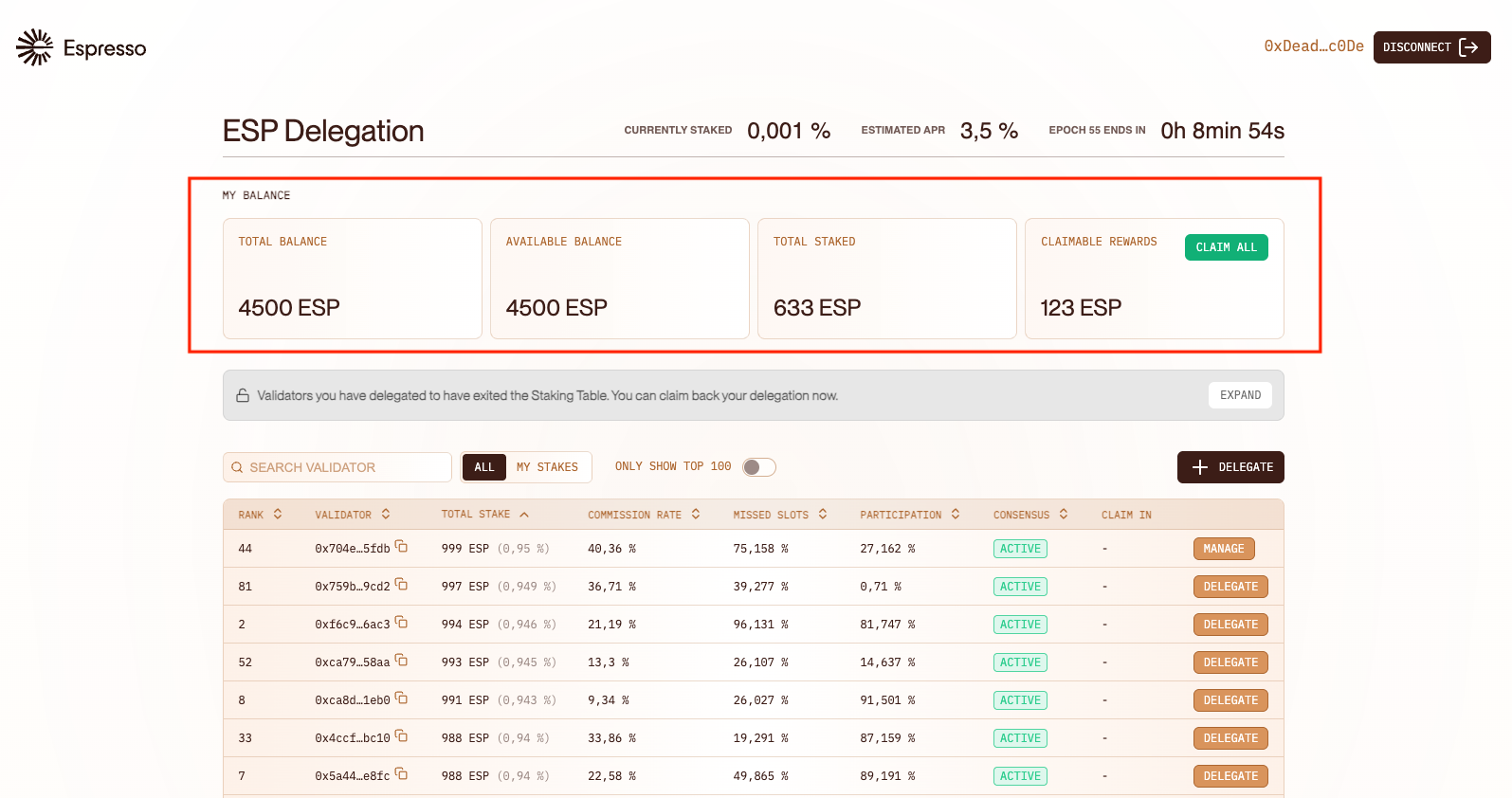
Choosing a Validator
Each validator sets a commission rate, which is deducted from your rewards in exchange for running the infrastructure that stakes your tokens. When selecting a validator, you can consider helpful data including: total stake, commission rate or missed slots.
NOTE: Only top 100 validators are eligible to receive rewards. If you delegate to a validator outside the top 100, you will not receive rewards till they enter the top 100.
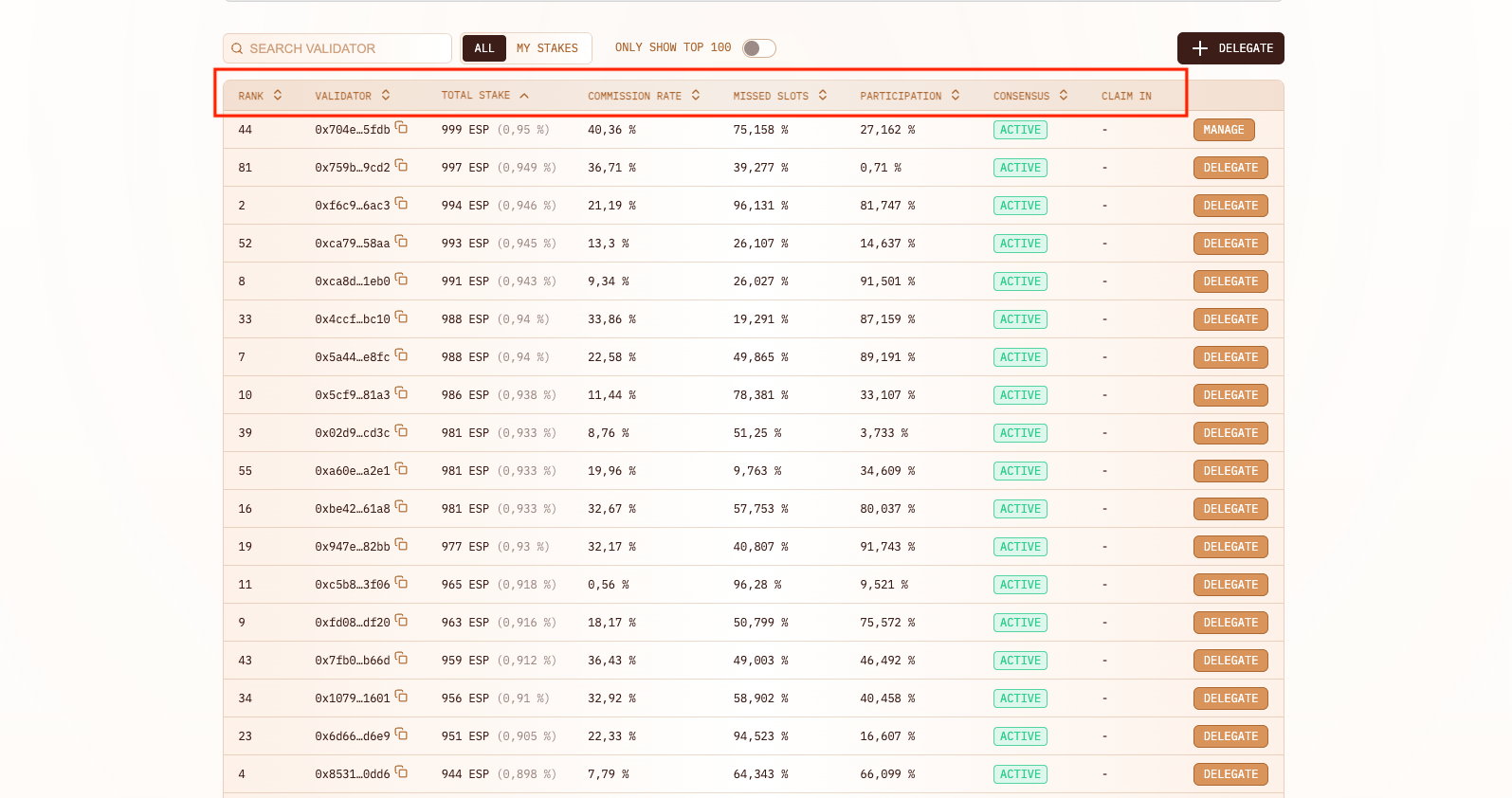
Delegating Your Tokens
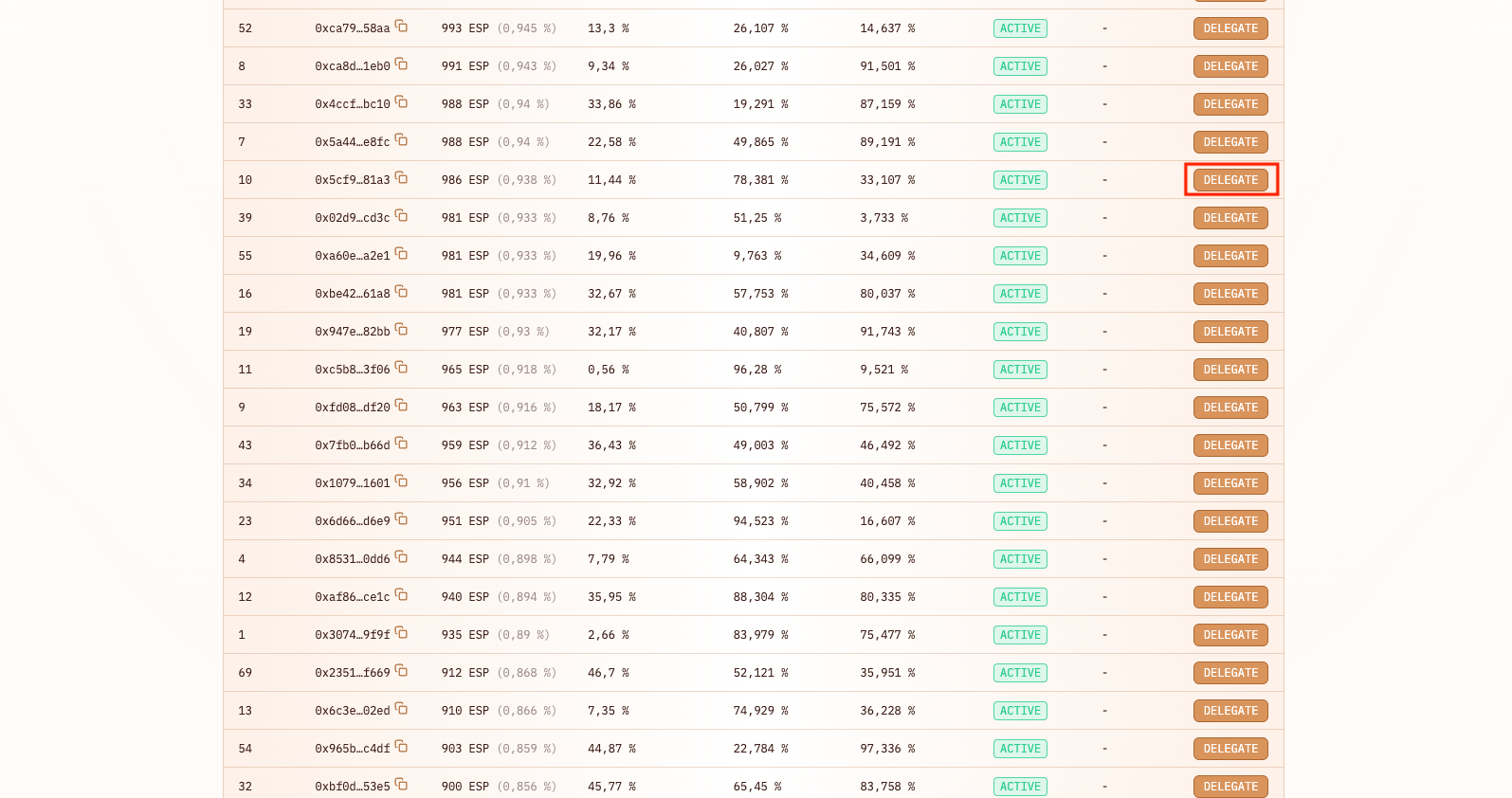
- Once you select a validator, click
Delegate.
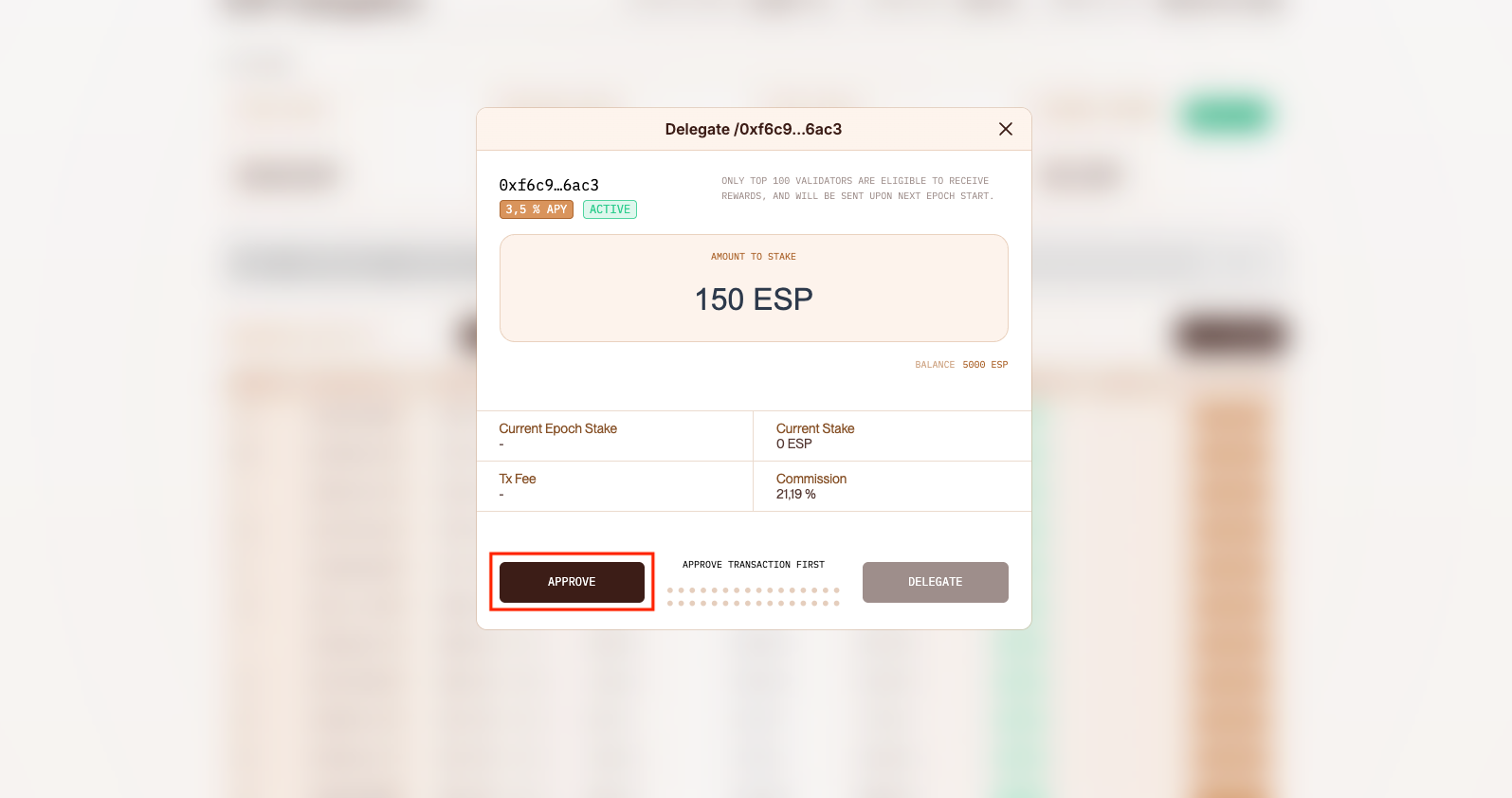
- Review key validator details (e.g., APY, commission), then choose the amount of $ESP you want to delegate.
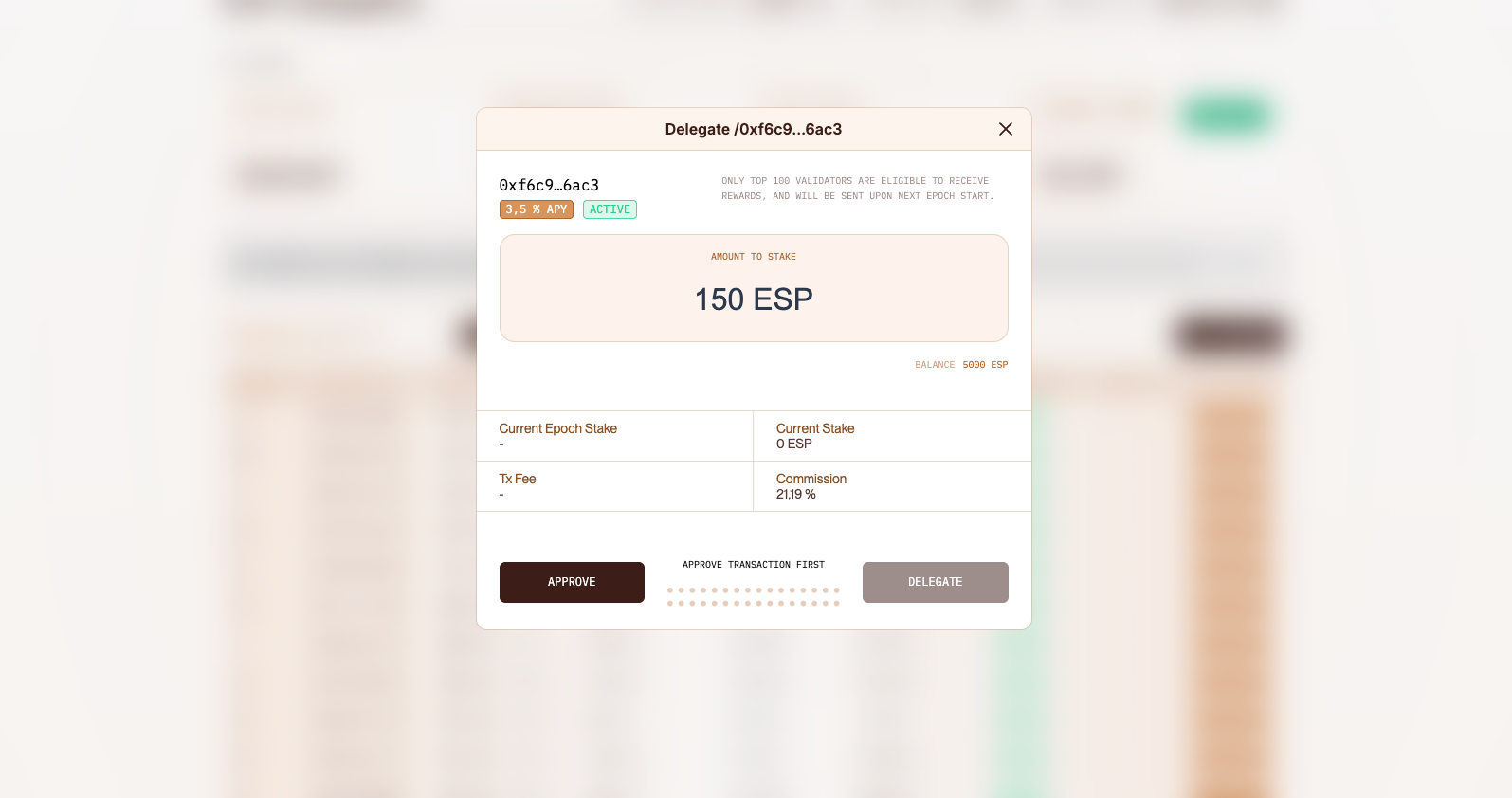
- Approve the transaction.
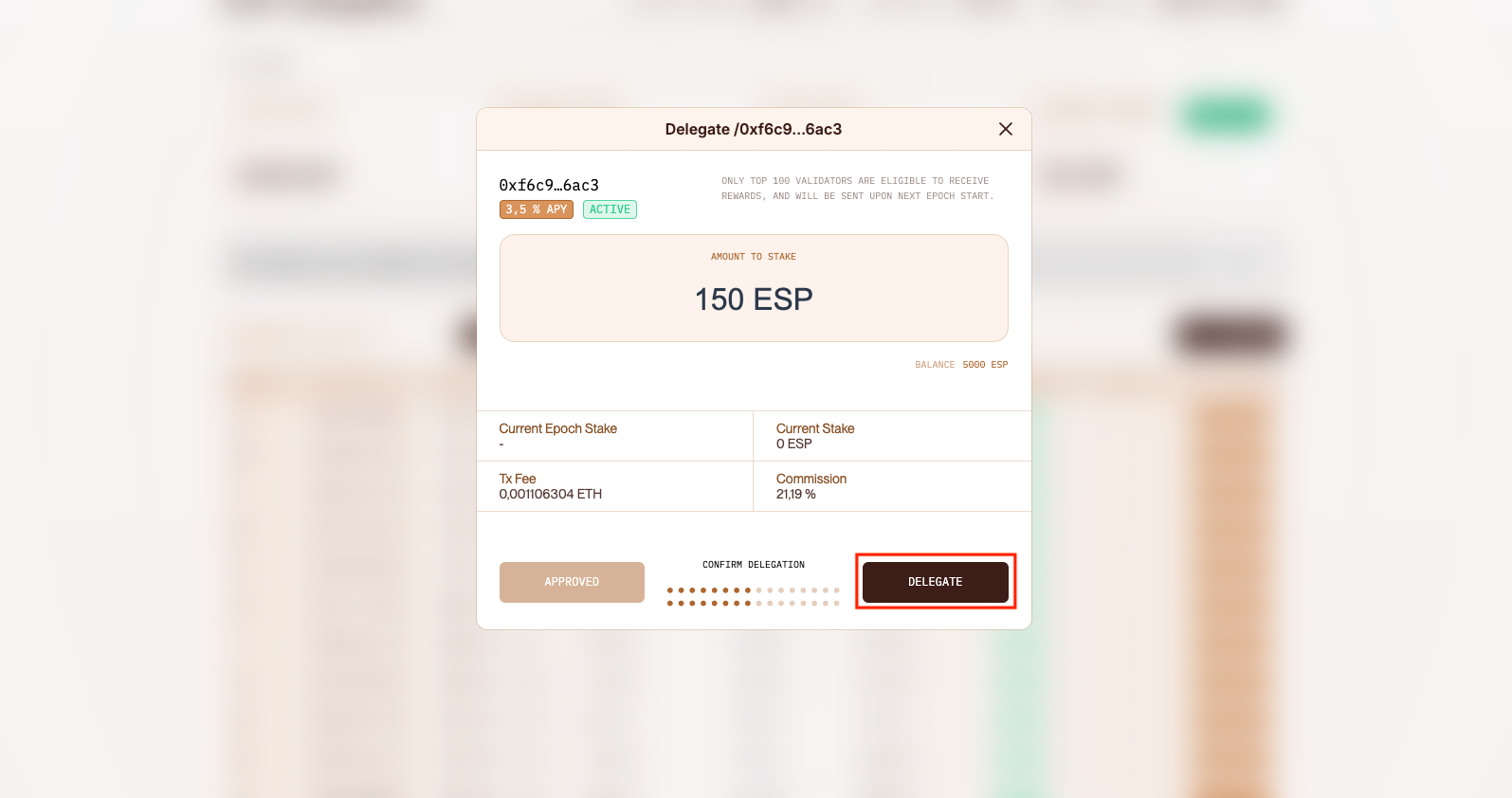
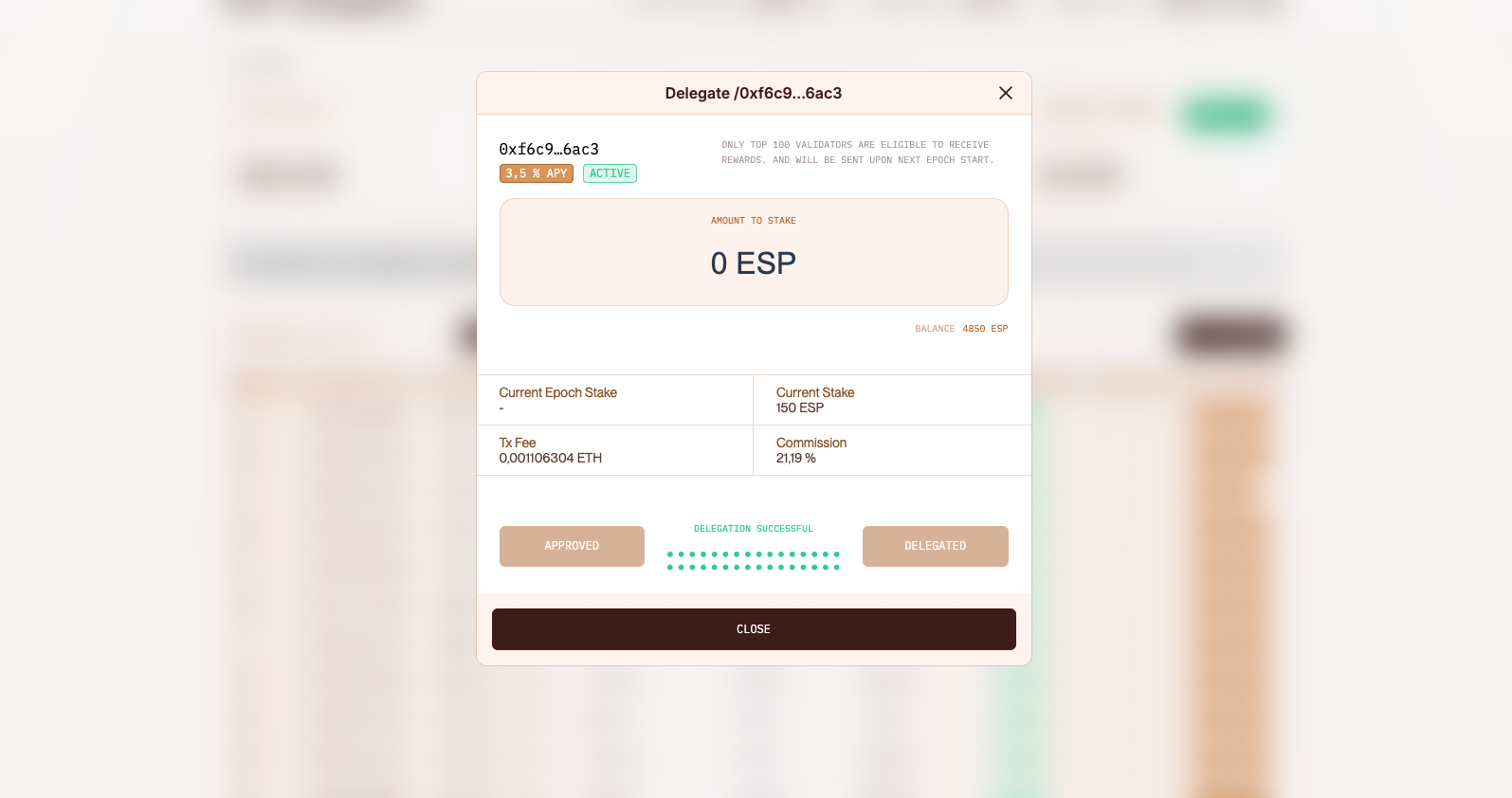
- Confirm the delegation.
Manage Your Stakes
After your delegation transaction has been confirmed, you will start getting rewards. You can check your current stakes in the My Stakes section.
- Click
Managenext to the validator you want to adjust.
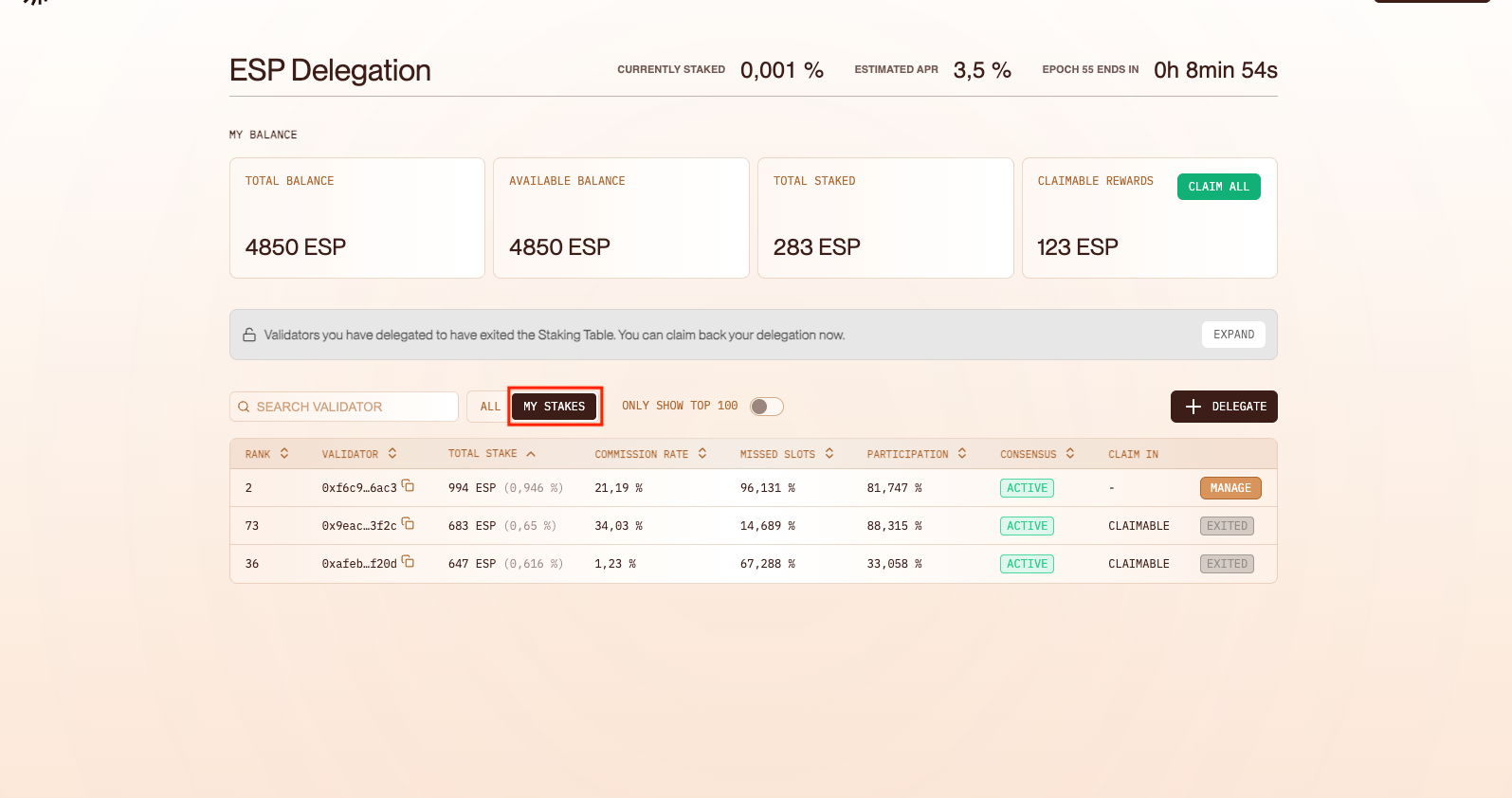
- From here, you can delegate more or undelegate.
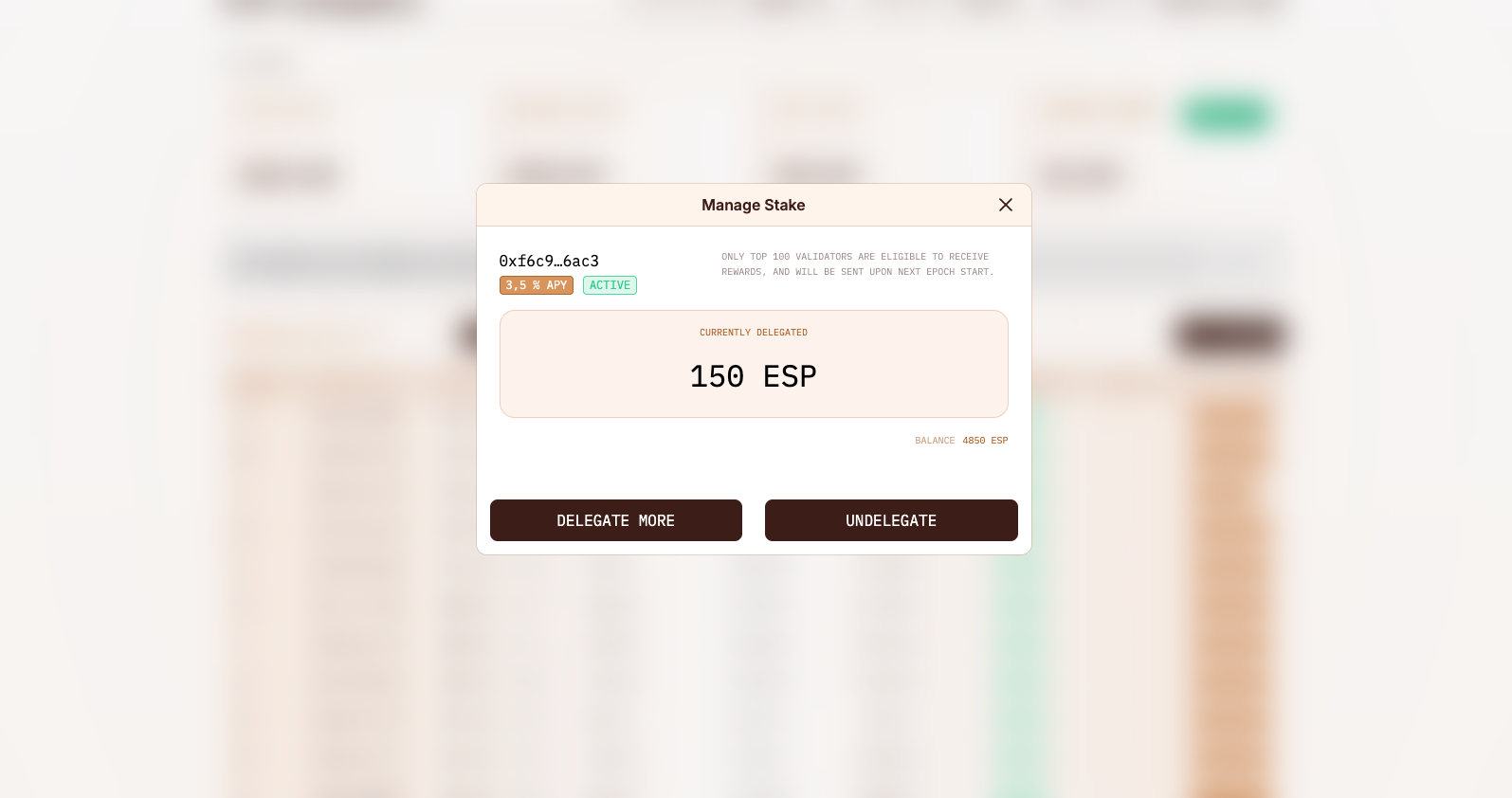
- When undelegating, you may choose to remove all your stake or only part of it.
- Note that it takes around 7 days to complete your undelegation, and you can only have one pending undelegation per validator at any given time.
Claiming Your Rewards
Once you’ve delegated, rewards accrue automatically every time the validators you’ve delegated to propose blocks (see the staking-cli README for how rewards are calculated). Your claimable rewards balance is visible on the dashboard after you connect your wallet, but rewards are not credited to your wallet automatically. You must claim them on Ethereum.
To claim:
- Open your dashboard and locate the claimable rewards balance.
- Initiate the claim from the dashboard and approve the resulting Ethereum transaction in your wallet.
The transaction calls the Reward Claim contract on Ethereum (see Networks → Contracts), which verifies a Merkle proof of your lifetime rewards against the onchain Light Client and mints the difference between what you’ve earned and what you’ve already claimed.
A few things to keep in mind:
- The contract tracks lifetime rewards rather than per-claim amounts, so you can claim as often or as rarely as you like. There’s no penalty for waiting and accumulating.
- Each claim is an on-chain Ethereum transaction, so gas costs apply. Less frequent claims can reduce overall gas spend.
- Rewards do not compound automatically. To compound, claim and then re-delegate the claimed tokens. See the staking-cli README.
- For deployed Reward Claim contract addresses on each network, see Networks → Contracts.
Changelog
Reverse-chronological history of Espresso network releases, with links to release notes and announcements.
This page lists Espresso network releases in reverse-chronological order. For live network details (endpoints, contract addresses), see Networks. For node software releases and upgrade alerts, see Releases.
Proof of Stake (Mainnet) - March 2026
Activated permissionless validator participation on Espresso through delegated proof-of-stake. Previously deployed on Decaf testnet in April 2025.
Mainnet (testnet release) - April 2025
Upgraded Espresso to support permissionless participation through delegated proof-of-stake. The upgrade went live on Decaf testnet on April 18, 2025; Ethereum mainnet upgrade followed March 4, 2026.
- Permissionless validator set (top 100 by delegated stake per epoch)
- New stake table and ESP token contracts
- API moves from
v0tov1 - See Chain Migration Guide for integration changes
Mainnet 0 - October 2024
First production release of Espresso. Initial operator set: 20 node operators running 100 nodes. Initial block size 1 MB with planned scaling to 5 MB.
Decaf Testnet - September 2024
Launched Decaf as Espresso’s persistent testnet alongside the upcoming Mainnet release. Expanded operator set to 24 operators running 100 geographically distributed nodes.
Cappuccino Testnet - May 2024
Onboarded 10 operators running 100 geographically distributed nodes. Tiramisu DA layer upgraded with VID support. Added Arbitrum Nitro fraud-proof support, enabling Arbitrum chains to run fully productized on Espresso. Deprecated by Decaf.
Gibraltar Testnet - January 2024
First integration with Arbitrum Nitro, along with progress on Savoiardi (a VID implementation forming the backbone of the Tiramisu DA solution). First testnet run by external node operators in collaboration with Blockdaemon. Deprecated.
Cortado Testnet - September 2023
First integration with the OP Stack, resulting from Espresso’s work on a leader election interface for the OP Stack. Public testnet deployed with two chains of different stacks: an OP Stack chain (Vienna, by Caldera) and a Polygon zkEVM chain. Deprecated.
Doppio Testnet - July 2023
Second testnet of Espresso. Includes integrations with both a minimal chain example and the Polygon zkEVM stack. Announcement · Public testnet announcement. Deprecated.
Americano Testnet - November 2022
First testnet of Espresso. Announcement. Deprecated.
Run Espresso Infrastructure
Pick the right Espresso infrastructure role for your team: validator or RPC Node.
There are two operator roles you can run against Espresso. Each one serves a different purpose, has different hardware needs, and is run by a different kind of team.
Pick your role
| Role | Who runs it | What it does | Hardware |
|---|---|---|---|
| Validator node | Stake operators (institutional and independent) earning ESP rewards | Participates in HotShot consensus, finalizing blocks across Espresso | 4 CPU cores, 8 GB RAM; see hardware requirements for disk |
| RPC Node | Chains and applications integrated with Espresso | Sits in front of an existing rollup full node and serves standard EVM JSON-RPC backed by Espresso finality (the espresso block tag), without modifying the node | Lightweight; runs alongside your full node. See the Espresso Rollup Node Proxy |
When to run which
- You hold ESP and want to participate in consensus / earn rewards. Run a Validator Node. You register in the stake table, attract delegations, and run the node software on Mainnet or Decaf.
- You want fast, low-latency reads of state settled by Espresso, in front of an existing full node, without modifying it. Run an RPC Node. It proxies your full node’s JSON-RPC and resolves the
espressoblock tag to Espresso-finalized state.
Related references
- Networks: public endpoints and contract addresses for Mainnet and Decaf Testnet.
- Stake Table Contract: validator registration and stake delegation contract addresses on Ethereum.
- Reading via the RPC Node: how the proxy serves Espresso finality in front of an existing full node.
Run a Validator Node
Register, configure, and operate an Espresso validator node on Mainnet or Decaf Testnet.
Espresso is secured by a permissionless, delegated Proof of Stake validator set. To participate, you register your node in the stake table contract on Ethereum, have ESP delegated to it, and run the Espresso node software.
This page covers both networks. Every command and environment variable is the same on Mainnet and Decaf; only the contract addresses, endpoints, and genesis file differ. Network-specific values are collected in Network values and referenced by name throughout.
Note
Running a Decaf node. New Decaf operators are welcome. Decaf ESP is not publicly distributed, so once your node is registered and running, ask the Espresso team for a delegation in the #decaf-node-ops channel of the Espresso Discord. Your node joins consensus once that delegation is active.
Network values
| Mainnet | Decaf Testnet | |
|---|---|---|
| Purpose | Production. Real ESP staking and rewards. | Testing integrations and node setups before Mainnet. |
| L1 | Ethereum | Ethereum Sepolia |
| Genesis file | /genesis/mainnet.toml | /genesis/decaf.toml |
| Stake table contract | 0xCeF474D372B5b09dEfe2aF187bf17338Dc704451 | 0x40304fbe94d5e7d1492dd90c53a2d63e8506a037 |
| Query service | https://query.main.net.espresso.network | https://query.decaf.testnet.espresso.network |
| Config cache | https://cache.main.net.espresso.network | https://cache.decaf.testnet.espresso.network |
| State relay | https://state-relay.main.net.espresso.network | https://state-relay.decaf.testnet.espresso.network |
| Staking UI | https://stake.espresso.network/ | https://stake.decaf.espresso.network/ |
The genesis files are built into the official container images. Operators building their own images should build from
the release tag for their network and include data/genesis/mainnet.toml or data/genesis/decaf.toml from that tag,
pointing the node at it.
For ESP token, light client, fee, and reward claim contract addresses, and for block explorers, see Networks.
Note
Environment variables use the prefix
ESPRESSO_NODE_for node settings andESPRESSO_L1_for L1 client settings, exceptESPRESSO_STATE_RELAY_SERVER_URL. The binary is namedespresso-node.
Releases
Node releases are published at
github.com/EspressoSystems/espresso-network/releases.
The title of a release lists the networks it is deployable on, for example 0.6.3.17 [decaf, mainnet]. A network’s
marker moves to the new release when that release is published for the network.
| Current Mainnet release | releases/latest |
| Current Decaf release | The release whose title contains decaf |
| Image | ghcr.io/espressosystems/espresso-network/espresso-node:<tag>, where <tag> is the release tag |
| Required actions | The Operator actions for <network> section of the release notes. No operator action required. when there are none. |
Print the current release for each network:
curl -fsS 'https://api.github.com/repos/EspressoSystems/espresso-network/releases?per_page=100' \
  | jq -r '.[] | select(.name | test("\\[")) | .name'
- Alerts: on the repository page, choose
Watch > Custom > Releases. GitHub then notifies when a release is published for a network. If the title names your
network, read its
Operator actions for <network>section before deploying. - Feed: for chat or other tooling, subscribe to the releases feed.
- Tags are immutable: a faulty release is superseded by a new tag, never overwritten.
Generate keys
Each validator needs three keypairs:
- Staking key (BLS): signs consensus messages. Supports the aggregation consensus performance depends on.
- State key (Schnorr): signs finalized consensus states, which drive onchain Espresso state updates.
- x25519 key: encrypts and authenticates connections to other validators.
Generate all three with the keygen utility shipped in the node image. $IMAGE is the container image for your network
from Releases:
docker run -v ./keys:/keys $IMAGE keygen -o /keys
This writes ./keys/0.env on the host, containing all three keypairs:
# Mnemonic: ...
# Index: 0
ESPRESSO_NODE_PUBLIC_STAKING_KEY=BLS_VER_KEY~...
ESPRESSO_NODE_PRIVATE_STAKING_KEY=BLS_SIGNING_KEY~...
ESPRESSO_NODE_PUBLIC_STATE_KEY=SCHNORR_VER_KEY~...
ESPRESSO_NODE_PRIVATE_STATE_KEY=SCHNORR_SIGNING_KEY~...
ESPRESSO_NODE_PUBLIC_X25519_KEY=X25519_PK~...
ESPRESSO_NODE_PRIVATE_X25519_KEY=X25519_SK~...
Generating the keys inside the container keeps them off the host unless you mount a volume, as above.
Without a persistent ESPRESSO_NODE_PRIVATE_X25519_KEY the node generates a random ephemeral key on every start, which
will not match the public key registered onchain.
keygen --help lists further options. --mnemonic <MNEMONIC> derives all three keys deterministically from a BIP-39
phrase instead of a randomly generated one, and -n <N> writes 0.env through <N-1>.env. keygen ignores --index,
deriving each file’s keys from its own file index. Without a mnemonic it generates a fresh one from OS entropy and, when
-o is given, records it and the index as comments at the top of each .env file.
Use keygen --scheme x25519 only to rotate the x25519 key on its own. It derives from a new random mnemonic, so replace
both the public and private x25519 lines in the key file when you do, and re-register the public key.
The node can also be configured with ESPRESSO_NODE_KEY_MNEMONIC (plus ESPRESSO_NODE_KEY_INDEX) instead of a key
file, deriving all three keys at startup. The mnemonic conflicts with ESPRESSO_NODE_KEY_FILE; use one or the other. To
print the public keys of a node configured this way, use the pub-key utility from the same image:
docker run -e ESPRESSO_NODE_KEY_MNEMONIC $IMAGE pub-key --scheme x25519 --index $KEY_INDEX
--scheme also accepts bls, schnorr, and all.
Register the validator
Registration associates the node’s consensus keys with an Ethereum address in the stake table contract. That address receives commission and does not exist on the node itself.
Before registering, decide the P2P address other validators will dial. The stake table requires both the x25519 public key and the P2P address at registration, and a validator without them cannot participate in consensus.
The P2P address must:
- Use the node’s public IP address or DNS name, not a private or loopback address.
- Be reachable over TCP from the public internet and route to the node’s P2P bind port
(
ESPRESSO_NODE_CLIQUENET_BIND_ADDRESS, default9977). Behind NAT, a firewall, or a load balancer, register the public address and forward that port to the node. - If it is an IP address, match the source IP of the node’s outgoing connections. The registered address is not only a listen address: peers check the source IP of every incoming connection against it.
Warning
Registering an IP address while the node’s outbound traffic leaves through a different IP breaks connectivity in one direction. This happens when ingress and egress use separate paths, for example an inbound load balancer or proxy with a separate NAT gateway for egress, or a pool of egress IPs. Peers reject those connections and log
party has invalid ip addr.Register a DNS name instead when the egress IP differs from the ingress IP or is not stable. Registering a DNS name disables the source IP check, so any source IP is accepted for the node.
docker run -e L1_PROVIDER -e STAKE_TABLE_ADDRESS -e MNEMONIC -e ACCOUNT_INDEX \
    -e CONSENSUS_PRIVATE_KEY -e STATE_PRIVATE_KEY \
    -e X25519_KEY -e P2P_ADDR \
    ghcr.io/espressosystems/espresso-network/staking-cli:main \
    staking-cli register-validator \
    --commission $COMMISSION \
    --metadata-uri $METADATA_URI
| Environment variable | Meaning |
|---|---|
L1_PROVIDER | RPC provider URL for the network’s L1. Ethereum for Mainnet, Ethereum Sepolia for Decaf. |
STAKE_TABLE_ADDRESS | The stake table address for your network. See Network values. |
MNEMONIC | Ethereum mnemonic, combined with ACCOUNT_INDEX to derive the wallet that signs the transaction. |
ACCOUNT_INDEX | Ethereum account index, combined with MNEMONIC. |
CONSENSUS_PRIVATE_KEY | The node’s staking key, of the form BLS_SIGNING_KEY~.... |
STATE_PRIVATE_KEY | The node’s state key, of the form SCHNORR_SIGNING_KEY~.... |
X25519_KEY | The node’s x25519 public key, of the form X25519_PK~.... |
P2P_ADDR | The host:port address other validators dial, for example validator.example.com:9977. |
COMMISSION | Share of rewards the validator keeps, in percentage points with up to 2 decimal places, from 0.00 to 100.00. 12.34 means 12.34%. The remainder is distributed proportionally to delegators. |
METADATA_URI | URL where validator metadata is hosted, in JSON or OpenMetrics format. |
The Ethereum wallet that signs this transaction is separate from the node key mnemonic used in
Generate keys. The example above signs with a mnemonic (MNEMONIC + ACCOUNT_INDEX); staking-cli
also accepts a raw private key (PRIVATE_KEY) or a Ledger device (--ledger, with --account-index). See
Choose your type of wallet
in the staking-cli README.
Additional requirements:
- Each Ethereum account (derived from
MNEMONIC+ACCOUNT_INDEX) needs enough gas on the L1 to call the registration method. - Each BLS key can be registered only once.
- Each Ethereum account can register only one validator. Running multiple validators requires different account indices or mnemonics.
- The P2P address must be publicly routable.
staking-clirejects addresses that are not, unless--skip-reachability-checkis passed.
A successful registration looks like this:
Success! transaction hash: 0xa632dfea882d80855d2cc5e6713d9fc839cdd5df5aa29f6e9ce8d5a5ec8da615
event: ValidatorRegisteredV3 { account: 0xf39Fd6e51aad88F6F4ce6aB8827279cffFb92266, commission: 1234, metadataUri: https://validator.example.com/metadata.json, x25519Key: 0x..., p2pAddr: validator.example.com:9977 }
The event prints commission in basis points, so 1234 is the 12.34% passed on the command line.
Values registered onchain take 2 to 3 epochs to become active in consensus.
Rotate keys and registered values
Everything registered onchain can be changed later. Each command is signed by the same Ethereum wallet that registered
the validator, and takes -e MNEMONIC -e ACCOUNT_INDEX -e L1_PROVIDER -e STAKE_TABLE_ADDRESS.
| Value | Command |
|---|---|
| Staking key and state key | update-consensus-keys |
| x25519 key and P2P address | update-network-config |
| x25519 key only | update-x25519-key |
| P2P address only | update-p2p-addr |
| Commission | update-commission, see Update the commission |
| Metadata URI | update-metadata-uri |
Rotate the consensus keys
Generate a new key set, then submit both new private keys. staking-cli uses them to sign a proof of ownership; they
are not stored onchain.
docker run -e MNEMONIC -e ACCOUNT_INDEX -e L1_PROVIDER -e STAKE_TABLE_ADDRESS \
    -e CONSENSUS_PRIVATE_KEY -e STATE_PRIVATE_KEY \
    ghcr.io/espressosystems/espresso-network/staking-cli:main \
    staking-cli update-consensus-keys
The new keys become active in the third epoch after the command runs, so update the node’s key file at that point, not
immediately. If the signing keys are held offline, sign in advance and pass the result with --node-signatures signatures.json.
Rotate the x25519 key or P2P address
docker run -e MNEMONIC -e ACCOUNT_INDEX -e L1_PROVIDER -e STAKE_TABLE_ADDRESS \
    ghcr.io/espressosystems/espresso-network/staking-cli:main \
    staking-cli update-network-config \
        --x25519-key $ESPRESSO_NODE_PUBLIC_X25519_KEY \
        --p2p-addr $PUBLIC_HOST:9977
update-x25519-key and update-p2p-addr change one value at a time. The node’s ESPRESSO_NODE_PRIVATE_X25519_KEY must
match the registered public key, and ESPRESSO_NODE_CLIQUENET_BIND_ADDRESS must use the same port as the registered P2P
address.
Update the metadata URI
docker run -e MNEMONIC -e ACCOUNT_INDEX -e L1_PROVIDER -e STAKE_TABLE_ADDRESS \
    -e CONSENSUS_PUBLIC_KEY \
    ghcr.io/espressosystems/espresso-network/staking-cli:main \
    staking-cli update-metadata-uri --metadata-uri $METADATA_URI
CONSENSUS_PUBLIC_KEY is the validator’s BLS public key, used to validate the metadata at the new URL. Pass
--skip-metadata-validation to submit without that check.
Update the commission
Commission can be changed after registration, subject to limits enforced by the stake table contract (these are adjustable by the contract admin):
- One commission increase per
minCommissionIncreaseInterval, 7 days at deployment. - Increases capped at
maxCommissionIncrease, 500 basis points (5 percentage points) at deployment, for example 10% to 15%. - Decreases are neither rate-limited nor capped, and do not reset the increase timer.
- The new value must differ from the current one, or the call reverts with
CommissionUnchanged.
docker run -e L1_PROVIDER -e STAKE_TABLE_ADDRESS -e MNEMONIC -e ACCOUNT_INDEX \
    ghcr.io/espressosystems/espresso-network/staking-cli:main \
    staking-cli update-commission \
    --new-commission 2.54
Deregister
Deregistration is a two-step process: deregister-validator exits the active set and unbonds all delegators, then after
the exit escrow period (about 7 days) claim-validator-exit returns the validator’s principal to the operator address.
Note
Accumulated staking rewards must be claimed separately with
claim-rewards. Deregistration does not claim them for you. See Claim rewards.
Step 1 removes the node from the active validator set immediately and starts the escrow:
docker run -e MNEMONIC -e ACCOUNT_INDEX -e L1_PROVIDER -e STAKE_TABLE_ADDRESS \
    ghcr.io/espressosystems/espresso-network/staking-cli:main \
        staking-cli deregister-validator
Step 2, once the escrow elapses, withdraws the principal to the operator wallet:
docker run -e MNEMONIC -e ACCOUNT_INDEX -e L1_PROVIDER -e STAKE_TABLE_ADDRESS \
    ghcr.io/espressosystems/espresso-network/staking-cli:main \
        staking-cli claim-validator-exit --validator-address $VALIDATOR_ADDRESS
VALIDATOR_ADDRESS is the Ethereum address associated with the validator at registration, derived from MNEMONIC +
ACCOUNT_INDEX.
Stake and rewards
A registered node participates only once ESP is delegated to it. On Mainnet, delegations can come from any ESP holder, and operators can bootstrap by delegating to their own node. On Decaf, ask the Espresso team for a delegation in #decaf-node-ops on the Espresso Discord.
Note
Participation is limited to a dynamic, permissionless set of 100 nodes. In each epoch (roughly 24 hours) the 100 nodes with the most delegated stake form the active set.
Delegate and undelegate
Delegate, undelegate, and claim withdrawals through the staking UI, using a wallet such as MetaMask or Ledger:
- Mainnet: https://stake.espresso.network/
- Decaf: https://stake.decaf.espresso.network/
See Delegate $ESP for a walkthrough.
Delegations become active 2 epochs after the L1 transaction is finalized, and the minimum delegation is 1 ESP. Undelegating starts an exit escrow of about 7 days, after which the withdrawal can be claimed; effective stake decreases 2 epochs after L1 finalization. Only one undelegation can be pending per validator at a time, so claim each withdrawal before starting another from the same validator.
Claim rewards
Validators and delegators accrue rewards every block their validator proposes. Rewards do not auto-compound: claim them manually and re-delegate if desired.
Rewards can be checked and claimed from the staking UI linked above. The staking-cli equivalents are useful for
scripting and multisig flows:
docker run -e MNEMONIC -e ACCOUNT_INDEX -e L1_PROVIDER -e STAKE_TABLE_ADDRESS \
    -e ESPRESSO_URL=https://query.main.net.espresso.network \
    ghcr.io/espressosystems/espresso-network/staking-cli:main \
        staking-cli unclaimed-rewards

docker run -e MNEMONIC -e ACCOUNT_INDEX -e L1_PROVIDER -e STAKE_TABLE_ADDRESS \
    -e ESPRESSO_URL=https://query.main.net.espresso.network \
    ghcr.io/espressosystems/espresso-network/staking-cli:main \
        staking-cli claim-rewards
On Decaf, use https://query.decaf.testnet.espresso.network. The ESP token address is read from the stake table
contract.
The claim transaction interacts with the Reward Claim contract on the L1; see Networks for
the address. For how rewards are calculated and distributed, and for using staking-cli with a Ledger, see the
staking-cli README.
Run the node
Command
The recommended configuration serves the query and light client APIs on SQL storage. With the embedded SQLite database, the container entrypoint supplies the storage module itself, so the command must not repeat it:
# ESPRESSO_NODE_EMBEDDED_DB=true
espresso-node -- http -- query -- light-client
With an external Postgres server, pass the storage module explicitly:
# ESPRESSO_NODE_EMBEDDED_DB=false (default)
espresso-node -- storage-sql -- http -- query -- light-client
Warning
With
ESPRESSO_NODE_EMBEDDED_DB=true, passingstorage-sqlagain fails withoptional module storage-sql can only be started once, and passingstorage-fssilently overrides SQLite.
With the query module enabled, the catchup, status, and state signature routes are served without being listed.
Please enable light-client. It serves leaves, headers, and stake tables that a client can verify against the light
client contract on Ethereum, which is how other nodes catch up without having to trust the node they fetch from. The
more operators serve it, the less that catchup traffic depends on any single provider.
espresso-for-dummies holds worked Docker Compose files for both networks and both storage backends, covering the services, volumes, and graceful shutdown. Take the file layout from there and the image tag, modules, and environment from this page.
A validator that does not serve the query API adds -- status -- catchup and drops -- query -- light-client. It still
needs SQL storage for its consensus state. Without status such a node exposes no consensus metrics at all, so none of
the alerts under Monitoring work. This configuration is not recommended: see
Storage and retention.
Environment
The same on both networks:
ESPRESSO_NODE_EMBEDDED_DB=true
RUST_LOG="warn"
RUST_LOG_FORMAT="json"
Network-specific, taken from Network values:
# /genesis/mainnet.toml or /genesis/decaf.toml
ESPRESSO_NODE_GENESIS_FILE

# The network's state relay server
ESPRESSO_STATE_RELAY_SERVER_URL

# Peers used to catch up consensus state over HTTP. At least one is required.
# Add further endpoints, comma-separated, to avoid depending on a single peer.
ESPRESSO_NODE_STATE_PEERS

# Peers used by the query module to fetch missing availability data over HTTP.
ESPRESSO_NODE_API_PEERS
Chosen by the operator:
# An HTTP JSON-RPC endpoint for the network's L1. Required.
ESPRESSO_L1_PROVIDER # e.g. https://mainnet.infura.io/v3/<API-KEY>

# A `ws://` or `wss://` endpoint for the network's L1. Optional but recommended,
# since it decreases the load on your provider.
ESPRESSO_L1_WS_PROVIDER # e.g. wss://mainnet.infura.io/v3/<API-KEY>

# Port on which to serve metrics, healthchecks, and the query API. Default 8080.
ESPRESSO_NODE_API_PORT

# Path in the container for persistent data. With SQLite the database is created
# in a `sqlite` subdirectory of this path.
ESPRESSO_NODE_STORAGE_PATH # e.g. /mount/espresso/store/

# Path in the container to the key file.
ESPRESSO_NODE_KEY_FILE # e.g. /mount/espresso/keys/0.env

# The address cliquenet binds for the validator mesh, in host:port form. The port
# must match the P2P address registered in the stake table and be reachable over
# TCP from the public internet. Default 0.0.0.0:9977.
ESPRESSO_NODE_CLIQUENET_BIND_ADDRESS

# Connection to the Postgres server. Required when ESPRESSO_NODE_EMBEDDED_DB=false.
ESPRESSO_NODE_POSTGRES_HOST
ESPRESSO_NODE_POSTGRES_PORT
ESPRESSO_NODE_POSTGRES_DATABASE
ESPRESSO_NODE_POSTGRES_USER
ESPRESSO_NODE_POSTGRES_PASSWORD
ESPRESSO_NODE_POSTGRES_USE_TLS
Instead of ESPRESSO_NODE_KEY_FILE, the keys can be set individually:
ESPRESSO_NODE_PRIVATE_STAKING_KEY=BLS_SIGNING_KEY~...ESPRESSO_NODE_PRIVATE_STATE_KEY=SCHNORR_SIGNING_KEY~...ESPRESSO_NODE_PRIVATE_X25519_KEY=X25519_SK~...
Mount ESPRESSO_NODE_STORAGE_PATH and ESPRESSO_NODE_KEY_FILE as volumes. With Postgres storage the node keeps no
local state, so only the key file needs a volume.
Note
The advertised P2P address is not an environment variable. Peers learn each other’s address and x25519 key from the stake table contract, so the address is set with
staking-cli.
Telemetry and identity
Please enable telemetry on every validator. It ships the node’s logs and metrics to Espresso, which lets the Espresso team diagnose timeouts, restarts, and degraded performance on your node without asking you for log excerpts.
# Ship logs (OTLP/HTTP). Default false.
ESPRESSO_NODE_TELEMETRY_LOGS_ENABLE=true

# Ship the Prometheus metrics registry (remote write). Default false.
ESPRESSO_NODE_TELEMETRY_METRICS_ENABLE=true
- The telemetry endpoint is configured automatically for Mainnet and Decaf.
- Each request is authenticated with a token signed by the node’s staking key and checked against the stake table. No extra credentials are needed.
- Shipped logs are filtered separately from local output. The default
ESPRESSO_NODE_TELEMETRY_LOG=warnsends warnings and errors;RUST_LOGis unaffected. - Metrics are pushed every 60 seconds (
ESPRESSO_NODE_TELEMETRY_METRICS_INTERVAL). - Export runs off the consensus path and keeps nothing on disk. If the endpoint is unreachable, the node logs a warning, drops the data, and keeps running.
Also set the two identity variables used by telemetry. They are embedded in the telemetry token and label the node’s logs and metrics; without them the node is identified only by its staking key.
# Human-readable node name, unique across your nodes, e.g. acme-mainnet-01
ESPRESSO_NODE_IDENTITY_NODE_NAME

# Operator organization, e.g. Acme Staking
ESPRESSO_NODE_IDENTITY_COMPANY_NAME
The remaining identity variables are listed in the Node Configuration Reference.
First start
On its very first start a node has no network configuration saved locally, and must fetch it from a running peer. Set
ESPRESSO_NODE_CONFIG_PEERS to the network’s config cache, for example https://cache.main.net.espresso.network.
The node stores the configuration once it joins, so this variable is not needed on subsequent restarts. It is needed again after any reset or migration that clears the node’s storage.
Networking summary
| Port | Protocol | Direction | Purpose |
|---|---|---|---|
9977 (default) | TCP | Inbound, public | Validator consensus mesh (cliquenet). Must match the registered P2P address. |
ESPRESSO_NODE_API_PORT | TCP | Inbound | Metrics, healthchecks, query API. |
The node serves plain HTTP. For production deployments, put the API port behind a reverse proxy that terminates TLS.
Storage and retention
Two independent storage systems have separate lifecycles. Operators need to configure only the second.
Consensus storage
Every validator reconstructs the full block payload for every view and writes it to consensus storage. Block data is the responsibility of the whole validator set, which is why the recommended configuration below is the same for every operator.
Consensus storage is a bounded working set, not accumulating history. As each view decides, the node emits its events and deletes the corresponding rows. Garbage collection is automatic and view-based, and operators should not need to change it. It targets about 1 GB of database, with a default retention of roughly one week of views and a floor of roughly three days.
This applies to every validator, including one running without the query module. Size such a node for write throughput, one full-payload write and delete per view, rather than for accumulated history.
Query database
Enabling the query module adds the historical database that serves the availability, node, and state APIs. This is the recommended configuration for all operators.
Pruning is off by default, so an unconfigured query node retains everything. For a non-archival node, enable pruning with a two-week retention window:
ESPRESSO_NODE_DATABASE_PRUNE=true
ESPRESSO_NODE_PRUNER_TARGET_RETENTION=14d
ESPRESSO_NODE_PRUNER_MINIMUM_RETENTION=14d
ESPRESSO_NODE_PRUNER_STATE_TARGET_RETENTION=14d
ESPRESSO_NODE_PRUNER_STATE_MINIMUM_RETENTION=14d
ESPRESSO_NODE_PRUNER_PRUNING_THRESHOLD=<your provisioned disk>
Target retention is what the pruner deletes past on every run. Minimum retention is the floor it will not cross even
under disk pressure, so setting both to 14d makes two weeks a hard window rather than a target. The STATE_ variables
cover the Merklized state tables; without them, that state is still pruned at the 7-day default.
Durations take one integer and one unit from ns, mc, ms, s, m, h, d, w, or a colon form (hh:mm or
hh:mm:ss). A bare number of seconds is rejected. 14d and 2w are equivalent.
Defaults for the remaining pruner settings, which most operators can leave alone:
| Variable | Default | Meaning |
|---|---|---|
ESPRESSO_NODE_PRUNER_PRUNING_THRESHOLD | 3TB | Database size above which the pruner deletes past target retention, down toward minimum retention. |
ESPRESSO_NODE_PRUNER_MAX_USAGE | 8000 | Basis points of the threshold to prune back to, so 80%. |
ESPRESSO_NODE_PRUNER_INTERVAL | 5400s | Time between pruner runs. The pruner sleeps one interval before its first run. |
ESPRESSO_NODE_PRUNER_BATCH_SIZE | 1000 | Block heights deleted per transaction. |
Warning
Setting any retention variable without
ESPRESSO_NODE_DATABASE_PRUNE=truehas no effect. The pruner configuration is only built when pruning is enabled.
Warning
Pruning does not shrink the database to the retention window. Two tables that dominate long-run growth, the hash table and the aggregate table, are never deleted by the pruner, and Merkle state pruning keeps the newest node at every path indefinitely. On Postgres the pruner also skips
VACUUM, so deleted rows return space to Postgres for reuse but not to the filesystem. Provision disk for peak usage, not for the size of the retention window.
Archival nodes
An archival node retains all historical data and can serve queries for arbitrary historical state. Run the query module
without any pruning variables. ESPRESSO_NODE_ARCHIVE=true additionally clears the pruning watermark so the node
backfills missing data from peers, which is what turns a pruned database into a full one. It conflicts with
ESPRESSO_NODE_DATABASE_PRUNE.
Storage backends
Both SQL backends support the full API; no endpoint is unavailable under SQLite. The differences are operational.
SQLite (ESPRESSO_NODE_EMBEDDED_DB=true) | Postgres | |
|---|---|---|
| Deployment | Single container, no separate database server | Requires operating a Postgres server |
| Reclaiming pruned space | Returns it to the filesystem via incremental vacuum | Returns it to Postgres for reuse, not to the filesystem |
| Query concurrency | Query load shares the node’s connection pool | Separate, tunable query pool (ESPRESSO_NODE_DATABASE_QUERY_MAX_CONNECTIONS) |
| Suited to | Most validators | Nodes serving heavy external query load |
ESPRESSO_NODE_PRUNER_INCREMENTAL_VACUUM_PAGES (default 8000) sets how many pages each SQLite vacuum reclaims. It has
no effect on Postgres.
Warning
Filesystem storage (
storage-fs) does not support pruning and cannot serve state catchup. Use SQL storage for any node running the query module.
Hardware requirements
These figures are observed from running nodes rather than a guaranteed minimum, and Espresso block data grows over time. Provision headroom and the ability to scale disk on demand.
| Validator with query API, pruned | Archival node | |
|---|---|---|
| CPU | 4 cores, plus 2 for a separate Postgres server | 4 cores, plus 2 for a separate Postgres server |
| Memory | 8 GB, plus 4 GB for a separate Postgres server | 8 GB, plus 4 GB for a separate Postgres server |
| Storage | 500 GB SSD | 2.5 TB SSD |
A Mainnet archival node measured about 1.7 TB in September 2026 and grows roughly 215 GB per month, of which most is Merkle tree and hash data that pruning does not bound. The pruned figure above is provisioning guidance, not a steady state: see the caveat under Query database.
Disk throughput matters more than capacity headroom for a query node. Database migrations on version upgrades are IO bound, and provisioning more IOPS temporarily makes them substantially faster.
TCP tuning
Consensus traffic runs over TCP. The node sets TCP_NODELAY and its own keepalive policy but does not size socket
buffers, so kernel autotuning bounds are the operator’s to set. These settings are optional OS-level tuning outside the
node; apply them if your validator is connecting across long-haul links.
net.ipv4.tcp_congestion_control=bbr
net.ipv4.tcp_rmem=8192 262144 67108864
net.ipv4.tcp_wmem=4096 16384 536870912
net.ipv4.tcp_adv_win_scale=0
net.ipv4.tcp_notsent_lowat=131072
net.ipv4.tcp_slow_start_after_idle=0
Apply without rebooting:
sudo sysctl -p /etc/sysctl.d/espresso-opts.conf
This applies to all TCP connections on the machine. To scope the settings to the node’s container instead, add them to the Docker Compose service:
sysctls:
    net.ipv4.tcp_congestion_control: "bbr"
    net.ipv4.tcp_rmem: "8192 262144 67108864"
    net.ipv4.tcp_wmem: "4096 16384 536870912"
    net.ipv4.tcp_adv_win_scale: "0"
    net.ipv4.tcp_notsent_lowat: "131072"
    net.ipv4.tcp_slow_start_after_idle: "0"
Or as --sysctl flags on docker run.
Monitoring
The node exposes Prometheus metrics at /status/metrics on ESPRESSO_NODE_API_PORT. See the
Status API for the full endpoint reference.
Warning
/healthcheckis a static liveness probe for the HTTP server. It does not reflect consensus health. Alert on the metrics below instead.
Consensus liveness
consensus_current_viewshould advance continuously at the network’s view rate. Static for more than a minute means the node has fallen out of sync or the network has lost liveness.consensus_last_decided_viewshould trackconsensus_current_viewclosely. Current view advancing while last decided view stalls points at a network-wide consensus problem./status/time-since-last-decidereturns seconds since the last decide and is the single best liveness alert.
Proposal health
-
consensus_number_of_timeouts_as_leadercounts views where this node was leader and failed to propose. Every increment is a missed proposal and warrants investigation. There is no separate missed-proposal or missed-vote metric. -
Participation is visible from another query node, for example the Espresso-hosted service:
curl <query service URL>/node/participation/proposal/current
curl <query service URL>/node/participation/vote/current
The response maps BLS public keys to participation scores. A healthy node scores close to
1.0. Below0.95warrants investigation. A dip lasting up to one epoch is expected after a restart or outage. To read a past epoch, replacecurrentwith the epoch number; that segment must be a number, so there is nopreviousshorthand.
Peer connectivity
consensus_cliquenet_*metrics carry apeerlabel holding the peer’s x25519 public key, base58-encoded rather than in theX25519_PK~...form used at registration.consensus_cliquenet_connect_attemptsclimbing for a peer while the connection never establishes is the signature of a misregistered P2P address or x25519 key. Fix this by re-registering the correct values withstaking-cli, not by changing node environment variables. See Rotate the x25519 key or P2P address.
Node resources
process_resident_memory_bytesandprocess_open_fdsagainst the file descriptor limit.- Database size is not exposed as a metric. Watch it at the operating system or Postgres level.
consensus_version{desc=...}reports the running image tag. Verify it matches the current release for your network (see Releases).
Related references
- Node Configuration Reference: every module, environment variable, and genesis field.
- Debug P2P Connectivity: checks for validators that cannot connect to peers.
- Networks: endpoints, contract addresses, and block explorers.
- Delegate $ESP: staking UI walkthrough for delegators.
- Status API: the full metrics endpoint reference.
- staking-cli README: every
staking-clisubcommand, including Ledger support. - espresso-for-dummies: Docker Compose examples for both networks.
Debug P2P Connectivity
Checks for validator P2P connectivity: nc probes, key configuration, cliquenet metrics, and proxy settings.
The validator P2P protocol (cliquenet) opens a connection symmetrically. As soon as the TCP connection is established, both sides concurrently send their supported protocol version range and read the peer’s, then run an encrypted Noise handshake. Neither side waits to be spoken to first, and it makes no difference which one accepted and which one dialed.
The version range is four bytes: a minimum and a maximum, each a big-endian u16. Nodes today support only version 1
and send 00 01 00 01, which is what the examples below show. Supported ranges are configurable, so expect these
bytes to change in a future release. What matters for the checks on this page is that four bytes arrive at all.
Proxy and service mesh documentation calls this a server-first protocol, on the grounds that the accepting side writes before it has received anything. That is the term to search for in a proxy manual.
This has two requirements:
- Nothing in the path may withhold the connection’s opening bytes. Anything that waits for the client to speak before forwarding deadlocks the connection. Observing bytes in passing is harmless; buffering them is not.
- The node must hold the private key for the x25519 public key registered onchain, or peers cannot complete the handshake.
The four checks below are ordered cheapest first.
Note
Examples on this page use
9977, the defaultESPRESSO_NODE_CLIQUENET_BIND_ADDRESS. Substitute the node’s actual ports. The Istio and Envoy examples take the container port the node listens on. Thencprobes take the public port peers dial, which may be a mappedNodePortsuch as30021.
1. Probe the port with nc
A healthy node sends its version range without being sent anything first, so four bytes come back from a bare connection. Run these from outside the network, for example from a laptop, against the registered public address and P2P port.
# 1. Control: no input at all. This is what a real peer sees.
nc -d -w3 $PUBLIC_HOST $P2P_PORT | xxd

# 2. Four bytes: a version range, as a peer sends.
printf "\x00\x01\x00\x01" | nc -w3 $PUBLIC_HOST $P2P_PORT | xxd

# 3. Five bytes: one byte past the typical sniffer minimum.
printf "\x00\x01\x00\x01\x00" | nc -w3 $PUBLIC_HOST $P2P_PORT | xxd
Healthy output, from all three:
00000000: 0001 0001 ....
-d stops nc from reading stdin and -w3 bounds the read wait. Each command returns after about 3 seconds; the reply
itself arrives in milliseconds. Where nc has no -d, use nc -w3 $PUBLIC_HOST $P2P_PORT < /dev/null | xxd instead.
| Result | Meaning |
|---|---|
All three print 00 01 00 01 | Nothing is withholding bytes. The port is fine, continue to check 2 |
1 and 2 are empty, 3 prints 00 01 00 01 | A byte-inspecting filter with a minimum-bytes threshold is in the path. Signature of PERMISSIVE mTLS or tls_inspector. See Proxies and protocol sniffing |
| All three are empty but the connection succeeds | Something holds the connection open without forwarding it, or the node is not listening on that port |
| Connection refused or timeout | Firewall, security group, or port mapping problem, not a sniffer |
| Something other than a 4-byte version range arrives | The stream is being rewritten. Check for TLS termination or a PROXY protocol header |
2. Check what is registered onchain
stake-table-entry prints everything the stake table contract holds for one address, including the x25519 public key
and P2P address peers will use.
docker run ghcr.io/espressosystems/espresso-network/staking-cli:main \
    staking-cli --network mainnet stake-table-entry --address $VALIDATOR_ADDRESS
--network supplies the stake table address and a public Ethereum RPC, so no other configuration is needed. Use
--network decaf for Decaf, and --rpc-url (or L1_PROVIDER) to substitute a different endpoint. --address
defaults to the signer address, so pass it explicitly when running without a wallet configured.
The relevant lines:
Validator:
  Status: Active
  ...
  x25519 public key: X25519_PK~...
  p2p address: node.example.com:9977
not set for either value means the validator predates the V3 stake table and has never registered them. Peers cannot
dial it at all. See Register the validator.
Confirm that the P2P address is the host and port the nc probes in check 1 succeeded against, and that the port
matches ESPRESSO_NODE_CLIQUENET_BIND_ADDRESS after any port mapping.
3. Check the node’s own x25519 key
Peers encrypt to the public key registered onchain, so a node holding a different private key fails every inbound handshake. Two configurations cause this, and both are visible in the node’s own logs.
No x25519 key configured. The node starts anyway, with a random ephemeral key that changes on every restart, and logs at startup:
No x25519 key provided, generating a random ephemeral key. A persistent key (via
ESPRESSO_NODE_PRIVATE_X25519_KEY or mnemonic) will be required for the Cliquenet protocol upgrade.
grep "No x25519 key provided" <node logs>
This fallback is temporary and will be removed once x25519 keys are mandatory.
A key file takes over x25519 configuration. When one is set, the key must be an
ESPRESSO_NODE_PRIVATE_X25519_KEY=... line inside the file itself; setting it in the environment instead does not
work. A key file with no such line starts with no error and lands here.
The legacy ESPRESSO_SEQUENCER_KEY_FILE counts as a key file. The node migrates it automatically and logs:
migrated deprecated env var old="ESPRESSO_SEQUENCER_KEY_FILE" new="ESPRESSO_NODE_KEY_FILE"
grep "migrated deprecated env var" <node logs>
Check that line even when no key file appears to be configured. A leftover ESPRESSO_SEQUENCER_KEY_FILE is easy to
miss, and it has caused exactly this failure on Mainnet.
A key that does not match the registration. Every inbound handshake fails and the node logs, for many different peers:
handshake failed err="noise error: decrypt error"
grep "noise error: decrypt error" <node logs>
Either the node’s configured key changed without re-registering, or the registered key was never the node’s. Confirm against check 2 and re-register if needed.
Both are fixed by putting a persistent x25519 key where the node’s configuration expects it, in Generate keys. That section also covers printing the node’s public key, for comparing against check 2 or re-registering.
4. Read the cliquenet metrics
Enable the status module and read /status/metrics. Cliquenet metrics are
prefixed consensus_cliquenet_. Every series carries a peer label holding a base58 x25519 public key, without the
X25519_PK~ prefix. The label means two different things depending on the metric: node-level gauges carry the node’s
own key, while per-peer counters and gauges carry the remote peer’s key.
| Metric | Type | peer label | Meaning |
|---|---|---|---|
consensus_cliquenet_peer_tasks | gauge | own | Established peer connections |
consensus_cliquenet_accept_tasks | gauge | own | Inbound TCP connections currently in the handshake |
consensus_cliquenet_hello_tasks | gauge | own | Inbound connections currently exchanging hellos |
consensus_cliquenet_connect_tasks | gauge | own | Outbound dials currently in flight |
consensus_cliquenet_channel_size | gauge | own | Queued outbound commands |
consensus_cliquenet_lower_bound | gauge | own | Lowest message slot still retained |
consensus_cliquenet_hellos | counter | remote | Inbound connections from that peer that got past the Noise handshake, including ones this node then rejects |
consensus_cliquenet_connect_attempts | counter | remote | Outbound dial tasks started for that peer |
consensus_cliquenet_errors | counter | remote | Peer failures after a connection was established |
consensus_cliquenet_outbound_messages | gauge | remote | Messages queued for that peer |
consensus_cliquenet_retrying_messages | gauge | remote | Messages awaiting retry for that peer |
consensus_cliquenet_remaining_budget | gauge | remote | Remaining send budget for that peer |
Note
These metrics are created lazily on first update. A missing series therefore carries information: a node that has never established a peer connection exports no
consensus_cliquenet_peer_tasksat all.
connect_attempts is not a retry counter. One dial task retries internally on its own delay ladder and never gives up,
so the counter sits at 1 per peer for as long as that first dial is outstanding. It increments again only when an
established connection to that peer drops and a fresh dial task starts.
Reading the numbers
curl -s localhost:$ESPRESSO_NODE_API_PORT/v1/status/metrics | grep consensus_cliquenet
peer_tasksabsent or 0: the node has no P2P mesh connections at all.peer_taskswell below the number of other validators in the stake table: partial connectivity. Compare thepeerlabels onoutbound_messagesagainst the stake table to find which peers are missing.- No
hellosseries at all: nothing has ever reached the node inbound. Because each side dials the other and one connection serves both directions, the node’s own outbound dials can keeppeer_taskslooking healthy while the inbound path is completely broken. This is the signature of an inspecting proxy, a closed port, or a registered P2P address that does not route to the node. Confirm with probe 1 above. hellospresent for a key but no connection to it: peers reach the node and get past the Noise handshake, but the node rejects them. Check the logs forparty has invalid ip addrandunknown party.hellosabsent for peers that should be dialing, whilehandshake failedwitherr="noise error: decrypt error"appears in the logs: those peers are encrypting to a different x25519 key than this node holds. Go back to check 3.connect_taskselevated and never draining,connect_attemptsstuck at 1 for those peers: outbound dials are hanging with nothing on the other end answering. Those peers’ inbound path is broken, or egress from this node is being proxied. Their side shows the samehellosgap described above.connect_attemptsabove 1 and climbing for a peer: established connections to that peer keep dropping and reconnecting. Cross-checkerrorsandpeer failurein the logs.errorsrising for one peer: connections establish and then drop. Look for byte corruption in the path, such as TLS termination or a PROXY protocol header.
Logs
These messages are WARN except where noted, and most carry an err field that identifies the cause. The err values
listed below are the ones that actually occur on Mainnet.
Messages about connections this node accepted:
| Log message | Meaning |
|---|---|
handshake failed | Any accept-side failure before the peer was identified. Read err: noise error: decrypt error means the dialing peer encrypted to a different x25519 public key than this node holds, and is by far the most common value; the rest are incompatible versions, timeout, i/o error: early eof, and connection resets |
incompatible versions | The two version ranges do not overlap. Check node versions, or check for bytes prepended to the stream: a PROXY protocol header parses as a nonsense version range |
party has invalid ip addr | An incoming connection’s source IP does not match that peer’s registered P2P address. Common on Mainnet, usually split ingress and egress paths on the peer’s side |
hello failed | The peer was identified but a hello was not Ok. Accompanies party has invalid ip addr one for one |
hello task error | The hello exchange errored after the peer was identified |
peer failure | An established peer connection dropped |
unknown party (INFO) | A connection arrived from an x25519 key that is not in the stake table |
Messages about connections this node dialed:
| Log message | Meaning |
|---|---|
connect/handshake error | The dial failed. Read err: i/o error: Connection refused (nothing listening, or a port mapping problem), timeout (a middlebox holding the connection without forwarding it, or a dropped SYN), i/o error: unexpected end of file (something accepted the connection and closed it), plus Connection timed out, Network is unreachable, No route to host, and DNS lookup failures |
hello response was not ok | The remote identified this node and refused it. That peer’s logs carry the reason, typically party has invalid ip addr |
failed to exchange hello | The hello exchange timed out or errored after connecting |
Proxies and protocol sniffing
Byte inspection goes by many names. Any of the following in front of the P2P port may require your attention.
Service meshes and sidecars: Istio (Envoy sidecar), Linkerd, Consul Connect, Cilium Service Mesh, AWS App Mesh, Kuma, Open Service Mesh, Traefik Mesh.
Envoy listener filters: tls_inspector, http_inspector, automatic protocol detection, protocol sniffing,
PERMISSIVE mTLS.
Ingress controllers and TCP routers: NGINX Ingress (TCP/UDP ConfigMap, ssl_preread), Traefik TCP routers with
HostSNI, HAProxy Ingress, Contour, Kong, Emissary / Ambassador, Gateway API TLSRoute.
Reverse proxies and SNI routers: nginx stream with ssl_preread, HAProxy with tcp-request inspect-delay or
req.ssl_sni, Traefik, Caddy layer4, standalone Envoy, sslh, sniproxy, stunnel, ghostunnel.
Cloud load balancers: AWS ALB, AWS NLB with a TLS listener, GCP HTTPS / SSL Proxy / TCP Proxy load balancers, Azure Application Gateway, Azure Front Door, Cloudflare Spectrum, Cloudflare Tunnel, Fastly, Akamai.
Firewalls, IDS/IPS, and DPI: deep packet inspection (DPI), next-generation firewall (NGFW), application control, application-layer gateway (ALG), TLS inspection or SSL/TLS interception, WAF, DDoS scrubbing, Palo Alto App-ID, Fortinet FortiGate, Check Point, Cisco Firepower, Snort, Suricata, Zenarmor, Zscaler, pfSense or OPNsense with an IPS plugin.
Header-prepending proxies: PROXY protocol v1/v2 (HAProxy, AWS NLB, Cloudflare Spectrum). Cliquenet does not parse the PROXY header, so the prepended bytes corrupt the version exchange.
Two failure modes to keep separate:
- Detection deadlock: the middlebox holds back the accepting side’s first bytes while waiting for the client. Symptom: the node looks dead on the P2P port even though it is listening and otherwise healthy.
- Byte corruption: the middlebox rewrites or prepends to the stream (PROXY protocol, TLS termination). Symptom: connections establish and then fail the version exchange or handshake.
What is safe in the path
Forwarding that never holds bytes back:
- Kubernetes
NodePort,hostPort, andhostNetworkpods. iptables/nftablesDNAT, port forwards, and NAT gateways.- AWS NLB with a TCP listener (not TLS), GCP passthrough network load balancer, Azure Load Balancer (L4).
- WireGuard, Tailscale, and IPsec tunnels.
- Stateful firewall rules that match only addresses and ports.
Warning
Passthrough must also preserve the source IP if an IP address is registered as the P2P address, because peers check the source IP of every incoming connection. Register a DNS name instead when the egress IP differs from the ingress IP. See Register the validator.
If a service mesh must stay in the path
Istio documents this failure class under server-first protocols. Both automatic protocol detection and PERMISSIVE mTLS wait for a connection’s opening bytes before forwarding it, so both break cliquenet. The P2P port is not on Istio’s list of ports exempted from sniffing automatically.
Option 1: exclude the port from the sidecar (recommended)
This removes the inbound iptables redirect, so packets reach the node’s socket with no filter chain at all.
metadata:
  annotations:
    # The node's cliquenet container port, 9977 by default.
    traffic.sidecar.istio.io/excludeInboundPorts: "9977"
Three conditions:
- The value is the pod’s container port. If a Service maps a
NodePortsuch as30021to container port9977, the annotation takes9977. Excluding theNodePorthas no effect. - It applies only when inbound capture is the default wildcard. If
traffic.sidecar.istio.io/includeInboundPortsis set to an explicit list, remove the P2P port from that list instead. - It is a pod annotation. Set it on the pod template in the Deployment or StatefulSet, not on the Service.
Option 2: keep the sidecar and disable both inspectors
Both changes are required. Either one alone leaves a byte-inspecting filter attached.
# 1. Disable protocol sniffing: declare the port as TCP.
apiVersion: v1
kind: Service
spec:
  ports:
    - name: tcp-cliquenet # or set appProtocol: tcp
      port: 9977 # the node's cliquenet container port
---
# 2. Disable PERMISSIVE-mode mTLS detection on the port.
apiVersion: security.istio.io/v1
kind: PeerAuthentication
metadata:
  name: cliquenet-plaintext
spec:
  selector:
    matchLabels:
      app: <espresso-node-label>
  portLevelMtls:
    9977:
      mode: DISABLE
portLevelMtls keys are container ports. STRICT also removes the inspector but is wrong here: peer validators are
outside the mesh and do not speak mTLS.
Confirm that no inspector is attached:
istioctl proxy-config listener <pod> --port 9977 -o json | grep -i inspector
Under option 1 the listener is absent entirely. Under option 2 the command returns nothing.
For other Envoy-based proxies, the equivalent change is to remove the tls_inspector and http_inspector listener
filters and route the port through a plain TCP proxy filter chain, with no filter chain match on transport protocol or
ALPN.
After the change, rerun the nc probes from check 1. All three must print 00 01 00 01.
Getting help
The lists above are not exhaustive, and Espresso does not test every proxy, mesh, and firewall product. If a P2P
connectivity problem persists after the checks on this page, open an issue at
espresso-network/issues or ask on the
Espresso Discord. Include the output of the three nc probes and the node’s
consensus_cliquenet_ metrics.
Related references
- Run a Validator Node
- Istio: server-first protocols
- Istio: explicit protocol selection
- Istio: resource annotations
Node Configuration Reference
Reference for espresso-node modules, environment variables, CLI flags, and the genesis file format.
This page lists the espresso-node options that Run a Validator Node refers to. For the recommended
configuration, image tag, and network values, start from that page.
Every option can be set as an environment variable or a CLI flag. Environment variables named ESPRESSO_SEQUENCER_* are
still accepted with a deprecation warning; use the ESPRESSO_NODE_* names.
Durations take one integer and one unit, for example 500ms, 7s, 1m, 14d.
Command syntax
espresso-node [options] -- <module> [module options] -- <module> [module options]
A module that depends on another must come after it on the command line, for example -- http -- query.
With the Docker image, ESPRESSO_NODE_EMBEDDED_DB=true makes the entrypoint prepend -- storage-sql with SQLite. Do
not pass a storage module again in that mode. See Command.
Modules
| Module | Requires | Purpose |
|---|---|---|
http | HTTP server with healthcheck and version endpoints. The other API modules attach to it. | |
status | http | Prometheus metrics at /status/metrics and consensus status endpoints. See the Status API. |
catchup | http | Serves consensus state to peers that fell behind. Included in query. |
config | http | Serves /config/hotshot (HotShot config without private keys), /config/env (public Espresso environment variables), and /config/runtime (effective configuration with secrets redacted). |
query | http, a storage module | Query service backed by the historical database: availability, node, and state APIs. |
light-client | http, storage-sql | Leaves, headers, and stake tables with proofs that a client verifies against the light client contract on Ethereum. |
explorer | http, storage-sql | Block explorer API. |
submit | http | POST endpoint for submitting transactions. |
storage-sql | Postgres or SQLite storage for consensus state and the query database. Recommended. | |
storage-fs | Filesystem storage. Used when no storage module is given. No pruning, no state catchup. |
hotshot-events is retired. It is still accepted on the command line and serves nothing.
http options
| Environment variable | CLI flag | Default | Description |
|---|---|---|---|
ESPRESSO_NODE_API_PORT | --port | 8080 | Port for the HTTP API, metrics, and healthcheck. |
ESPRESSO_NODE_API_MAX_CONNECTIONS | --max-connections | unlimited | Maximum concurrent HTTP connections. Further connections receive 429. |
Note
The node serves plain HTTP. For production, place a reverse proxy (for example Caddy, nginx, or a cloud load balancer) in front of the node to terminate HTTPS.
query options
| Environment variable | CLI flag | Default | Description |
|---|---|---|---|
ESPRESSO_NODE_API_PEERS | --peers | none | Comma-separated peer query service URLs to fetch missing data from. |
storage-sql options
Connection to Postgres, used when ESPRESSO_NODE_EMBEDDED_DB=false:
| Environment variable | CLI flag | Description |
|---|---|---|
ESPRESSO_NODE_POSTGRES_HOST | --host | Postgres server hostname. |
ESPRESSO_NODE_POSTGRES_PORT | --port | Postgres server port. |
ESPRESSO_NODE_POSTGRES_DATABASE | --database | Database name. |
ESPRESSO_NODE_POSTGRES_USER | --user | Database user. |
ESPRESSO_NODE_POSTGRES_PASSWORD | --password | Database password. |
ESPRESSO_NODE_POSTGRES_USE_TLS | --use-tls | Connect over TLS. |
With SQLite, ESPRESSO_NODE_STORAGE_PATH (--path) sets the data directory and the database is created at
<ESPRESSO_NODE_STORAGE_PATH>/sqlite/database. storage-fs uses the same option.
Storage mode and connection pool:
| Environment variable | Default | Description |
|---|---|---|
ESPRESSO_NODE_DATABASE_PRUNE | false | Enable the pruner. Retention settings are in Query database. |
ESPRESSO_NODE_ARCHIVE | false | Retain all history and backfill pruned data from peers. Conflicts with ESPRESSO_NODE_DATABASE_PRUNE. See Archival nodes. |
ESPRESSO_NODE_LIGHTWEIGHT | false | Store leaves only. Conflicts with ESPRESSO_NODE_ARCHIVE. |
ESPRESSO_NODE_DATABASE_MAX_CONNECTIONS | 25 | Maximum connections in the node’s pool. |
ESPRESSO_NODE_DATABASE_QUERY_MAX_CONNECTIONS | node pool size | Maximum connections in the separate query pool. Postgres only. |
ESPRESSO_NODE_DATABASE_STATEMENT_TIMEOUT | 10m | Abort statements running longer than this. |
Fetching missing data from peers:
| Environment variable | Description |
|---|---|
ESPRESSO_NODE_FETCH_RATE_LIMIT | Maximum simultaneous requests to peers when fetching missing data, for example 25. |
ESPRESSO_NODE_ACTIVE_FETCH_DELAY | Minimum delay between fetch requests to a peer, to stay within its rate limit, for example 50ms. |
ESPRESSO_NODE_CHUNK_FETCH_DELAY | Minimum delay between loading chunks from the local database in a sequential stream, for example 100ms. |
Node options
| Environment variable | CLI flag | Default | Description |
|---|---|---|---|
ESPRESSO_NODE_GENESIS_FILE | --genesis-file | Path or http(s):// URL of the genesis file. | |
ESPRESSO_NODE_KEY_FILE | --key-file | Path to the key file. See Generate keys. | |
ESPRESSO_NODE_STATE_PEERS | --state-peers | Comma-separated peer URLs used to fetch missing consensus state. | |
ESPRESSO_NODE_CONFIG_PEERS | --config-peers | Peers to fetch the network config from when none is stored locally. See First start. | |
ESPRESSO_STATE_RELAY_SERVER_URL | --state-relay-server-url | URL of the state relay server, provided by Espresso. | |
ESPRESSO_NODE_CLIQUENET_BIND_ADDRESS | --cliquenet-bind-address | 0.0.0.0:9977 | host:port that cliquenet binds for the validator mesh. TCP, reachable from the public internet. |
Keys
Instead of a key file, keys can be given directly or derived from a mnemonic. A key file cannot be combined with these options.
| Environment variable | CLI flag | Description |
|---|---|---|
ESPRESSO_NODE_PRIVATE_STAKING_KEY | --private-staking-key | BLS staking key, BLS_SIGNING_KEY~.... Signs consensus messages. |
ESPRESSO_NODE_PRIVATE_STATE_KEY | --private-state-key | Schnorr state key, SCHNORR_SIGNING_KEY~.... Signs finalized states for the light client. |
ESPRESSO_NODE_PRIVATE_X25519_KEY | --private-x25519-key | x25519 key, X25519_SK~.... Authenticates the node on cliquenet. |
ESPRESSO_NODE_KEY_MNEMONIC | --mnemonic | Mnemonic to derive keys from. Explicit keys take precedence over derived ones. |
ESPRESSO_NODE_KEY_INDEX | --index | Derivation index for --mnemonic. |
The staking and state keys are required. Without an x25519 key the node generates a random one on each start, which does not match the key registered in the stake table, so peers reject its connections. Always set a persistent x25519 key.
L1 client
| Environment variable | CLI flag | Default | Description |
|---|---|---|---|
ESPRESSO_L1_PROVIDER | --l1-provider-url | Comma-separated HTTP JSON-RPC endpoints. Further entries are failover providers. | |
ESPRESSO_L1_WS_PROVIDER | --l1-ws-provider | Comma-separated ws:// or wss:// endpoints. Used to stream blocks instead of polling. | |
ESPRESSO_L1_POLLING_INTERVAL | --l1-polling-interval | 7s | Interval for polling-based streams. |
ESPRESSO_L1_RETRY_DELAY | --l1-retry-delay | 1s | Delay after a failed request. |
ESPRESSO_L1_RATE_LIMIT_DELAY | --l1-rate-limit-delay | retry delay | Delay after a 429 response. |
ESPRESSO_L1_EVENTS_MAX_BLOCK_RANGE | --l1-events-max-block-range | 10000 | Maximum blocks in one eth_getLogs call. Lower it if the provider rejects large ranges. |
ESPRESSO_L1_EVENTS_MAX_RETRY_DURATION | --l1-events-max-retry-duration | 20m | The node exits after retrying an L1 event fetch for this long. |
ESPRESSO_L1_SUBSCRIPTION_TIMEOUT | --subscription-timeout | 1m | Reset the block stream after this long without a new block. |
ESPRESSO_L1_FREQUENT_FAILURE_TOLERANCE | --l1-frequent-failure-tolerance | 1m | Two failures within this interval trigger failover to the next provider. |
ESPRESSO_L1_CONSECUTIVE_FAILURE_TOLERANCE | --l1-consecutive-failure-tolerance | 10 | This many consecutive failures trigger failover. |
ESPRESSO_L1_FAILOVER_REVERT | --l1-failover-revert | 30m | Return to the first provider this long after a failover. |
ESPRESSO_L1_BLOCKS_CACHE_SIZE | --l1-blocks-cache-size | 100 | Finalized L1 blocks cached in memory. |
ESPRESSO_L1_EVENTS_CHANNEL_CAPACITY | --l1-events-channel-capacity | 100 | New block events buffered before events are dropped. |
ESPRESSO_L1_FINALIZED_SAFETY_MARGIN | --l1-finalized-safety-margin | none | Depth below a known finalized block at which all providers are assumed finalized. Older blocks are fetched by number; newer ones by hash chain from a known finalized block. Without it, every block is fetched by hash chain. |
ESPRESSO_NODE_L1_STAKE_TABLE_UPDATE_INTERVAL | --stake-table-update-interval | 60m | Interval for syncing stake table events from L1. |
Telemetry
| Environment variable | Default | Description |
|---|---|---|
ESPRESSO_NODE_TELEMETRY_LOGS_ENABLE | false | Ship logs to Espresso. |
ESPRESSO_NODE_TELEMETRY_METRICS_ENABLE | false | Ship metrics to Espresso. |
ESPRESSO_NODE_TELEMETRY_LOG | warn | Filter for shipped logs, in RUST_LOG syntax. |
ESPRESSO_NODE_TELEMETRY_METRICS_INTERVAL | 60 | Seconds between metrics pushes. |
Identity
Identity values are published in the node_identity_* metrics on /status/metrics. NODE_NAME and COMPANY_NAME also
label the node’s telemetry.
| Environment variable | CLI flag | Description |
|---|---|---|
ESPRESSO_NODE_IDENTITY_NODE_NAME | --node-name | Display name of the node, for example acme-mainnet-01. |
ESPRESSO_NODE_IDENTITY_NODE_DESCRIPTION | --node-description | Free-text description of the node. |
ESPRESSO_NODE_IDENTITY_COMPANY_NAME | --company-name | Operator organization, for example Acme Staking. |
ESPRESSO_NODE_IDENTITY_COMPANY_WEBSITE | --company-website | Operator homepage URL. |
ESPRESSO_NODE_IDENTITY_NETWORK_TYPE | --network-type | Hosting type: Residential, Hosted, AWS, GCP, Azure, or Cloud Provider, optionally with a region, for example AWS us-west-2. |
ESPRESSO_NODE_IDENTITY_COUNTRY_CODE | --country-code | ISO 3166-1 alpha-2 country code, for example DE. |
ESPRESSO_NODE_IDENTITY_LATITUDE | --latitude | Approximate latitude as a decimal, for example 40.4173. Set together with longitude. |
ESPRESSO_NODE_IDENTITY_LONGITUDE | --longitude | Approximate longitude as a decimal, for example -82.9071. Set together with latitude. |
ESPRESSO_NODE_IDENTITY_OPERATING_SYSTEM | --operating-system | Defaults to the OS name, for example linux. uname -sr gives a more specific value. |
ESPRESSO_NODE_IDENTITY_NODE_TYPE | --node-type | Defaults to espresso-sequencer <version>. |
ESPRESSO_NODE_IDENTITY_ICON_14x14_1x … ESPRESSO_NODE_IDENTITY_ICON_24x24_3x | --icon-14x14-1x … | Icon URLs at 14x14 and 24x24 pixels, for 1x, 2x, and 3x displays. |
Genesis file
The genesis file holds settings that must be identical on all nodes: protocol versions, the genesis state, and the
parameters that decide block validity. Genesis files for the supported networks
(source) are bundled in the image under
/genesis. Set ESPRESSO_NODE_GENESIS_FILE=/genesis/mainnet.toml or /genesis/decaf.toml; operators of these networks
never edit a genesis file.
A custom network uses its own genesis file, mounted into the container or served over HTTP(S).
Format
The file is TOML. Abridged from mainnet.toml:
base_version = "0.6"
upgrade_version = "0.6"
genesis_version = "0.2"
epoch_height = 40000
epoch_start_block = 10960201
drb_difficulty = 25000000000
drb_upgrade_difficulty = 25000000000

[stake_table]
capacity = 200

[chain_config]
chain_id = 1
base_fee = "1 wei"
max_block_size = "10mb"
fee_recipient = "0x0000000000000000000000000000000000000000"
fee_contract = "0x..."
stake_table_contract = "0x..."

[header]
timestamp = "1970-01-01T00:00:00Z"

[header.chain_config]
# chain config of the genesis header, same fields as [chain_config]

[l1_finalized]
number = 21116303
Top-level keys
genesis_version: protocol version of the genesis block. Must not exceedbase_version.base_version,upgrade_version: protocol version the node starts on, and the version it upgrades to through an[[upgrade]]entry. Equal when no upgrade is scheduled.epoch_height,epoch_start_block: blocks per epoch and the first epoch block. Required from version0.3.drb_difficulty,drb_upgrade_difficulty: difficulty of the distributed randomness beacon. Required from version0.4.
[stake_table]
capacity: maximum number of validators the light client stake table commitment represents. Expanding it after genesis requires a network upgrade. The validator set itself comes from the stake table contract on Ethereum.
[chain_config]: parameters that decide block validity. Hashed into every block header, so a client can check that
a block belongs to the expected chain.
chain_id: identifier of this Espresso network. Protocol transactions reference it to prevent replay across networks.max_block_size: blocks with a larger payload are rejected. Bytes as an integer, or a number with a unit such askb,KiB,mb.base_fee: fee per byte of data, in wei, or a number with unitwei,gwei, oreth.fee_recipient: address that receives fees.fee_contract(optional): L1 contract for depositing ETH into the Espresso fee state. Omitted means deposits are disabled. Required in thechain_configof every[[upgrade]]entry, and never the zero address.stake_table_contract(optional): address of the stake table contract on Ethereum.
[header]
timestamp: timestamp of the genesis header, as an RFC 3339 string or Unix seconds. Later blocks take the proposer’s time.[header.chain_config]: chain config of the genesis header. Required.
[l1_finalized]: the finalized Ethereum block from which the node processes L1 events. One of:
number,timestamp, andhash: the node accepts only this exact block.numberonly: the node fetches the block once it is finalized.timestamponly: the node starts from the first L1 block at or after this time.
The first Espresso block processes all L1 events from this block up to the current finalized block, so choose a block recent enough for those events to be processed within one view timeout. If the block is not finalized yet, the node waits before starting consensus.
Upgrade
An [[upgrade]] entry schedules a protocol upgrade from base_version to upgrade_version. Only the entry whose
version equals upgrade_version applies.
[[upgrade]]
version = "0.6"
start_proposing_time = "2026-01-01T16:00:00Z"
stop_proposing_time = "2026-01-02T16:00:00Z"

[upgrade.new_protocol]
[upgrade.new_protocol.chain_config]
# chain config after the upgrade, same fields as [chain_config]; fee_contract is required
- The window is either view-based (
start_proposing_view,stop_proposing_view) or time-based (start_proposing_time,stop_proposing_time). Exactly one form is allowed. Optionalstart_voting_*andstop_voting_*bound the voting window the same way. - Leaders propose the upgrade inside the window. Leave enough time for it to succeed, for example 300 views or 5 to 10 minutes.
- Upgrade types:
fee,epoch,drb_and_header,epoch_reward,new_protocol. Each takes achain_configtable with the post-upgrade chain config.
More detail: upgrades.md.
Run an RPC Node
To read Espresso settlement in your application, you run an RPC Node. To understand the role it plays, see Reading from Espresso.
What it does
The RPC Node (Espresso Rollup Node Proxy) is a Go service that sits between clients and a rollup’s full node and enforces Espresso finality. It does not replace or modify the full node — it proxies JSON-RPC traffic in front of an unmodified node.
It has three parts:
- Proxy — Intercepts every JSON-RPC request (including batch requests) before forwarding it to the full node. Any occurrence of the Espresso block tag (default
"espresso") in the request params is replaced with the current Espresso-finalized L2 block number, then the request is forwarded transparently. - Verifier — A background loop that continuously compares data received from Espresso against the corresponding blocks on the full node. On a match it advances the finalized position and persists it; on a mismatch it retries at the next interval.
- Store — Persists the Espresso-finalized L2 block number and the HotShot fallback height to a JSON file so state survives restarts. On restart the verifier resumes from both — the L2 block number is where verification left off, and the HotShot height is where to resume reading from Espresso.
The "espresso" tag always resolves to max(espresso finalized, eth finalized). Until the verifier confirms its first batch, the Espresso-finalized position has not advanced, so the tag returns that parent blockchain’s finalized block; once batches start being confirmed, it reflects Espresso’s faster finality whenever it is ahead. The Espresso-finalized block number is monotonically increasing — it never moves backwards across restarts, parent blockchain reorgs, or sequencer reorgs.
The proxy supports both OP Stack (--mode op) and Arbitrum Nitro / Orbit (--mode nitro) rollups. Clients integrate by pointing their RPC URL at the proxy and (optionally) using the "espresso" tag in their calls.
Prerequisites
The proxy runs in front of an existing, fully synced full node — it does not run one for you. Stand up the full node first, then point full_node_execution_rpc (and, for WebSockets, ws_full_node_execution_rpc) at it.
- Arbitrum Nitro / Orbit: see Run a full node in the Arbitrum docs. Point
nitro.feed_urlat the full node’s feed. You will need to enable and configure this on the full node. - OP Stack: see Node operators overview in the Optimism docs. The proxy sits in front of
op-geth’s JSON-RPC.
Architecture
Build
go build -o espresso-rollup-node-proxy .
Prebuilt container images are published to ghcr.io/espressosystems/espresso-rollup-node-proxy.
Network endpoints and contracts
Two of the required settings depend on which Espresso network you point at: the query service URL (query_service_url, both modes) and the light client contract address (op.light_client_address, OP mode). The current values are published on the Networks page:
| Network | Query service URL (query_service_url) | Light Client address (op.light_client_address) |
|---|---|---|
| Mainnet | https://query.main.net.espresso.network/v1 | 0x95ca91cea73239b15e5d2e5a74d02d6b5e0ae458 (Ethereum) |
| Decaf Testnet | https://query.decaf.testnet.espresso.network/v1 | 0x303872bb82a191771321d4828888920100d0b3e4 (Sepolia) |
See the Networks page for the full, authoritative list of endpoints and contract addresses (including the Stake Table, ESP Token, Fee, and Reward Claim contracts).
Configuration
The proxy is configured via CLI flags or a JSON config file (or both — flags override file values). Pass --config <path> to load a file first, then apply any additional flags on top.
The examples below use placeholders such as <espresso-query-service-url> and <light-client-contract-address> — see Network endpoints and contracts above for the Mainnet and Decaf values to fill in. Replace <l2-chain-id> with your rollup’s chain ID (see Finding the chain ID): namespace, eth_rpc, and query_service_url are now top-level settings required in both OP and Nitro modes. For <initial-hotshot-height>, see Initial HotShot height.
Example config file (OP Stack):
{
  "full_node_execution_rpc": "<op-geth-rpc>",
  "ws_full_node_execution_rpc": "<op-geth-ws-rpc>",
  "eth_rpc": "<eth-rpc>",
  "mode": "op",
  "namespace": <l2-chain-id>,
  "listen_addr": ":8080",
  "ws_listen_addr": ":8081",
  "espresso_tag": "espresso",
  "store_file_path": "/data/espresso_store.json",
  "query_service_url": "<espresso-query-service-url>",
  "verification_interval": "250ms",
  "initial_hotshot_height": <initial-hotshot-height>,
  "op": {
    "light_client_address": "<light-client-contract-address>",
    "batcher_address": "<batcher-address>",
    "batch_authenticator_address": "<batch-authenticator-contract-address>"
  }
}
Example config file (Nitro):
{
  "full_node_execution_rpc": "<nitro-rpc>",
  "ws_full_node_execution_rpc": "<nitro-ws-rpc>",
  "eth_rpc": "<eth-rpc>",
  "mode": "nitro",
  "namespace": <l2-chain-id>,
  "listen_addr": ":8080",
  "ws_listen_addr": ":8081",
  "espresso_tag": "espresso",
  "store_file_path": "/data/espresso_store.json",
  "query_service_url": "<espresso-query-service-url>",
  "verification_interval": "250ms",
  "initial_hotshot_height": <initial-hotshot-height>,
  "nitro": {
    "feed_url": "<nitro-full-node-feed-ws-url>",
    "bridge_address": "<bridge-contract-address>",
    "valid_signing_key_addresses": [
      { "address": "<signing-key-address>", "from": 0, "to": 18446744073709551615 }
    ]
  }
}
Run with a config file:
./espresso-rollup-node-proxy --config config.json
Run with flags only (OP Stack):
./espresso-rollup-node-proxy \
  --full-node-execution-rpc <op-geth-rpc> \
  --ws.full-node-execution-rpc <op-geth-ws-rpc> \
  --mode op \
  --namespace <l2-chain-id> \
  --listen-addr :8080 \
  --ws.listen-addr :8081 \
  --espresso-tag espresso \
  --store-file-path /data/espresso_store.json \
  --query-service-url <espresso-query-service-url> \
  --initial-hotshot-height <initial-hotshot-height> \
  --eth-rpc <eth-rpc> \
  --op.light-client-address <light-client-contract-address> \
  --op.batcher-address <batcher-address> \
  --op.batch-authenticator-address <batch-authenticator-contract-address>
Run with flags only (Nitro):
./espresso-rollup-node-proxy \
  --full-node-execution-rpc <nitro-rpc> \
  --ws.full-node-execution-rpc <nitro-ws-rpc> \
  --mode nitro \
  --namespace <l2-chain-id> \
  --listen-addr :8080 \
  --ws.listen-addr :8081 \
  --espresso-tag espresso \
  --store-file-path /data/espresso_store.json \
  --query-service-url <espresso-query-service-url> \
  --initial-hotshot-height <initial-hotshot-height> \
  --eth-rpc <eth-rpc> \
  --nitro.feed-url <nitro-full-node-feed-ws-url> \
  --nitro.bridge-address <bridge-contract-address> \
  --nitro.valid-signing-key-addresses <signing-key-address>
Example Config: ApeChain (Arbitrum Orbit)
ApeChain is a live Espresso-integrated Arbitrum Orbit chain (operated by Caldera), so it makes a useful concrete reference for filling in the Nitro placeholders above. The values below are public — the chain ID, Caldera’s public RPC and sequencer feed, the Bridge contract on Arbitrum One, and the batch poster’s signing key address:
{
  "mode": "nitro",
  "namespace": 33139,
  "full_node_execution_rpc": "https://rpc.apechain.com/http",
  "eth_rpc": "<your-arbitrum-one-mainnet-rpc>",
  "query_service_url": "https://cache.main.net.espresso.network/v1",
  "listen_addr": ":8080",
  "espresso_tag": "espresso",
  "store_file_path": "/data/espresso_store.json",
  "verification_interval": "50ms",
  "initial_hotshot_height": 16819740,
  "nitro": {
    "feed_url": "wss://apechain.calderachain.xyz/feed",
    "bridge_address": "0x6B71AFb4b7725227ab944c96FE018AB9dc0434b8",
    "wait_for_eth_finality": false,
    "valid_signing_key_addresses": [
      { "address": "0x3918b6ecc471211a942B0A904fbFb36302348f6B", "from": 0, "to": 18446744073709551615 }
    ],
    "eth_log_scan_block_range": 10000
  }
}
A few notes for adapting this to your own chain:
namespaceis the chain’s own chain ID (ApeChain Mainnet is33139).full_node_execution_rpcis the full node’s EVM JSON-RPC endpoint — the same endpoint clients would otherwise query directly (the proxy sits in front of it). ApeChain documents how to run your own node at docs.apechain.com/run-node.eth_rpcmust be your own Arbitrum One Mainnet RPC endpoint (ApeChain’s parent chain) — point it at whichever provider or node you run.feed_urlis the message feed exposed by the Nitro full node you run in front of — point it at that node’s feed, not at a separate service.bridge_addressis the chain’s Bridge contract on Arbitrum One, available from the chain’s public documentation. ApeChain publishes its contract addresses at docs.apechain.com.valid_signing_key_addressesis either the chain’s batch poster address or its sequencer signing key address, depending on the deployment. If you’re unsure which applies to your chain, check with the Espresso team.initial_hotshot_heightis only used on the very first run, before a state file exists. The value shown is the height this deployment started streaming from — choose your own per Initial HotShot height.eth_log_scan_block_rangeis optional and defaults to10000. It caps how many Ethereum blocks the verifier scans pereth_getLogsquery when fetching delayed messages — lower it if your Arbitrum One RPC provider rejects wide log ranges.- Optional settings —
listen_addr,espresso_tag,store_file_path, andverification_intervalare all optional; they appear above only to show concrete example values (verification_intervalhere is50msrather than the10msdefault). Anything you omit falls back to its default. This example also runs HTTP-only — the WebSocket proxy stays off unless you add bothws_listen_addrandws_full_node_execution_rpc(see WebSockets). For every optional setting and its default, see the Optional reference table.
Docker
Run with a config file:
docker run --rm \
  -v /path/to/config.json:/config.json \
  -v /path/to/data:/data \
  -p 8080:8080 \
  ghcr.io/espressosystems/espresso-rollup-node-proxy:latest \
  --config /config.json
Mount a volume for --store-file-path so the persisted state survives container restarts.
Example docker-compose.yml (OP Stack):
services:
  espresso-rollup-node-proxy:
    image: ghcr.io/espressosystems/espresso-rollup-node-proxy:latest
    restart: unless-stopped
    ports:
      - "8080:8080"
      - "8081:8081"
    volumes:
      - proxy-data:/data
    command:
      - --full-node-execution-rpc=http://op-geth:8545
      - --ws.full-node-execution-rpc=ws://op-geth:8546
      - --mode=op
      - --namespace=<l2-chain-id>
      - --listen-addr=:8080
      - --ws.listen-addr=:8081
      - --store-file-path=/data/espresso_store.json
      - --query-service-url=<espresso-query-service-url>
      - --eth-rpc=<eth-rpc>
      - --op.light-client-address=<light-client-contract-address>
      - --op.batcher-address=<batcher-address>
      - --op.batch-authenticator-address=<batch-authenticator-contract-address>
    depends_on:
      op-geth:
        condition: service_healthy

volumes:
  proxy-data:
Clients should point at the proxy (http://localhost:8080) rather than directly at the full node.
Configuration reference
The Required column shows ✅ for settings required in all modes, and ✅ OP / ✅ Nitro for settings required only in that mode. Everything else is optional and falls back to the listed default.
Required
| Flag | JSON key | Required | Description |
|---|---|---|---|
--mode | mode | ✅ | Verifier mode: op or nitro |
--namespace | namespace | ✅ | Espresso namespace; must equal the chain’s own chain ID |
--full-node-execution-rpc | full_node_execution_rpc | ✅ | Rollup execution layer RPC URL (the full node the proxy sits in front of) |
--eth-rpc | eth_rpc | ✅ | Ethereum / parent-chain RPC URL |
--query-service-url | query_service_url | ✅ | Espresso query service URL |
--op.light-client-address | op.light_client_address | ✅ OP | Espresso light client contract address on Ethereum |
--op.batcher-address | op.batcher_address | ✅ OP | OP batcher address |
--op.batch-authenticator-address | op.batch_authenticator_address | ✅ OP | Batch Authenticator contract address on Ethereum |
--nitro.feed-url | nitro.feed_url | ✅ Nitro | Nitro full node feed WebSocket URL |
--nitro.bridge-address | nitro.bridge_address | ✅ Nitro | Nitro Bridge contract address on Ethereum |
--nitro.valid-signing-key-addresses | nitro.valid_signing_key_addresses | ✅ Nitro | Valid signing key addresses (at least one) |
Optional
| Flag | JSON key | Default | Description |
|---|---|---|---|
--listen-addr | listen_addr | :8080 | Address the proxy listens on |
--ws.listen-addr | ws_listen_addr | — | WebSocket listen address; set together with ws.full-node-execution-rpc to enable the WebSocket proxy |
--ws.full-node-execution-rpc | ws_full_node_execution_rpc | — | Execution layer WebSocket RPC URL; required to enable the WebSocket proxy |
--espresso-tag | espresso_tag | espresso | JSON-RPC block tag to intercept; set to finalized to back the standard finality tag with Espresso |
--store-file-path | store_file_path | espresso_store.json | Path to the state persistence file |
--verification-interval | verification_interval | 10ms | How often the verifier polls for new confirmed batches |
--finality-poll-interval | finality_poll_interval | 1s | How often the finality poller queries the full node for the latest finalized block |
--initial-hotshot-height | initial_hotshot_height | 0 | HotShot height to start streaming from; used only on first run, when no state file exists. Must be non-zero on a fresh start — the proxy exits otherwise (see Initial HotShot height) |
--max-batch-size | max_batch_size | 1000 | Maximum requests in a JSON-RPC batch (0 = unlimited) |
--max-request-body-size | max_request_body_size | 5242880 | Maximum request body size in bytes (0 = unlimited) |
--log-level | log_level | info | Log level (debug, info, warn, error) |
--log-format | log_format | json | Log output format (text or json) |
--track-batch-latency | track_batch_latency | false | Log per-batch and average latency from HotShot finalization to verification |
--nitro.wait-for-eth-finality | nitro.wait_for_eth_finality | false | Wait for Ethereum block finalization before fetching delayed messages |
--nitro.eth-log-scan-block-range | nitro.eth_log_scan_block_range | 10000 | Max Ethereum blocks scanned per eth_getLogs query when fetching delayed messages; lower it for RPC providers that cap log ranges (0 uses the default) |
Finding the chain ID
The namespace setting must equal the chains own chain Id. If you don’t already know it, query the full node’s EVM JSON-RPC endpoint (the same URL you set as full_node_execution_rpc) with eth_chainId:
curl -s -X POST <full-node-execution-rpc> \
  -H "Content-Type: application/json" \
  -d '{"jsonrpc":"2.0","method":"eth_chainId","params":[],"id":1}'
The result is hex-encoded, so convert it to decimal for the namespace value — for example "0x8173" (33139) is ApeChain Mainnet.
If you have Foundry’s cast installed, it returns the decimal chain ID directly:
cast chain-id --rpc-url <full-node-execution-rpc>
Initial HotShot height
initial_hotshot_height (--initial-hotshot-height) sets the HotShot block height the verifier starts streaming from. It is only used on the first run, when no state file exists. Once the proxy has written its state file (store_file_path), every restart resumes from the persisted position and this setting is ignored — changing it later has no effect unless you delete the state file.
On a fresh start (no state file) you must set a non-zero value — the proxy refuses to start with initial_hotshot_height at its 0 default, because streaming the entire Espresso blockchain from genesis is not intended and would take a very long time.
Set it to a HotShot height whose block timestamp is before the current Ethereum-finalized L2 block’s timestamp. Starting from before that point ensures the verifier streams forward without leaving a gap between the Espresso-confirmed data it reads and what the full node already treats as finalized. Until the verifier catches up, the "espresso" tag safely falls back to Ethereum-finalized state through the max(espresso finalized, eth finalized) resolution, so erring earlier is harmless.
To find the current HotShot block height, query the status/block-height endpoint of your query_service_url:
curl https://query.decaf.testnet.espresso.network/v1/status/block-height
(Swap in the Mainnet query service URL from Network endpoints and contracts as needed.)
WebSockets
To enable the WebSocket proxy, two optional settings must both be present — the WebSocket listening address and the execution WebSocket RPC URL:
| Flag | JSON key |
|---|---|
--ws.listen-addr | ws_listen_addr |
--ws.full-node-execution-rpc | ws_full_node_execution_rpc |
If one or both are missing, the WebSocket port is not enabled. The startup logs indicate whether the WebSocket proxy is active or why it was skipped.
Verify the proxy is running
The proxy forwards traffic transparently to the full node from the moment it starts. The "espresso" tag resolves to max(espresso finalized, eth finalized), so until the verifier confirms its first batch it returns the chain’s Ethereum-finalized block; once batches start being confirmed, it reflects Espresso’s faster finality whenever it is ahead. The startup logs report the listening addresses, verifier progress, and whether the WebSocket proxy is active.
Point the examples below at your proxy by setting its URL once — use the proxy’s listen address, which defaults to http://localhost:8080:
export PROXY_URL="http://localhost:8080" # replace with your proxy's address
To confirm the proxy is up and reachable, query it the same way you would the underlying full node — for example, fetch the latest block:
curl -s -X POST "$PROXY_URL" \
  -H "Content-Type: application/json" \
  -d '{"jsonrpc":"2.0","method":"eth_blockNumber","params":[],"id":1}'
Once the verifier has confirmed its first batch, the "espresso" tag begins tracking the Espresso-finalized L2 block (before that it returns the Ethereum-finalized block). The value is monotonically increasing — re-running this query over time should show it advance and never move backwards:
curl -s -X POST "$PROXY_URL" \
  -H "Content-Type: application/json" \
  -d '{"jsonrpc":"2.0","method":"eth_getBlockByNumber","params":["espresso",false],"id":1}'
If the "espresso" tag returns an error or the same block indefinitely, check that the verifier is making progress in the logs and that --query-service-url and the mode-specific settings (--op.* / --nitro.*) are correct.
Using the proxy from a client
Clients integrate by pointing their RPC URL at the proxy (its listen address, e.g. http://localhost:8080) instead of directly at the full node. No other code changes are required — the proxy speaks the standard JSON-RPC API and forwards everything transparently.
To opt into Espresso finality, use the "espresso" block tag anywhere a client would normally pass a block tag such as "latest" or "finalized":
curl -s -X POST "$PROXY_URL" \
  -H "Content-Type: application/json" \
  -d '{
        "jsonrpc": "2.0",
        "method": "eth_getBalance",
        "params": ["0xYourAddress", "espresso"],
        "id": 1
      }'
The proxy resolves the tag to max(espresso finalized, eth finalized), so clients always get Espresso’s faster finality when it is ahead while safely falling back to Ethereum finality.
If you want existing clients to benefit without any code changes, run the proxy with --espresso-tag finalized. The proxy then backs the standard "finalized" tag with Espresso finality, so anything already requesting "finalized" transparently gets faster, Espresso-backed finality.
Troubleshooting
Common symptoms and what to check. For how the proxy behaves under outages, verification mismatches, reorgs, and force inclusion, see Edge cases and failure behavior.
- Proxy exits at startup with “no state file found and
--initial-hotshot-heightis 0”. On a fresh start you must set a non-zeroinitial_hotshot_height— see Initial HotShot height. It is ignored once a state file exists. - Proxy exits at startup with “invalid configuration”. A required setting is missing or malformed; each offending field is logged on its own line. Check the Required settings for your
mode. - Proxy exits at startup in OP mode while setting up the light client. Confirm
eth_rpcis reachable andop.light_client_addressis correct for your network (see Network endpoints and contracts). - The
"espresso"tag returns an error or never advances. The verifier isn’t making progress. At the defaultinfolog level a healthy verifier emits an advance line each time it moves the position forward —Successfully verified and advanced OP batches(OP) orsuccessfully verified and advanced nitro messages(Nitro), each including the newhotshot_height. If you don’t see these recurring, check the logs for verifier errors and confirmquery_service_urland the mode-specific settings (op.*/nitro.*) are correct. - The
"espresso"tag is stuck at the Ethereum-finalized block. Expected before the verifier confirms its first batch, or while Espresso is unreachable — the tag falls back to Ethereum finality and resumes once the verifier catches up. On startup you should seeStarting OP Verifier/Starting Nitro Verifier(logging the position it resumed from), followed by the advance line above appearing repeatedly as it catches up. - The WebSocket endpoint isn’t reachable. Both
ws_listen_addrandws_full_node_execution_rpcmust be set; otherwise the WebSocket proxy is skipped. The startup logs say whether it is active or why it was skipped (see WebSockets). The WebSocket endpoint must also be enabled on the full node itself —ws_full_node_execution_rpchas to point at a node that actually serves WebSockets. - Nitro: errors fetching delayed messages, or the Eth RPC endpoint rejects wide
eth_getLogsranges. Lowernitro.eth_log_scan_block_rangebelow your RPC provider’s log-range cap.
Restart and crash recovery
All verifier progress lives in store_file_path (the Espresso-finalized block number and the HotShot fallback position). On restart the proxy loads this file and resumes from the persisted position, so a crash or restart never replays already-verified work and never moves the tag backwards. Remember that initial_hotshot_height is honored only on the very first run, when no state file exists — after that it is ignored (see Initial HotShot height).
Integrate a Chain
Use these guides if you are building a stablecoin, tokenized asset platform, exchange, payment network, or other application that needs dedicated chain infrastructure with decentralized settlement.
The Espresso stack
When you integrate a chain or application with Espresso, your environment is composed of four layers. Understanding how they fit together will help you choose the right integration path.
1. Execution environment
Your application runs its own execution environment. This is where transactions are executed and state is derived. Espresso does not execute transactions and does not dictate what VM or logic your environment uses.
Supported execution clients include:
- Besu and other EVM clients
- OP Stack execution environments
- Nitro / Orbit execution environments
- Custom VMs
Your execution environment defines its own rules for fees, ordering policy, compliance checks, and asset support.
2. Sequencer
Each application environment has a dedicated sequencer. The sequencer is responsible for ordering incoming transactions and streaming blocks to Espresso. Blocks can be encrypted before submission to preserve transaction privacy.
The sequencer is operated by you or your designated operator. It is separate from Espresso’s validator network.
3. Espresso
Espresso finalizes the blocks produced by your sequencer through decentralized Proof of Stake consensus. Once Espresso finalizes a block, it cannot be reordered or removed without consensus-level corruption.
Espresso provides:
- Finality: decentralized Proof of Stake consensus across a permissionless validator set
- Scalable throughput: the ability to scale to millions of transactions per second across parallel environments
- Crosschain readability: State finalized by Espresso can be verified by other chains and applications
- Optional data availability
Espresso does not execute transactions. It finalizes the transaction stream your sequencer produces.
4. RPC nodes and provers
Authorized clients read the finalized transaction stream from Espresso via RPC nodes. They execute the deterministic application logic against that stream to derive state. For private applications, this includes decrypting blocks using access keys they hold.
For crosschain coordination, coordination servers generate zero-knowledge proofs that allow destination environments to verify message correctness without re-executing the source logic.
Choose your integration path
| Starting point | Guide |
|---|---|
| Private permissioned Besu network | From Private Besu to an Espresso Application Chain |
| New Nitro / Orbit chain | Deploy a New Orbit Chain |
| Existing Nitro / Orbit chain | Migrate an Existing Orbit Chain to Espresso |
| OP Stack chain | OP Stack Integration |
Not sure which path fits? Contact Espresso to schedule an architecture review.
Integration stages
All integration paths follow the same four stages:
- Internal deployment: deploy and validate against your own test environment (3 to 4 days)
- Devnet: validate against a shared Espresso development network
- Testnet: minimum 5 to 7 day clean run required before proceeding
- Mainnet: go live on Espresso Mainnet with 24/7 monitoring
Espresso provides a kick-off call, devops assistance, async support, and monitoring throughout.
From Private Permissioned Besu to an Espresso Application Chain
This guide is for teams running a private, permissioned Besu network who want to move to an Espresso-based application environment. It covers what changes, what stays the same, and how the architecture fits together.
Why migrate
A private permissioned Besu network gives institutions control and privacy, but limits what they can prove to the outside world and constrains throughput to a single execution environment.
Espresso resolves this without requiring you to abandon your existing EVM logic, smart contracts, or access controls.
| Capability | Private Besu alone | Besu on Espresso |
|---|---|---|
| Transaction privacy | Yes | Yes, blocks encrypted before submission |
| Control over execution rules | Yes | Yes, unchanged |
| Decentralized finality | No | Yes, Proof of Stake consensus |
| External verifiability | Limited | State finalized by Espresso is verifiable by counterparties |
| Crosschain coordination | Manual or bridge-dependent | ZK-proof-secured, no trusted intermediary |
| Horizontal scale | Single instance | Multiple parallel Besu instances, each scaling independently |
What stays the same
- Your Besu EVM instance and execution logic
- Your smart contracts
- Your access controls and permissioning rules
- Your compliance configuration
- Your existing RPC interface for internal clients
You do not need to rewrite application logic or adopt a new VM. Espresso integrates at the settlement layer, below your existing execution environment.
What changes
Settlement moves to Espresso
Your Besu network currently handles ordering, finality, and execution internally through a single system. On Espresso, a dedicated sequencer handles ordering and streams blocks to Espresso, which provides finality through Proof of Stake consensus. Your Besu environment continues to execute transactions, but against Espresso’s finalized transaction stream rather than an internally managed one.
A sequencer is added per application environment
Each Besu application environment gets a dedicated sequencer. The sequencer is responsible for ordering incoming transactions and streaming them to Espresso. Blocks can be encrypted before submission, so Espresso finalizes the transaction sequence without ever seeing the plaintext transaction content.
In the initial deployment, each application environment uses a single dedicated sequencer. Rotating and decentralized sequencers are supported for use cases that require them.
RPC nodes read from Espresso
Your RPC nodes, and any authorized clients that derive application state, read the finalized transaction stream from Espresso rather than directly from a local Besu instance. They decrypt blocks using access keys they hold, then execute the deterministic Besu logic to derive state. Because Espresso’s consensus ensures all participants observe the same finalized sequence, all authorized clients derive identical state.
ZK provers are added for crosschain coordination
If your application needs to coordinate with other environments, for example using assets on one Besu instance as collateral in agreements on another, ZK provers generate zero-knowledge proofs that are attached to crosschain messages. Destination environments verify the proof without re-executing the source logic or accessing private data.
Multiple Besu application environments can run in parallel on Espresso. Espresso finalizes a unified sequence of transactions across all of them, and each environment scales throughput independently.
Migration path
Stage 1: Internal deployment
Deploy a test Espresso environment alongside your existing Besu network. Validate that your smart contracts and execution logic behave identically when running against Espresso’s finalized stream. Espresso provides devops assistance and async support throughout this stage.
Estimated time: 3 to 4 days.
Stage 2: Devnet
Deploy to a shared development network. Validate sequencer configuration, encrypted block submission, and RPC node integration against a live Espresso environment.
Stage 3: Testnet
Run on Espresso’s testnet. A minimum clean run of 5 to 7 days is required before proceeding to Mainnet. Espresso provides 24/7 monitoring throughout this stage.
Stage 4: Mainnet
Go live on Espresso Mainnet. Your application environment settles through Espresso’s decentralized validator network.
Multiple instances for scale
A single Besu EVM instance has throughput limits. Espresso supports deploying multiple parallel Besu instances for the same application, each with its own sequencer, all settling through Espresso. Throughput scales linearly across instances while Espresso’s finality latency stays bounded. This is how high-volume financial workloads, such as collateral management at institutional scale, can be supported without redesigning application logic.
Next steps
- Contact Espresso to schedule a kick-off call and architecture review.
- Configurable Execution Environments explains what you control vs. what Espresso provides.
- What is Espresso? covers the consensus and ZK proof design in more detail.
Nitro
Arbitrum integration with Espresso
This guide is for teams integrating an existing Arbitrum Nitro / Orbit chain with Espresso. Espresso provides settlement and finality on the chain’s blocks. L1 batch posting (where applicable) is a property of the chain framework, not Espresso settlement itself.
Espresso has developed an integration with the Arbitrum Nitro tech stack that allows Arbitrum Orbit chains to integrate with Espresso. The integration gives each Orbit chain decentralized Proof of Stake settlement and finality from Espresso: the chain continues to run its own Nitro sequencer and execution stack, and Espresso finalizes the blocks it produces.
The first production integration launched on January 29, 2025 at block 1486407. Orbit chains can integrate by running Espresso’s Docker image directly or through a RaaS provider.
Note
If you just want to see the steps for getting up and running, you can skip to the guide.
Integration overview
This integration makes minimal changes to the Arbitrum Nitro stack, and ensures that each batch processed by the rollup is consistent with HotShot-finalized blocks within its namespace.
To ensure that the batch has been finalized by HotShot, the following checks are performed:
- Namespace validation: Ensure that the set of transactions in a rollup’s batch corresponds to the correct namespace. Namespacing allows multiple chains to share Espresso’s settlement layer simultaneously by associating each chain’s transactions with a unique namespace within HotShot blocks.
- Espresso block Merkle proof check: Confirm that the rollup’s batch maps to a valid HotShot block. Specifically, verify that the HotShot block associated with a rollup batch is a valid leaf in the Merkle tree maintained by Espresso’s onchain state contract.
- The sequencer calls
WriteSequencerMsgon the transaction streamer. - The batcher fetches the message from the transaction streamer and submits the transaction to HotShot via the transaction streamer.
- The batcher then calls the query API to check if the transaction has been finalized by HotShot.
- Once the transaction is finalized, the batcher performs batch consistency checks.
- The batcher signs the transaction calldata that would be sent to the
Sequencer Inboxcontract. - The
Sequencer Inboxcontract is modified to verify the batcher’s signature.
This approach involves running a Nitro node with only the batcher enabled, operating in a TEE environment (such as Intel SGX). The batcher will sign the transaction calldata. In case the TEE is broken, the batch poster can’t impact the safety of the Orbit chain. It could, however, temporarily halt the chain’s progress, thereby breaking liveness. Bridges relying on Espresso confirmations for faster settlement need to trust the TEE as well in this integration. In a future update, the dependency on TEEs will be removed entirely.
Deploy a New Orbit Chain
TL;DR
This guide provides a step-by-step approach to deploying a rollup or Arbitrum Orbit chain with Espresso. It emphasizes testing the integration in a controlled environment and includes guidance for mainnet deployment. The instructions cover both local and cloud setups using Docker.
Note: This guide assumes certain trust conditions and may not be suitable for production.
Background
Espresso is a decentralized settlement layer. Integrated chains continue to run their own sequencers; Espresso provides decentralized Proof of Stake settlement and finality on the blocks they propose. The batch poster accepts batches only after HotShot finalization, which is faster than waiting for parent-chain finality on Ethereum (typically on the order of 12–15 minutes). Espresso does not replace the chain’s sequencer. For product-level framing, see What is Espresso?.
How It Works
In a regular chain, the transaction lifecycle will look something like this:
- A user transacts on an Arbitrum chain.
- The transaction is processed by the chain’s sequencer, which provides a soft-confirmation to the user, and the transactions are packaged into a block.
- The sequencer, responsible for collecting these blocks, compressing, and submitting, submits the transactions to the base layer.
- If the base layer is Arbitrum One or Ethereum, the transaction will take at least 12-15 minutes to finalize, or longer, depending on how frequently the sequencer posts to the base layer.
- In this transaction lifecycle, the user must trust that the chain’s sequencer provided an honest soft-confirmation and will not act maliciously. There are limited ways to verify that the sequencer and batcher acted honestly or did not censor transactions.
This reliance on trust is a strong assumption, and it’s where Espresso provides significant benefits. When the chain is integrated with Espresso, the following enhancements occur:
- The sequencer provides a soft confirmation to the user, while the transactions are also sent to Espresso to receive a stronger confirmation secured by Byzantine Fault Tolerance (BFT) consensus.
- A software component of the sequencer, called the batch poster (henceforth referred to as “batcher”), operates inside a Trusted Execution Environment (TEE) and must honor Espresso confirmation. It cannot change the ordering or equivocate.
- This setup provides a strong guarantee that the transaction will ultimately be included and finalized by the base layer.
While the user must still trust that the chain’s sequencer has provided an honest soft confirmation, Espresso offers a stronger confirmation that holds the sequencer accountable and prevents it from equivocating or acting maliciously. The initial implementation of the batch poster is permissioned, and the user must trust that it will not reorder blocks produced by the sequencer.
For a comprehensive overview of how Espresso integrates with your rollup, including details on the architecture, component interactions, and overall flow, please refer to this integration guide.
Running Your Own
Integrating with Espresso requires minimal changes to Arbitrum Nitro’s existing rollup design. The Espresso Team has already done that, and in the following sections we will provide a comprehensive guide for running your own instance and building on Espresso!
Components
We model the rollup as a collection of three components:
- The sequencer
- The batcher
- The TEE contract (which we mock in this example)
Deploying The Cloud Arbitrum Orbit Chain
Please note that these documents are to facilitate the deployment of a testable instance of the Arbitrum Orbit Chain with Espresso and should not be assumed to be production-ready infrastructure.
Note: This guide is based on deploying your on own rollup on Arbitrum Sepolia. A dedicated section at the end of the guide outlines all the modifications needed for deployment on Arbitrum One.
0. Install Requisite Dependencies
Ensure you have Node.js 16, yarn, foundry, git and build-essential tools installed on your system before proceeding.
1. Deploy the Contracts
First, clone the contracts repository and set up the development environment:
git clone https://github.com/EspressoSystems/nitro-contracts.git
cd nitro-contracts
git checkout develop
Install the dependencies and build the project (this may take several minutes):
yarn install && forge install
yarn build:all
Create a .env file with the following variables:
ARBISCAN_API_KEY="YOUR_KEY_HERE"
DEVNET_PRIVKEY="YOUR_PRIVATE_KEY"
ESPRESSO_TEE_VERIFIER_ADDRESS="0x8354db765810dF8F24f1477B06e91E5b17a408bF"
You can get your Arbiscan API key by going to here. You need an account in order to get one. As for the private key, choose any address you want to use as the owner of the rollup. The amount required to deploy all the rollup contracts is arount 0.15 ETH.
This contract above is a mock TEE verifier that will be used to test the rollup by always returning true for any input. In this guide, we are thus assuming that the batch poster will not act maliciously because it is not operating inside a TEE.
2. Configure Deployment
There is a config.example.ts file in the scripts folder that show you how the config file should look like. There is also a config.template.ts file that you can use to create your own config file.
- Rename
config.template.tstoconfig.ts2.Update the following values inconfig.ts:
owner: "OWNER_ADDRESS",
chainId: ethers.BigNumber.from('YOUR_CHAIN_ID'), // Update with your desired chain ID
// Chain configuration
chainConfig: {
    "chainId": ChainID, // Update with the same chain ID,
    "InitialChainOwner": "YOUR_OWNED_ADDRESS",
}
validators: ["AN_OWNED_ADDRESS"],
batchPosterAddress: ["ANOTHER_OWNED_ADDRESS"],
batchPosterManager: "ANOTHER_OWNED_ADDRESS",
Important Notes:
- chainId: Ensure that the
chainIdvalues in both configuration fields are identical and unique.- initialChainOwner: The
initialChainOwnershould be the same as theowneraddress. Don’t forget to modify this value at the end of the chain configuration.- Validators/Stackers: The
validatorsarray only requires one address, though you may add more if needed. These addresses need a minimal amount of funds (approximately 0.00003 ETH ~ ArbSepolia) each time they stake.- Batch Poster: The
batchPosterAddressandbatchPosterManagercan be the same, but they should differ from the validators. A very small amount of funds (approximately 0.00001 ETH ~ ArbSepolia) is required for posting batches.
3. Run Deployment
Execute the deployment script:
npx hardhat run scripts/deployment.ts --network arbSepolia
Note: You can ignore the message “env var ESPRESSO_LIGHT_CLIENT_ADDRESS not set…” - this is only needed for RollupCreator deployment.
Add deployed rollup creator address to .env
The previous deployment script will output the address of the rollup creator. Add this address to your .env:
ROLLUP_CREATOR_ADDRESS="DEPLOYED_ADDRESS"
Deploy the Rollup Proxy Contract
npx hardhat run scripts/createEthRollup.ts --network arbSepolia
Note: You can keep the terminal opened with the logged addresses and the block number. This is the easiest way to find the deployed contract addresses when configuring the chain in the latest sections of this guide.
Find the Deployed Contract Addresses
To find the addresses of your deployed contracts:
- Go to Arbiscan Sepolia (or Arbiscan for mainnet)
- Search for the address associated with your
DEVNET_PRIVKEYfrom the.envfile - In the transactions list, look for a transaction with the method name
Create Rollup - Click on the transaction to view its details
- Click on the “Logs(x)” tab and scroll down to the bottom of the page to find all deployed contract addresses.
📝 Note: You can also find most of the contract addresses in
espresso-deployments/arbSepolia.json. The upgrade executor contract address from this JSON file will be needed for the next section.
Configuring and Running the Chain
The docker configuration can be found in the espresso-build-something-real repository.
1. Clone and Configure the Repository
git clone https://github.com/EspressoSystems/espresso-build-something-real
cd espresso-build-something-real
2. Update Configuration Files
You’ll need to modify two configuration files with the deployment addresses, keys, ids and rpc url from the previous steps:
Files to update:
config/full_node.jsonconfig/l2_chain_info.json
Required updates:
- In
config/l2_chain_info.json:- Set
chainIdunderchain-configto match your rollup’s chain ID - Set
InitialChainOwnerto the address of the rollup owner - Set the rollup smart contract addresses from the previous deployment
- Update
deployed-atto the block number where rollup proxy was created
- Set
- In
config/full_node.json:- Add the rpc provider’s arbitrum URL with your API key to the
urlfield (e.g., infura, alchemy, etc.) - Set
idunderchainto match your rollup’s chain ID - Update
private-keyfor both stacker (validator) and batch poster addresses
- Add the rpc provider’s arbitrum URL with your API key to the
Note: Make sure you do not push your private keys to your repository if it is public. Or use environment variables to store your private keys.
3. Run the Chain
For those seeking to evaluate their infrastructure and to get a clearer picture of what a “working” implementation looks like, we have made available a Docker Compose configuration for local development. The configuration included in this repository is ready to use as is – it will run your rollup locally. For cloud deployment details, see the Cloud Configuration section at the end of the guide.
version: '2.2'
services:
  nitro:
    image: ghcr.io/espressosystems/nitro-espresso-integration/nitro-node:integration
    container_name: nitro-node
    ports:
      - "8547:8547"
      - "8548:8548"
      - "8549:8549"
    command: --conf.file /config/full_node.json
    volumes:
      - ./config:/config
      - ./wasm:/home/user/wasm/
      - ./database:/home/user/.arbitrum
    depends_on:
      - validation_node

  validation_node:
    image: ghcr.io/espressosystems/nitro-espresso-integration/nitro-node:integration
    container_name: validation_node
    ports:
      - "8949:8549"
    volumes:
      - ./config:/config
    entrypoint: /usr/local/bin/nitro-val
    command: --conf.file /config/validation_node_config.json
Start the chain using Docker:
docker compose up -d
Understanding the Startup Process
During startup, you’ll see various logs and warnings. Here’s what to expect and how to interpret them:
-
Initial Staker Warnings
WARN [02-11|18:54:23.102] error acting as staker
err="error advancing stake from node 5: block validation is still pending"
WARN [02-11|18:55:00.911] Large gap between last seen and current block number, skipping check for reverts
last=122,990,253 current=122,990,485
This is normal, this means that staker doesnt have any new nodes to stake on.
-
Batch Validation Process
INFO [02-11|19:33:42.369] Batch validation status: hasBatchBeenValidated=false
INFO [02-11|18:55:52.264] Fetching Merkle Root at hotshot height=1,173,100
These logs show the batch poster working to validate and process transactions.
-
Successful Batch Processing When you see the following logs, it indicates successful batch processing:
INFO [02-11|19:36:28.868] Batch validation status: hasBatchBeenValidated=true
INFO [02-11|19:36:29.688] DataPoster sent transaction
INFO [02-11|19:36:29.691] BatchPoster: batch sent
Important Notes:
- Update to Batch posting can take from 1-30 minutes after a user has sent the transaction.
- Verify successful operation by checking the sequencerInbox contract on the Arbitrum Sepolia explorer.
- Occasional staker warnings occur when there are no new nodes to stake on.
-
RPC Rate Limiting Issues
You may encounter errors indicating you’ve exceeded the RPC provider’s rate limits:
2025-02-27 11:12:54 INFO [02-27|16:12:54.607] rpc response method=eth_getLogs logId=199 err="Too Many Requests" result=null
2025-02-27 11:12:54 WARN [02-27|16:12:54.609] error reading inbox err="Too Many Requests"
These errors can occur when resyncing the entire rollup history after deleting the database folder or when using an RPC provider with strict rate limits.
Solutions:
- Adjust polling intervals in configuration files to reduce request frequency
- Use one provider for initial sync, then switch to another for ongoing operations
- Upgrade to a higher tier with your RPC provider
4. Testing the Chain
To verify your chain is running correctly:
- Check Confirmed Nodes by the Validator/Staker
cast call --rpc-url https://arbitrum-sepolia-rpc.publicnode.com YOUR_ROLLUP_PROXY_ADDRESS "latestConfirmed()(uint256)"
- Test bridge functionality:
cast send --rpc-url https://arbitrum-sepolia-rpc.publicnode.com YOUR_INBOX_CONTRACT_ADDRESS 'depositEth() external payable returns (uint256)' --private-key YOUR_PRIVATE_KEY --value 10000000000 -vvvv
Note: Bridging transactions can take up to 15 minutes to finalize.
- Verify your balance:
cast balance YOUR_PRIVATE_KEY_PUBLIC_ADDRESS --rpc-url http://127.0.0.1:8547
- Test sending transactions:
cast send ANY_ADDRESS --value 1 --private-key YOUR_PRIVATE_KEY_WITH_FUNDS --rpc-url http://127.0.0.1:8547
For a more consistent test, you can also continuously send transactions to the rollup. This approach simulates a more realistic environment by continually submitting transactions, allowing you to see how the system handles ongoing activity. (See the next section for details.)
- Check recipient balance:
cast balance ANY_ADDRESS --rpc-url http://127.0.0.1:8547
If successful, the recipient’s balance should show 1 wei or the amount you sent if different.
Transaction Flow Generator
If you want to generate test transactions on your rollup, navigate to the tx-generator repository subfolder and follow the README instructions:
cd tx-generator
This script continuously generates transactions to help you evaluate your rollup and Espresso.
Hotshot Query Tool
You can also use this project in conjunction with the transaction generator to verify that the transactions you generate are properly submitted to Hotshot. By inputting the correct chain ID in the config, the Hotshot Query Tool, a simple Go project, fetches and prints namespace transactions from the Hotshot query service. This tool sends HTTP requests and can be easily adapted for other API endpoints as needed.
Deploying Your Rollup on Mainnet
To deploy your rollup on Arbitrum mainnet, update your configuration files with the appropriate parameters and follow the guide. Below are the key changes you need to make, along with references to the relevant sections of this guide:
- TEE Verifier Address:
Set the mock Espresso TEE verifier address to:- Mainnet:
0xE68c322e548c3a43C528091A3059F3278e0274Ed - Testnet:
0x8354db765810dF8F24f1477B06e91E5b17a408bF
Refer to Deploy the Contracts.
- Mainnet:
- Network Selection:
Change the network in the nitro-contracts repository fromarbSepoliatoarb1when running smart contract and deployment scripts.
Refer to Run Deployment. - Batch Poster Settings:
Update the batch-poster configuration in theconfig/full_node.jsonfile by:- Changing the hotshot URL to
https://query.main.net.espresso.network/v0 - Setting the light-client address to
0x47495bb99CCCBB1bda9F15b32B69093137F886Db.
Refer to Update Configuration Files.
- Changing the hotshot URL to
- Parent Chain ID:
Inl2_chain_info.json, change theparent-chain-idfrom421614to42161and optionally adjust thechain-name.
Refer to Update Configuration Files. - RPC Endpoint:
- In
full_node.json, update the RPC URL to the mainnet endpoint. - When testing, change the RPC URL from
https://arbitrum-sepolia-rpc.publicnode.comtohttps://arbitrum-one-rpc.publicnode.com.
Refer to both Update Configuration Files and Testing the Chain.
- In
Apply these modifications to ensure your rollup is properly configured for mainnet deployment.
Cloud Configuration
Info: If you want to get up and running with this and you already know about cloud configuration, you can take the docker compose file and modify it as needed. If you aren’t familiar with cloud environments, read on. (Note: This setup is for AWS, but it should work with any cloud.)
Booting A Chain on EC2
The first step is to launch an ec2 instance, which is a simple process. First, go into the console and either search for ec2, or select it from the quick select if you’ve used it before.
From here, we can configure the EC2 launch configuration. You can leave everything default, but feel free to change the settings if you’ve done this before. Under Instance Type you can select t3.medium or t3.large, but any cloud instance with at least 4 gigabytes of RAM and 2 CPU cores should be sufficient.
Info: Please note that in our testing
t3.mediumseems to meet the requirements, but if you encounter instability, you might need to upgrade to the larger instance.
From here, make sure you configure your key pair, otherwise you will not have SSH access to the machine. You can use the auto generated security group for the instance. Make sure you allow SSH traffic as well. The following image should mostly reflect your configuration:
Security Note: Keep your key pair secure and do not share it with others. Ensure that the permissions on your key file are set to be readable only by you (e.g.,
chmod 400 your-key.pem).
Setting up CloudWatch logging (Optional)
If you want to have access to the logs of your rollup without having to each time SSH into the instance, you can enable CloudWatch logging and send the logs to a CloudWatch log group. You will then be able to view the logs in the CloudWatch console. Follow the steps below to enable this:
- Create IAM Role:
- In the advanced details section, create a new IAM profile to enable logging if you don’t have one already.
- Click on Create role then select EC2 as the use case in the next screen.
- Click “Next” then select the AmazonAPIGatewayPushToCloudWatchLogs policy in the next screen.
- Name your role in the next screen (e.g., “CloudWatchLogsRole”) and create the role.
- Attach Role to EC2:
- Return to the EC2 instance creation screen.
- In Advanced settings, select the role you just created and click Launch instance.
-
Create Log Group:
- Navigate to the CloudWatch console and create two log groups for your rollup:
- You can name them both
nitro-node-logsandvalidation-node-logsor something similar. This is the name we give them in the docker-compose.yml file at the following step.
-
Update Docker Configuration: Modify your docker-compose.yml to include CloudWatch logging:
version: '2.2'
services:
  nitro:
    image: ghcr.io/espressosystems/nitro-espresso-integration/nitro-node:integration
    container_name: nitro-node
    ports:
      - "8547:8547"
      - "8548:8548"
      - "8549:8549"
    command: --conf.file /config/full_node.json
    volumes:
      - ./config:/config
      - ./wasm:/home/user/wasm/
      - ./database:/home/user/.arbitrum
    depends_on:
      - validation_node
    # ===== CloudWatch Configuration Start =====
    logging:
      driver: "awslogs"
      options:
        awslogs-region: "us-east-2" # Update to your EC2 instance's region
        awslogs-group: "nitro-node-logs"
        awslogs-stream: "nitro-node"
    # ===== CloudWatch Configuration End =====

  validation_node:
    image: ghcr.io/espressosystems/nitro-espresso-integration/nitro-node:integration
    container_name: validation_node
    ports:
      - "8949:8549"
    volumes:
      - ./config:/config
    entrypoint: /usr/local/bin/nitro-val
    command: --conf.file /config/validation_node_config.json
    # ===== CloudWatch Configuration Start =====
    logging:
      driver: "awslogs"
      options:
        awslogs-region: "us-east-2" # Update to your EC2 instance's region
        awslogs-group: "validation-node-logs"
        awslogs-stream: "validation-node"
    # ===== CloudWatch Configuration End =====
📝 Note: Make sure to update the
awslogs-regionto match your EC2 instance’s region.
Preparing Your Environment
- Move Key to .ssh Folder:
-
Move your key from the downloads folder or any other folder to the
.sshfolder:mv ~/Downloads/'your-key.pem' ~/.ssh/
-
- Test Your Connection:
-
Use
pingto test your connection with the IPv4 address:ping 'your-host' -
If you encounter “Connection refused” or “Communication prohibited by filter,” try using a different network, like mobile data.
-
- Connect to Your EC2 Instance:
-
Run this command to connect to your EC2 instance using your key:
ssh -i ~/.ssh/'your-key.pem' ec2-user@'your-host'Note: Replace
your-hostwith either the public DNS or IP address of your EC2 instance.
-
Transferring Files to Your EC2 Instance
- Create Config Folder:
-
On another terminal, run the following to create a config folder on your instance:
ssh -i ~/.ssh/'your-key.pem' ec2-user@'your-host' "mkdir -p ~/rollup/config"Note: For this first step, you can also run the mkdir command from the instance terminal.
-
- Move Config Files to Instance:
-
From the root of your git repo, transfer your config files to the instance’s config folder:
scp -i ~/.ssh/'your-key.pem' config/* ec2-user@'your-host':~/rollup/config/
-
- Move Docker File to Instance:
-
Similarly, transfer the Docker Compose file to your instance:
scp -i ~/.ssh/'your-key.pem' docker-compose.yml ec2-user@'your-host':~/rollup/
-
Configuring Docker
From inside your instance, install docker with the following steps:
sudo yum update -y && \
    sudo yum install -y docker && \
    sudo service docker start && \
    sudo usermod -aG docker ec2-user
You can now log out and back in, and your user, ec2-user, should have Docker access without needing sudo. The last thing we need is Docker Compose. Unfortunately, at the time of writing, Amazon Linux 2023 has an older distribution of Docker, which does not yet support the compose subcommand. To access Docker Compose, you need to download it by executing the following steps:
Note: Before continuing, exit and reconnect to your instance by running
exitin the terminal.
# First, pull docker compose
sudo curl -L https://github.com/docker/compose/releases/download/1.22.0/docker-compose-$(uname -s)-$(uname -m) -o /usr/local/bin/docker-compose

# Then, add execute permissions
sudo chmod +x /usr/local/bin/docker-compose

# Verify
docker-compose version
Running Docker Compose
- Connect to EC2 Instance:
- Return to the terminal connected to your EC2 instance, or reconnect if you have logged out. You can find the connection command in the Preparing Your Environment section.
- Run Docker Compose:
-
From the rollup folder, execute the following command to start your services:
docker-compose upNote: You can add the
-dflag to run the containers in the background.
-
- Handle Permission Errors:
-
If you encounter a permission error like:
nitro-node | Fatal configuration error: unable to create chain directory: mkdir /home/user/.arbitrum/local: permission denied -
Create the necessary folders and set permissions:
mkdir -p database wasm sudo chown -R 1000:1000 database wasm -
This gives Docker container’s user permission to write to these directories.
-
Testing the Connection
You can now that the connection to your rollup by for example checking your balance:
cast balance 'your-address' --rpc-url http://your-host:8547
Deploy Your Orbit Chain RPC Node
This guide introduces a Go project that reads from Espresso and monitors for specific transactions, filtering them by value and sender address. You can imagine this project as being a bot that alerts you when your wallet gets drained.
Overview
The hackathon-example repository provides a foundation for building applications that interact with Espresso. You can use this project as a starting point for developing applications or more sophisticated monitoring and analysis tools.
Prerequisites
Before proceeding with this guide, you’ll need:
- A running Arbitrum Orbit chain integrated with Espresso, either locally or in the cloud
- Access to a RPC node, which serves as your interface to Espresso
For convenience, the RPC node setup is available in the same espresso-build-something-real repository as the previous guide, under the caff-node directory. If you’ve already deployed your rollup following the earlier instructions, you’re ready to proceed with this monitoring project.
The RPC Node
The RPC node is a full node and your interface to Espresso. It processes Hotshot blocks, maintains state, and provides a JSON-RPC endpoint for monitoring transactions. The monitoring tool we’ll build uses these capabilities to track specific transactions based on sender address and value.
Setup Instructions
Navigate to the espresso-build-something-real repository and follow these steps to configure and run your RPC node locally:
1. Update the config
Update the caff-node/config/caff_node.json file with:
{
  "chain": {
      "id": 1000000,
      ...
  },
  ...
  "next-hotshot-block": 9999,
  "namespace": 1000000,
  "parent-chain-node-url": "WEBSOCKET_ARBITRUM_SEPOLIA_RPC_URL",
}
- Namespace and Chain ID: Both should match your rollup chain ID. Update both values.
- Next Hotshot Block:
- Find the latest Hotshot block height at https://explorer.decaf.testnet.espresso.network/. Update this value just before running the RPC node to avoid resyncing the entire chain.
- Parent Chain Node URL: Enter your Arbitrum Sepolia or mainnet RPC URL (must be a WebSocket URL).
📝 Note: We recommend using a different RPC URL for the RPC node to avoid hitting rate limits (free tier should be enough).
2. Set Up and Run
-
Copy Configuration Files:
- Copy the
l2_chain_info.jsonfile into thecaff-node/configfolder - Copy the
databasefolder from the repository root to thecaff-nodedirectory.
📝 Note: Make sure the node is not running when you do this.
- Copy the
-
Start the Services:
- First, run
docker compose upat the root of the repository. - Then, run
docker compose upin thecaff-nodefolder.
- First, run
Setting Up the Example Project
Instructions can be found on the README to set this project up but we will go over the steps here in more detail.
-
Clone the Repository
git clone https://github.com/EspressoSystems/hackathon-example --recursive
cd hackathon-example
If you’ve already cloned the repository without the
--recursiveflag (e.g., through your IDE), you can fetch the go-ethereum submodule with:git submodule update --init --recursiveThe reason we are doing this is because we want to use a forked version of the go-ethereum library from offchainlabs to interact with the RPC node.
-
Install Dependencies
go mod tidy -
Configure the Application
You should configure the following settings in the
/config/config.jsonfile:{ "caff_node_url": "http://YOUR_HOST:8550", "polling_interval": 1, "value": 1, "from": "0x0000000000000000000000000000000000000000" }-
caff_node_url: Change
YOUR_HOSTto either:localhostif running locally.- Your EC2 instance’s IPv4 address if running on the cloud.
-
polling_interval:
- Controls how frequently the application checks for new transactions.
- Adjust based on your needs, but keep it low enough to avoid missing transactions.
-
value: Set the minimum transaction value (in wei) that you want to monitor.
-
from: Enter the Ethereum address you want to monitor transactions from.
📝 Note: The docker setup exposes the RPC node on port 8550. 📝 Note: The code divides the polling value by 2 to determine the actual polling interval.
-
-
Run the Application At the root of the repository, run the following command:
go run .This will start the application and monitor Espresso for transactions that match your rollup and the specified criteria.
📝 Note: This monitoring tool simply logs matching transactions to the console. You can extend it to perform more complex actions when transactions are detected.
-
Send Transactions
Now that you have both your rollup and RPC node running, you can send test transactions to your rollup. You have two options:
- Use a simple command-line transaction:
cast send ANY_ADDRESS --value 1 --private-key YOUR_PRIVATE_KEY_WITH_FUNDS --rpc-url http://127.0.0.1:8547- Use the transaction generator script in the
espresso-build-something-real/tx-generatordirectory, which can continuously generate test transactions. See the README in that repository for detailed instructions.
These transactions will be processed by your rollup and should appear in the monitoring tool’s output if they match your configured criteria.
📝 Note: The block number shown in the logs is not the latest block height of the espresso network but the latest block processed by your rollup.
Troubleshooting
If you’ve followed the guide carefully and paid attention to the notes, you shouldn’t encounter many issues. However, here are solutions to some common problems:
Normal Warning Messages
The following logs are normal and not cause for concern:
2025-02-27 13:29:11 WARN [02-27|18:29:11.645] unable to get next message               err="no message found"
2025-02-27 13:29:13 WARN [02-27|18:29:13.273] failed to fetch the transactions         err="no majority consensus reached"
These messages simply indicate that the node is listening to the rollup but there are no new transactions to process.
Transaction Detection Messages
The following logs indicate that the node is correctly listening to the rollup and has detected a new transaction:
2025-03-06 INFO [03-06|21:38:50.671] Added message to queue message=487
...
2025-03-06 INFO [03-06|21:38:50.765] Now processing hotshot block "block number"=2,056,058
...
2025-03-06 INFO [03-06|21:38:52.099] Initial State lastBlockHash=6033cf..9f3bef lastBlockStateRoot=35ca02..3749dc
2025-03-06 INFO [03-06|21:38:52.103] Produced block block=751811..23907a blockNumber=487 receipts=2
Syncing to the Latest Hotshot Block
If you see many logs like these at startup, your RPC node is simply syncing to the latest Hotshot block:
2025-02-27 11:22:32 INFO [02-27|16:22:32.835] No transactions found in the hotshot block "block number"=1,850,985
2025-02-27 11:22:32 INFO [02-27|16:22:32.835] Now processing hotshot block             "block number"=1,850,986
Solution: To reduce syncing time, update the next-hotshot-block value in caff-node/config/caff_node.json to the latest block height from the espresso explorer before starting the node.
Restarting Docker Containers
If you stop and restart both your rollup and RPC node, you might need to recopy the database folder to your /caff-node folder. Failing to do this can cause your rollup and RPC node to fall out of sync.
📝 Note: This can result in transactions not being detected by the monitoring tool.
Rate Limiting Issues
If you’re experiencing rate limiting from your RPC provider, you can adjust polling intervals in the configuration files:
// In caff-node/config/caff_node.json
"caff-node-config": {
    "hotshot-polling-interval": "1ms",
    "retry-time": "2s",
},

// In config/full_node.json
"staker": {
    "staker-interval": "120s",
    "make-assertion-interval": "120s",
}
"parent-chain-reader": {
    "poll-interval": "120s"
}
Increasing these intervals will reduce the frequency of RPC calls, helping you stay within rate limits.
Monitoring Issue
If you don’t see logs indicating successful block processing, your RPC node might not be properly connected to or in sync with the rollup. This often happens when the database directory isn’t properly configured. You should see logs like:
2025/03/01 10:00:00 Searching for transaction at last processed block number: 123456
If these logs are missing, check that:
- Your repository structure is correct.
- The docker-compose.yml file is properly configured and indented.
- Your RPC node is properly syncing with the rollup.
Update for Listening to Mainnet
To ensure your setup is ready for Arbitrum and Espresso mainnet, you’ll need to make the following changes in addition to those described in the Deploying Your Rollup on Mainnet section in the previous guide:
-
Update Caffeinated Node Configuration: In
caff-node/config/caff_node.json, update the following values:parent-chain-node-url: "WEBSOCKET_ARBITRUM_MAINNET_RPC_URL", espresso-tee-verifier-addr: "0xE68c322e548c3a43C528091A3059F3278e0274Ed", hotshot-url: "https://query.main.net.espresso.network/v0"📝 Note: Make sure to use a WebSocket URL (starting with
wss://) for your Arbitrum mainnet RPC provider. -
Update Hotshot Block Height: Find the latest Hotshot block height at the mainnet espresso explorer and update the
next-hotshot-blockvalue in your configuration.
Deploying your RPC node on the cloud
Similarly to the preceding guide, the next step would be to deploy your RPC node on the cloud. You can follow the instructions in the Cloud Configuration section of the previous guide for building your EC2 instance and installing the required docker configs. Here are the steps to migrate your RPC node to the cloud:
-
Start off from the
Set Up and Runsection of this guide. The steps on how to run your rollup in the cloud have been covered in the previous guide. You can use the same rollup config files. -
Create and configure the caff-node directory structure on your EC2 instance:
# Create directory structure
ssh -i ~/.ssh/your-key.pem ec2-user@YOUR_HOST "mkdir -p ~/rollup/caff-node/{config,database,wasm}"

# Set permissions for directories that need write access
ssh -i ~/.ssh/your-key.pem ec2-user@YOUR_HOST "sudo chown -R 1000:1000 ~/rollup/caff-node/database ~/rollup/caff-node/wasm"
📝 Note:
- The
configdirectory remains owned by ec2-user for configuration files databaseandwasmdirectories need write permissions for the Docker container user (1000:1000)
- The
-
Transfer the config files to your EC2 instance: From the root of the repository, run the following command:
scp -i ~/.ssh/your-key.pem -r ./caff-node/config/* ec2-user@YOUR_HOST:~/rollup/caff-node/config/ -
Copy the database from your rollup to the caff-node directory: From outside the EC2 instance, run the following command:
ssh -i ~/.ssh/your-key.pem ec2-user@YOUR_HOST "cp -r ~/rollup/database ~/rollup/caff-node/database"Or from inside the EC2 instance, run the following command:
cp -r ~/rollup/database ~/rollup/caff-node/database📝 Note: Make sure you sync and stop the rollup service before copying the database. This step is crucial and is often the cause of issues.
-
Enable CloudWatch Logging (Optional):
If you want to monitor your RPC node logs in CloudWatch:
-
Create a log group for your RPC node in the CloudWatch console, similar to how you created log groups in the
Setting up CloudWatch loggingsection of the previous guide. -
Modify your
caff-node/docker-compose.ymlfile to include CloudWatch logging:version: '2.2' services: caff_node: image: ghcr.io/espressosystems/nitro-espresso-integration/nitro-node@sha256:bf63374a00a5d6676ca39af79ac4b0f053128cb7438bcdaa746dba6656c12658 container_name: caff_node ports: - "8550:8547" - "8551:8548" - "8552:8549" command: --conf.file /config/caff_node.json volumes: - ./config:/config - ./wasm:/home/user/wasm/ - ./database:/home/user/.arbitrum logging: driver: "awslogs" options: awslogs-region: "us-east-2" # Update to your EC2 instance's region awslogs-group: "caff-node-logs" awslogs-stream: "caff-node"📝 Note: Make sure to update the
awslogs-regionto match your EC2 instance’s region.
Whether you enabled logging or not, you can now transfer the
docker-compose.ymlfile inside your instance. From outside the EC2 instance, run the following command:scp -i ~/.ssh/your-key.pem ./caff-node/docker-compose.yml ec2-user@YOUR_HOST:~/rollup/caff-node/📝 Note: Your rollup folder structure should be very similar to the repository structure of the espresso-build-something-real repository. 📝 Note: You can always update the docker-compose.yml file using nano or by copying again the file from the repository.
-
-
Connect to your EC2 instance and start the services:
ssh -i ~/.ssh/your-key.pem ec2-user@YOUR_HOST
cd rollup
docker-compose up -d
cd caff-node
docker-compose up -d
📝 Note: Do not forget to update the latest hotshot block height in the
caff-node/config/caff_node.jsonfrom the espresso explorer to avoid resyncing the entire chain. 📝 Note: You can stop the services by runningdocker compose downin therollupandcaff-nodedirectories. 📝 Note: You can remove the-dflag to run see the logs of the containers in the terminal.
Run the monitoring application
Once your RPC node is running on the cloud, update the caff_node_url in the hackathon-example repository’s config to point to your EC2 instance’s public IP address. Then try running the application with the updated config.
Configuring Network Access
If you encounter connection timeouts when trying to access your EC2 instance (e.g., dial tcp YOUR_HOST:8550: i/o timeout), you need to open the required ports in your EC2 security group:
- In the AWS EC2 Console, navigate to your instance
- Select the “Security” tab in the bottom panel
- Click on the security group ID (e.g., “sg-0123456789abcdef”)
- In the security group page, select the “Inbound rules” tab
- Click “Edit inbound rules”
- Add two new rules:
- Type: Custom TCP, Port range: 8547, Source: Custom 0.0.0.0/0 (or your IP for better security)
- Type: Custom TCP, Port range: 8550, Source: Custom 0.0.0.0/0 (or your IP for better security)
- Click “Save rules”
This enables external connections to your RPC node (port 8550) and rollup node (port 8547).
Espresso Nitro Integration
Note
You may wish to familiarize yourself with the security audits for this integration.
This guide is for teams integrating an existing Arbitrum Orbit chain with Espresso. Espresso provides settlement and finality on the chain’s blocks. Batch posting to the parent chain is a property of the Nitro framework, not Espresso settlement itself.
This guide covers migrating an existing Arbitrum Orbit chain to settle through Espresso, and deploying a new Arbitrum Orbit chain with Espresso settlement from the start.
By leveraging Espresso settlement, a rollup only accepts a batch after it has been finalized by HotShot. This ensures that each batch processed by the rollup is consistent with HotShot-finalized blocks within its namespace. Integrating with Espresso requires minimal changes to Arbitrum Nitro’s existing rollup design. The key change is running the Arbitrum Nitro batch poster inside a Trusted Execution Environment (TEE).
See Using TEE with Nitro for an explanation of the TEE design, and Arbitrum Nitro Trust & Liveness Dependencies for trust assumptions to be aware of before integrating.
Prerequisites & Requirements
Assumes familiarity with TEEs. Teams new to TEE technology may want to allocate up to 7 days to upskill and deploy it for the first time.
Espresso will host a kick-off call to walk through your technical architecture, including cloud provider setup. Before that call, please have ready:
- A config file to work from. (Only needed if Espresso is running the batch poster.)
- Direct access to your RPC node (not through an intermediary). (Only needed if Espresso is running the batch poster.)
- Confirmation that you can run the TEE within your existing infrastructure. (Espresso can run it on your behalf if needed, but self-hosting is preferred.)
- Your current Arbitrum Nitro version.
If you are not yet familiar with TEE operation, the following resources are a useful starting point:
- AWS Nitro Enclaves:
- SGX:
Integration Timeline
A full integration runs through up to four deployment stages:
- Internal deployment (3–4 days): optional, recommended for new architecture or first-time integrations.
- Devnet deployment (3–7 days): optional, recommended for the same reasons.
- Testnet deployment (5–7 days): required. Espresso requires a clean testnet run of at least 5–7 days with no incidents before proceeding to mainnet.
- Mainnet deployment: follows a successful testnet deployment.
Quickstart
The quickest way to get familiar with what the migration entails is to run through our migration test.
The script creates up an ephemeral Nitro chain on the local computer and migrates it to using Espresso’s Global Confirmation Layer (also running locally on the computer). This test mocks out the TEE part by using a mocked TEE verifier contract and configured the batch poster to bypass the TEE interactions. Thereby it’s possible to run through the migration locally, without requiring a special CPU and extra software to support the TEE.
Warning
For a safe production deployment the TEE is required and the real TEE verifier contract must be deployed.
The test requires Docker,
Foundry,
Yarn, openssl and jq to be installed.
For convenience the nix package manager can take care of installing all dependencies except for Docker. Nix can be installed by running
curl --proto '=https' --tlsv1.2 -sSf -L https://install.determinate.systems/nix | sh -s -- install
To run the test first some setup:
git clone --recursive https://github.com/EspressoSystems/nitro-testnode
cd nitro-testnode
git checkout integration
nix develop # omit if you have foundry, yarn, jq, openssl installed already
Now you can run the test itself.
espresso-tests/migration-test.bash
You may need to run the following command to ensure the submodules are initialized:
git submodule update --init --recursive
You should see substantial output. The first time you run this, it can take up to 15-20 minutes due to initial setup steps like installing dependencies. Subsequent runs should take less than 10 minutes.
After some time, if successful, you should see Migration successfully completed!.
⚠️ Warning: If you see “Waiting for confirmed nodes” logs for more than 60 seconds, it’s recommended to restart the process.
It’s encouraged to read through the
migration test
to get an idea of all the steps involved and what information is required for each step. For the real migration using
.env files instead of environment variables to provide the necessary inputs may be more convenient.
Once familiar, you might run some commands to further your understanding. Transfer some eth, for example:
cast send $RECIPIENT_ADDRESS --value 1ether --rpc-url $CHILD_CHAIN_RPC_URL --private-key $PRIVATE_KEY
Assumptions
Before attempting a migration please verify that the assumptions listed here make sense for your nitro deployment. If not, please get in touch with us via our contact form.
- The Orbit chain to be migrated is using vanilla Nitro stack, or Celestia DA via the
Celestia fork of nitro. If your Orbit chain is using Celestia for DA you need
to use the
celestia-integrationbranches of Espresso’s nitro forks. - You are able to run the batch poster in an SGX TEE environment. This is required to provide TEE attestations that the L2 transactions have been finalized by Espresso. These attestations are verified in the TEE verifier smart contract on the parent chain as part of the batch submission.
Production Setup Requirements
For production migrations, you will need the following system requirements (note: these are not needed for running the test migration):
- SGX
- Gramine
- 16GB RAM
You will also need these Espresso projects. Depending on whether you use celestia DA or not, you will need either the
integration branch or celestia-integration branch. Please take the time to review each project’s respective README.
- https://github.com/EspressoSystems/nitro-espresso-integration
- https://github.com/EspressoSystems/nitro-contracts
- https://github.com/EspressoSystems/nitro-testnode
- https://github.com/EspressoSystems/orbit-actions
- https://github.com/EspressoSystems/gsc
As well as Espresso’s nitro-node docker image:
ghcr.io/espressosystems/nitro-espresso-integration/nitro-node:v3.3.2-fcd633f
Migration Flow
Note
This flow is more precisely defined in our migration test. Since that script is intended for testing migrations, it does not not require SGX. Therefore it should not be use for production deployments.
- Run the new batch poster inside SGX and get the
MREnclaveandMRSignervalues (which is the hash of the code running inside the SGX). These values are needed to deploy the EspressoTEEVerifier contract. - Deploy the
EspressoTEEVerifiercontract. - Stop Nitro node with the batch poster and copy the batch poster’s databases files to the TEE.
- Perform the sequencer inbox migration.
- Run new Batch poster. You will notice it starts catching up messages and building up state.
Note
Please also be aware of steps to revert a migration should you need them.
Verify SGX Setup
Note
Setup of SGX TEE is beyond the scope of this document. We have had success with Azure SGX VMs
First verify you have linux version with in-kernel SGX. To ensure you have in-kernel SGX run the following command to
verify you are running a Linux kernel greater than version 5.11.
uname -r
Ensure that your machine has an Intel SGX2 (Software Guard Extensions) enabled CPU to run our batch poster (See here and here). You can verify if your CPU supports SGX2 on Linux by inspecting CPU information:
grep -i sgx /proc/cpuinfo
If your CPU supports SGX, the output should resemble the following. If it does not, your CPU either doesn’t support SGX2, or it isn’t enabled in the BIOS.
SGX2 supported = true
Install Gramine
To install gramine follow the following instructions:
- Install software packages
- Setup host configuration
- Install the SGX software stack
- If your machine is running on Microsoft Azure, you can refer to this document for configuring aesm.
You don’t need to follow the build gramine steps as we will be using Gramine Shielded Containers (GSC)
At this point systemctl status aesmd should report a healthy service (Active: active (running)).
If you see any errors here, ensure your aesmd is configured properly. If your machine is running on Microsoft Azure,
you can refer to
this document for
configuring aesm.
Running the Batch Poster Inside SGX
Building the Poster Image
Warning
These steps need to happen inside SGX
Use our default
Dockerfile.sgx-poster
or the Celestia
Dockerfile.sgx-poster
to build the sgx-poster Docker image.
First obtain the source:
git clone https://github.com/EspressoSystems/nitro-espresso-integration
cd nitro-espresso-integration
-
Alternative 1: using default Nitro stack
git checkout integration -
Alternative 2: using Celestia DA
git checkout celestia-integration
Then build the image.
docker build -f Dockerfile.sgx-poster -t sgx-poster .
Building the Gramine Image
Once the docker image is built, you need to build a Gramine Shielded Container (GSC) image.
The gsc python script requires a few python packages. For ubuntu 24.04 run
sudo apt-get install -y python3 python3-docker python3-jinja2 python3-tomli python3-tomli-w python3-yaml
For more information see the GSC docs.
Clone Espresso’s gsc repo and build the Gramine image:
git clone https://github.com/EspressoSystems/gsc.git
cd gsc
git checkout master
cp config.yaml.template config.yaml
./gsc build sgx-poster ./nitro-espresso.manifest
Now before building the gramine image, you need to edit your poster_config.json file to include the following fields
(given parent chain is arbitrum sepolia):
"batch-poster": {
    "hotshot-url": "https://query.decaf.testnet.espresso.network/v0",
    "light-client-address": "0x08d16cb8243b3e172dddcdf1a1a5dacca1cd7098",
    "resubmit-espresso-tx-deadline": "2m"
},
"transaction-streamer": {
    "user-data-attestation-file": "/dev/attestation/user_report_data",
    "quote-file": "/dev/attestation/quote"
}
You need the sha256 hash of your poster_config.json file. You can get the hash using the following command:
sha256sum poster_config.json
Replace the nitro-espresso.manifest in the gsc with these contents and replace the <YOUR_SHA256_HERE> with the
sha256 of your poster_config.json file.
sys.enable_extra_runtime_domain_names_conf = true
sgx.edmm_enable = true
sgx.remote_attestation = "dcap"
sgx.use_exinfo = true
sys.experimental__enable_flock = true
fs.mounts = [
    { path = "/home/user/.arbitrum/", uri = "file:/home/user/.arbitrum"},
    { path = "/config/", uri = "file:/config"}
]
sgx.allowed_files = ["file:/home/user/.arbitrum"]
[[sgx.trusted_files]]
uri = "file:/home/user/kzg10-aztec20-srs-1048584.bin"
sha256 = "cded83e82e4b49fee4cb2e0f374f996954fe12548ad39100432ee493069ef09d"
[[sgx.trusted_files]]
uri = "file:/config/poster_config.json"
sha256 = "<YOUR_SHA256_HERE>"
Next we will need to sign the image in order to run this container inside the SGX enclave.
Generate the signing key (if you don’t already have one).
openssl genrsa -3 -out enclave-key.pem 3072
PLEASE KEEP THIS KEY SAFE in some local private storage, but delete it from the server after you have signed.
Sign the container
./gsc sign-image sgx-poster enclave-key.pem
The final step is to run the container inside the SGX enclave. This requires a config folder which contains the
poster_config.json file (available from the legacy batch poster).
Finally we also need a .arbitrum folder which contains the state of the batch poster. At this point it can be an empty
folder but once the legacy batch poster is shut down, we should fill this up with the contents of the legacy batch
poster and re-start the poster.
Run the batch poster using the following command, replacing $CONFIG_PATH with the actual path to these folders on your
host machine.
Note
These folders are mounted in the docker container, so any changes to them on the host change them in the container.
docker run \
    --device=/dev/sgx_enclave \
    -v /var/run/aesmd/aesm.socket:/var/run/aesmd/aesm.socket \
    -v $CONFIG_PATH/.arbitrum:/home/user/.arbitrum \
    -v $CONFIG_PATH/config:/config \
    gsc-sgx-poster
At this stage, you will see an attestation report similar to the following. The hex value, is the report data which
contains the MR_ENCLAVE (the hash of the code running inside SGX) and the MR_SIGNER. After you see the attestation
report, you can shut down the batch poster.
0e0e100fffff010000000000000000000100000000000000000000000000
0000000000000000000000000000000000000500000000000000e7000000
000000001f43237dce5a5deecd51d834e6467af7cc9856c7455dcabab6bb
2e7a2012c4c8000000000000000000000000000000000000000000000000
00000000000000000458a0e62674775ca9a048016f817f39b0bd40153000
aceb44a5128ded30555e0000000000000000000000000000000000000000
000000000000000000000000000000000000000000000000000000000000
000000000000000000000000000000000000000000000000000000000000
000000000000000000000000000000000000000000000000000000000000
000000000000000000000000000000000000000000000000000000000000
000000000000000000000000000000000000000000000000000000000000
000000000000000000000000000000000000000000000000000000000000
000000000000000000000000000000000000000000000000888ae654e178
b8fa82cc685faa45a521000000000000000000000000000000009cc8bb48
d11c1dd7039a0ceadbdc1c77
Successfully read attestation report.
You can decode all this information using the following steps:
-
Create a
report.txtfile with the hex value and create a bin file as follows:xxd -r -p report.txt report.bin -
Use this bash script to decode the binary, it will print out the
MR_ENCLAVEandMR_SIGNER.
Deploying the EspressoTEEVerifier contract
Contract Deployment
You will need to use our version of
nitro contracts. The instructions below
assume you are using celestia for DA. If not, simply checkout on integration branch instead.
Please clone this repo at the given branch to follow the next steps.
git clone --recurse-submodules git@github.com:EspressoSystems/nitro-contracts.git
git checkout celestia-integration
To run this script to deploy a rollup on arbSepolia follow the given steps:
Compile the contracts using yarn
yarn install && forge install
yarn build:all
Create a .env file with variables from the previous steps
DEVNET_PRIVKEY="" # Private key with funds on Arbitrum Sepolia.
MR_ENCLAVE="MR_ENCLAVE_VALUE" # MR_ENCLAVE value from the last step
MR_SIGNER="MR_SIGNER_VALUE" # MR_SIGNER value from the last step
ARBISCAN_API_KEY="" # [Arbscan API Key](https://docs.arbiscan.io/getting-started/viewing-api-usage-statistics)
Deploy the contract
npx hardhat run scripts/deployEspressoTEEVerifier.ts --network arbSepolia
Sequencer Inbox Migration
Obtain the Contracts
In this section we will be working out of our orbit-actionsrepo. Again the choice of integration or
celestia-integration depends on DA.
git clone git@github.com:EspressoSystems/nitro-contracts.git
Be aware that the contract to deploy the sequencer inbox needs to locally deploy a mock ArbitrumChecker to prevent foundry from declaring calls to precompiles as invalid opcodes. This shouldn’t affect on chain deployment from these scripts, nor should it affect the onchain execution of the migration action.
Configuration
Create a .env file in the orbit-actions directory that contains the following values:
#The private key for use during the migration. This should be the rollup owner's private key for steps involving performing the migration.
PRIVATE_KEY=""
# Environment variables for chain name and rpc_url
# These are essential for the upgrade
PARENT_CHAIN_CHAIN_ID=""
PARENT_CHAIN_RPC_URL=""
# Addresses to the upgrade executors on both chains.
# These are essential for the upgrade
PARENT_CHAIN_UPGRADE_EXECUTOR=""
# Environment variables for the sequencer inbox migration action contract
ROLLUP_ADDRESS=""
PROXY_ADMIN_ADDRESS=""

# The reader address should be set to the zero address for orbit chains, for other chains, set this to the same address as your current reader for the sequencer inbox
READER_ADDRESS="0x0"
IS_USING_FEE_TOKEN=""

MAX_DATA_SIZE="104857" #for orbit chains, use this value, for chains posting to ethereum, use 117964
# The old batch poster address will be removed from the sequencer inbox proxy to ensure only the batch poster running in the TEE will be allowed to post batches.
OLD_BATCH_POSTER_ADDRESS=""
NEW_BATCH_POSTER_ADDRESS=""
# The new batch poster address and batch poster manager address will be provided to you to run the migration.
BATCH_POSTER_MANAGER_ADDRESS=""
# This should be the address of the contract you deployed in the last step.
ESPRESSO_TEE_VERIFIER_ADDRESS=""
# This will allow you to deploy a reverting sequencer inbox migration action if desired (there are additional steps in the migration readme)
IS_REVERT=""
Source it.
source ./.env
Install all dependencies.
yarn
yarn prepare
yarn build
Run the migration deployment scripts
Run the migration deployment scripts for the parent chain. Including both DeployAndInitEspressoSequencerInbox.s.sol,
and DeployEspressoSequencerInboxMigrationAction.s.sol. From the base directory of the orbit actions repo, you can use
the following commands to run these scripts:
DeployAndInitEspressoSequencerInbox.s.sol
forge script --chain $PARENT_CHAIN_CHAIN_ID contracts/parent-chain/espresso-migration/DeployAndInitEspressoSequencerInbox.s.sol:DeployAndInitEspressoSequencerInbox --rpc-url $PARENT_CHAIN_RPC_URL --broadcast -vvvv --skip-simulation
Before you proceed: make sure to store the address of the new SequencerInbox in the environment variable
NEW_SEQUENCER_INBOX_IMPL_ADDRESS
DeployEspressoSequencerInboxMigrationAction.s.sol
forge script --chain $PARENT_CHAIN_CHAIN_ID contracts/parent-chain/espresso-migration/DeployEspressoSequencerMigrationAction.s.sol:DeployEspressoSequencerMigrationAction --rpc-url $PARENT_CHAIN_RPC_URL --broadcast -vvvv --skip-simulation
Before you proceed: make sure to store the address of the new SequencerInbox in the environment variable
SEQUENCER_MIGRATION_ACTION
Execute the Upgrade
The final step for executing the migration involves using cast to call the perform() function of the sequencer inbox
migration action via the upgrade executor. You can use the following command to accomplish this:
cast send $PARENT_CHAIN_UPGRADE_EXECUTOR "execute(address, bytes)" $SEQUENCER_MIGRATION_ACTION $(cast calldata "perform()") --rpc-url $PARENT_CHAIN_RPC_URL --private-key $PRIVATE_KEY
After running this command, your rollup contracts should be set up to accept batches from your new batch poster.
Run the Batch Poster with Legacy State
As stated in upstream documentation, you need to copy the contents of the .arbitrum folder of the legacy batch poster to the .arbitrum folder of the new
Then re-start the batch poster.
Verify the Migration
You should be able to see batch sent logs once the batcher starts posting batches. This would indicate that the
batcher has started successfully.
Support
Espresso engineers support integrated chains and RaaS providers throughout the integration process via devops assistance, async technical support, and scheduled calls.
Espresso operates a 24x7 support model and monitors the health and frequency of batch posting to detect delays. If an issue is detected, Espresso will automatically trigger an on-call procedure to investigate. Integrated chains are encouraged to also monitor these health metrics and maintain their own incident management process.
Ongoing support engagement is typically around 0.5–1 hour per week once in production.
FAQ
How much does it cost a chain or RaaS provider to integrate with Espresso?
Fees are paid by the builder of each block. Espresso runs a builder and covers fees. Fees are not collected from integrated chains or their users.
What are the latency and throughput characteristics of Espresso?
For current performance data, see the Performance page.
Using TEE with Nitro
This guide is for teams integrating an existing Arbitrum Orbit chain with Espresso. Espresso provides settlement and finality on the chain’s blocks. Batch posting (where applicable) is a property of the Nitro framework, not Espresso settlement itself.
Espresso is a decentralized settlement layer. Integrated chains continue to run their own sequencers; Espresso provides decentralized Proof of Stake settlement and finality on the blocks they propose. The batch poster accepts batches only after HotShot finalization, which is faster than waiting for parent-chain finality on Ethereum (typically on the order of 12–15 minutes). Espresso does not replace the chain’s sequencer.
Purpose: This document describes how Espresso provides fast confirmations to Arbitrum Orbit chains. Espresso has developed a TEE based integration, which is ready for chain operators and rollup-as-a-service providers to implement. There is some assumed familiarity with the Arbitrum Nitro stack.
How it works: In a regular chain, the transaction lifecycle will look something like this: A user transacts on an Arbitrum chain. The transaction is processed by the chain’s sequencer, which provides a soft-confirmation to the user, and the transactions are packaged into a block. The sequencer is responsible for collecting these blocks, compressing, and submitting them to the base layer. If the base layer is Arbitrum One or Ethereum, then the transaction will take at least 12-15 minutes to finalize, or longer depending on how frequently the sequencer posts to the base layer. In this transaction lifecycle, the user must trust that the chain’s sequencer provided an honest soft-confirmation and will not act maliciously. There are limited ways to verify that the sequencer and batcher acted honestly or did not censor transactions.
However, if the chain is integrated with Espresso: The sequencer provides a soft-confirmation to the user, while the transactions are also sent to Espresso to provide a stronger confirmation secured by BFT consensus. A software component of the sequencer called the batch poster (or “batcher”) is run inside a TEE and must honor Espresso confirmation. It cannot change the ordering or equivocate. This gives a strong guarantee that the transaction will ultimately be included and finalized by the base layer.
- Implication: The user must trust that the chain’s sequencer provided an honest soft-confirmation; however Espresso provides a stronger confirmation that keeps the sequencer accountable and prevents the sequencer from equivocating or acting maliciously. The initial implementation of the batch poster is permissioned and the user must trust that it will not reorder blocks produced by the sequencer.
Integration considerations: **Integrating with Espresso requires minimal changes to Arbitrum Nitro’s existing rollup design. The key change is running the Arbitrum Nitro batch poster (which collects multiple transactions, organizes them into batches, and compresses the data to post to the base layer) inside a Trusted Execution Environment (“TEE”). Espresso’s preferred TEE for this integration is built using Intel SGX, and we plan to support other approaches in the future.
Effort required: We would kick off the integration process with a full walkthrough of your architecture. Espresso will provide a config file that chains and RaaS providers can leverage during integration. We prefer to have direct access to your node (instead of through an intermediary).
Goal
Espresso settlement gives users and chain operators faster, decentralized finality on transaction ordering and a trust-minimized source of finalized state for their own chain and other integrated chains. That supports improved UX and cross-chain composability.
The goal of this document is to integrate Espresso settlement with minimal changes to Arbitrum Nitro’s existing rollup design. By leveraging HotShot finalization, a rollup accepts a batch only after it has been finalized by Espresso. This integration ensures that each batch processed by the rollup is consistent with the blocks finalized via Espresso.
This approach involves running an Arbitrum Nitro node with only the batcher enabled, operating in a TEE environment (such as Intel SGX). The batcher signs the combined hash of blob hashes and add this signature to the L1 transaction calldata.
Assumption
This document assumes that the batch poster sends only blob transactions to L1. However, in some cases, it does post the data in calldata. The flow remains the same in this scenario, except that the batcher signs the data directly, and the Sequencer Inbox contract verifies the signature accordingly.
Batch Consistency Checks
To ensure that the batch has been finalized by Espresso (“HotShot” is the name of the consensus protocol), the following checks are required:
- Namespace Validation: Ensure that the set of transactions in an Arbitrum Nitro batch corresponds to an Arbitrum Nitro/Orbit chain namespace. Namespacing allows multiple chains to share Espresso’s settlement layer simultaneously by associating each chain’s transactions with a unique namespace within Espresso blocks.
- Espresso Block Merkle Proof Check: Confirm that the Arbitrum Nitro batch maps to a valid HotShot block. Specifically, verify that the HotShot block associated with an Arbitrum Nitro batch is a valid leaf in the Merkle tree maintained by Espresso’s onchain state contract on Ethereum.
Integration Design
The integration flow is as follows:
.png)
Arbitrum Nitro integration flow with Espresso
The flow is as follows:
- The sequencer calls
WriteSequencerMsgon the transaction streamer. - The batcher fetches the message from the transaction streamer and submits the transaction to HotShot via the transaction streamer. Code for this is already implemented in the batcher here.
- The batcher then calls the query API to check if the transaction has been finalized by HotShot. This code is also written and can be found here.
- Once the transaction is finalized, the batcher performs batch consistency checks.
- The batcher computes the hashes of the blobs it plans to submit. (Note: Arbitrum uses blob transactions.) This allows the batcher to sign the combined hash of the blobs, along with other calldata fields, before sending the transaction. The signature is then included in the transaction’s calldata. If blob transactions are not being used, the batcher instead signs the l2MessageData along with the other calldata fields.
- The
Sequencer Inboxcontract must be modified to verify the batcher’s signature. If the signature is invalid, it will revert the transaction.
Batching Flow Changes
Running Arbitrum Nitro batch poster in TEE
The first set of changes require running the batch-poster in a Trusted Execution Environment (TEE), specifically Intel SGX.
- Several LibOSes have been developed to run applications on SGX, including Gramine, Occlum and EGo. We selected Gramine due to its maturity, stability, and comprehensive documentation.
- We implemented Remote Attestation support, enabling anyone to verify the SGX proof. This is accomplished by generating a Remote Attestation TLS (RA-TLS) certificate during startup, which embeds the SGX attestation report (more info here).
Submitting Transactions to Espresso (HotShot)
Most of the necessary code for this function (which allows the batcher to submit transactions to Espresso after receiving transactions from the sequencer) is already implemented in our batcher.
Checking for HotShot Finalization
We have existing code in place where the batcher prepares an Espresso justification once HotShot finalizes a transaction.
Verifying Batch Consistency
Batch consistency verification involves checking the block Merkle proof and the namespace proof. Jellyfish, Espresso’s cryptography library, is written in Rust. We created an espresso-crypto-helper Rust package that allows us to verify the Merkle proof and namespace proof.
To enable the Go-based batcher to use these Rust functions, we implemented a Foreign Function Interface (FFI) to expose the Rust verification functions to Go.
Sending Transactions to L1
We add the batcher’s signature to the transaction calldata over the blob hashes, which can be constructed using the ComputeCommitmentAndHashes method. We sign blob hashes instead of the blob data itself because, in a Blob Commitment transaction, the blob data is unavailable on the execution layer, only blob hashes are accessible in Solidity via the blobhash opcode.
In a scenario when a chain is not using blob transactions, the batcher will sign the l2MessageData.
Sequencer Inbox Contract
- The Sequencer Inbox’s methods will need to be modified to accept the batcher signature as a parameter.
- These methods verify that the signature is valid
Escape Hatch
We also have an escape hatch where the batch poster calls IsHotshotLive on the onchain state contract before posting a batch. Each batch poster configuration allows the chain to choose between two behaviors: (i) waiting for Hotshot to go live before posting the batch, or, (ii) if Hotshot is not live, proceeding without checking batch consistency with Hotshot. This flexibility enables chains to tailor their approach as needed.
Arbitrum Nitro Trust & Liveness Dependencies
TL;DR - Espresso is a decentralized settlement layer. Integrated chains continue to run their own sequencers; Espresso provides decentralized Proof of Stake settlement and finality on the blocks they propose. HotShot finalization is faster than waiting for parent-chain finality on Ethereum (typically on the order of 12–15 minutes) and is additive to a chain’s own sequencer soft confirmations. For protocol details, see Protocol documentation.
Recap: optimistic chain architecture - There are two components of the Arbitrum Nitro stack:
- The validator, the fraud proof mechanism, and everything that exists to secure the integrity of the chain.
- The sequencer, which includes the batcher, and exists to drive progress and have some influence (in that they can re-order transactions) without the ability to corrupt the chain and steal user funds.
What Espresso is changing and why -
- What? Espresso is not changing how sequencing is done; instead we are ensuring that what gets sequenced is immediately posted to Espresso and what is ultimately published to the L1, is consistent with Espresso. On a technical level, we do this by modifying the software module (the batcher), ensuring that the batcher publishes batches to Espresso. The batcher module is run inside a TEE so that even if hacked the batcher will never publish something to the L1 that is inconsistent with what was published and finalized on Espresso.
- Why? These additional checks confirm the order of transactions and prevent equivocation prior to finality. These confirmations provide stronger guarantees to chains wanting to verify their own state, or the state of chains they want to compose with. Importantly these changes are limited in power and do not provide the ability to directly steal user funds, although there may still be chain reorganization risk for applications like bridges that rely on soft-confirmations (instead of waiting for chain finality).
Resources:
- This document outlines key trust and liveness dependencies to help chains to understand the design.
Liveness Dependencies
Batch Poster
ELI5: The chain’s sequencer batches individual transactions into blocks, and the chain’s batch poster is responsible for collecting these blocks and submitting them to the base layer (for example, an Arbitrum Orbit L3 would typically post batches to Arbitrum One, an L2). If the batch poster were to crash, customers could still use the chain regularly and would only be limited in their ability to withdraw funds (as delays in batch posting impact the fraud proof window).
Technical explainer: the batch poster does play a role in the liveness of withdrawals. Any downtime experienced by the batch poster adds to the latency of withdrawals initiated during its outage. This is because the challenge period cannot begin until the batch poster comes back online and posts a batch containing the withdrawal. Given that the challenge period for an optimistic rollup is seven days, the delay caused by a batch poster outage would only become noticeable to users if the batch poster remains down for several days, rather than just a few minutes. While this scenario is unlikely, it remains a potential risk. An extended delay in batch posting (>72 hours) may trigger Arbitrum Nitro’s force-inclusion mechanism and may result in a chain reorganization that may impact clients or applications that rely on soft confirmations. See batch posting for details.
Integration considerations: The responsibility of running infrastructure (whether operated by your Rollup-as-a-Service (”RaaS”) provider or your chain) is unchanged. In either case, your chain (or your RaaS provider) will be required to run a fork of the Nitro batch poster developed by Espresso Systems. The batch poster will need to be run in a Trusted Execution Environment (”TEE”) that is SGX/AWS Nitro supported, with support for TDX coming soon. Espresso can share a getting-started guide, links to relevance code, and technical/integration support.
Espresso
ELI5: Espresso is designed to enhance the security of soft confirmations, which are given when a transaction has been included in a pending, recent block but has not yet been finalized. In doing this, Espresso’s confirmations speed up the process of a transaction reaching finality (when a transaction is considered irreversible and the network has reached consensus that the transaction is valid) by providing a quicker indication that a transaction is likely to be valid. In the unlikely event that Espresso goes offline, there may be an impact on a users’ ability to withdraw funds as outlined above (see Batch Poster). Chains can choose to (i) disable the escape hatch, or (ii) enable the escape hatch in the event that Espresso is offline. Chains that enable the escape hatch may result in clients and bridges building an incorrect state due to their reliance on soft confirmations.
Technical explainer: Similarly, if Espresso goes offline, there can be a similar impact on withdrawals as outlined above (see Batch Poster). While the likelihood of such downtime is low, it remains a possibility.
Hotshot URL
ELI5: Espresso provides updates on state via the HotShot URL, similar to an RPC. If the HotShot URL were to go offline or provide an incorrect state, this may trigger a failure that could delay batch posting.
Technical explainer: The batch poster configuration specifies a Hotshot URL, which is analogous to an RPC URL. This URL is used to connect to the node running the Hotshot network to retrieve updates.
There is a liveness dependency on the Hotshot URL. If this URL provides incorrect state, it will lead to Espresso specific checks failing and thus preventing the batch poster from being able to post batches. The likelihood of this is low but still possible.
Integration considerations: None. Please note that chains can verify liveness by checking the Espresso Explorer and Query Service to verify that Espresso is live and the HotShot URL is working as intended. If there have been no updates for 15-30 minutes, please assume there is an issue that we will investigate via on-call procedures and resolve.
Trust Dependencies
L1 URL
We retrieve the Arbitrum state from an RPC node. This introduces a trust dependency on the RPC node to provide accurate state information. You may configure the batcher to use the same Arbitrum RPC that it is currently using.
Onchain State Contract
An onchain state contract has been deployed on the Arbitrum network. This contract maintains the state of the Hotshot network. There is a trust dependency that this contract remains secure, unhacked, and consistently contains the correct state.
SGX Intel/AWS Infrastructure
We have built our design using Intel SGX/AWS Nitro, so there is a trust dependency that Intel/AWS is behaving honestly and their infrastructure is secure and trustworthy.
Mainnet 0 to Mainnet Upgrade
Migrating rollup integrations from Mainnet 0 to Mainnet
This guide applies to chains that integrated Espresso on Mainnet 0 using Nitro-style batch posting to a parent chain.
If you have a rollup using the Espresso network version 0 for confirmations, some changes are necessary in order to be compatible with version 1. These changes should be minimal. They must be completed before April 15, 2025 for the Decaf testnet. Mainnet launched on March 4, 2026. Rollups should complete this migration to remain compatible.
Estimated Effort: 1 engineer-day
Rust Integrations
- Update dependencies:
hotshot-types = { git = "https://github.com/EspressoSystems/espresso-network", default-features = false, tag = "20250412-dev-node-pos-preview" }
hotshot-query-service = { git = "https://github.com/espressosystems/espresso-network", tag = "20250412-dev-node-pos-preview" }
espresso-types = { git = "https://github.com/espressosystems/espresso-network", tag = "20250412-dev-node-pos-preview" }
- The following types have been moved to different modules, so you may have to adjust some import statements:
#![allow(unused)]
fn main() {
use hotshot_query_service::VidCommon;
use hotshot_types::{data::VidCommitment, light_client::hash_bytes_to_field};
}
Go Integrations
- Update the Espresso Go SDK:
require github.com/EspressoSystems/espresso-network-go v0.0.35
All Integrations
- Change the API you use to connect to the Espresso query service from
v0tov1(as inhttps://query.decaf.testnet.espresso.network/v1orhttps://query.main.net.espresso.network/v1. - Test your integration with the new version of Espresso. You can run a local Espresso network in
v1mode using a fork of the Espresso dev node, with the usual options:ghcr.io/espressosystems/espresso-sequencer/espresso-dev-node:20250412-dev-node-pos-preview
Optimism
This guide is for teams integrating an existing OP Stack chain with Espresso. Espresso provides settlement and finality on the chain’s blocks. L1 batch posting (where applicable) is a property of the chain framework, not Espresso settlement itself.
Espresso is developing an integration for OP Chains.
Integration overview
The Espresso-OP Stack integration ensures that each batch processed by the rollup is consistent with Espresso-finalized blocks.
To ensure that the batch has been finalized by Espresso, the following checks are performed:
- Namespace validation: Namespacing allows multiple chains to share Espresso’s settlement layer simultaneously by associating each chain’s transactions with a unique namespace within Espresso blocks. This check ensures that the set of transactions in an OP batch corresponds to the correct namespace.
- Espresso finalization check: Confirms that the OP batch maps to a valid Espresso finalized block.
The flow is as follows:
- A user submits either a deposit transaction to the L1 or an L2 transaction.
- The rollup node (
op-node, running in sequencer mode) fetches any deposit transactions from L1. - The rollup node constructs the payload attributes and sends them to
op-geth, which executes them to create blocks. - The
op-batcherqueries the blocks and creates batches accordingly. - The batcher then submits these batches to HotShot for finalization via the submit API.
- Periodically, the batcher also calls the availability API to check for finalized HotShot blocks containing these batches and performs batch consistency checks.
- The batcher signs the transaction calldata that would be sent to the
Batch Inboxcontract. - In the integration, the
Batch Inboxaddress is converted from an EOA to a contract containing only a fallback function. This fallback function receives all transactions sent to the contract and verifies the signature to ensure it originates from the trusted batcher:
A small change to the derivation pipeline filters out transactions sent to the batch inbox that caused the contract to revert.
This approach involves running an op-batcher in a TEE environment (such as Intel SGX). The batcher signs the transaction calldata. In case the TEE is broken, the batch poster can’t impact the safety of the chain. It could, however, temporarily halt the chain’s progress, thereby breaking liveness. Bridges relying on Espresso confirmations for faster settlement however need to trust the TEE as well in this integration. In a future update the dependency on TEEs will be removed entirely.
OP Stack Integration
This guide is for teams integrating an existing OP Stack chain with Espresso. Espresso provides settlement and finality on the chain’s blocks. Batch posting (where applicable) is a property of the chain framework, not Espresso settlement itself.
This document outlines key components, design considerations, and special features of the integration that are specific to the OP Stack.
Key Components
OP Batcher
The Espresso integration leverages the parallel architecture of the standard OP batcher. In the vanilla OP Stack, the batcher operates two concurrent loops: one that loads blocks from the sequencer, and another that publishes compressed frames to L1. This separation allows to insert Espresso confirmations as an intermediate step without disrupting the existing L1 posting cadence.
The integrated version of the OP batcher has three loops:
- Fast path to Espresso: As soon as new blocks arrive from the sequencer (
op-geth), they are immediately submitted to the Espresso Network for fast confirmation via HotShot consensus. - Confirmation wait: The batcher waits for Espresso to finalize the batch, then validates that the confirmed data matches what was submitted.
- Slow path to L1: Only after Espresso confirmation does the batcher compress the data into frames and post to L1, maintaining the same L1 transaction frequency as an unmodified batcher.
This design ensures that blocks reach Espresso as fast as possible (for fast confirmations) while L1 costs remain unchanged (batches are still compressed and posted at the normal rate).
TEE Enforcement:
The batcher runs inside an AWS Nitro Enclave (TEE) to guarantee that it cannot post anything to L1 that wasn’t first confirmed by Espresso. The TEE manages two keys:
- Batcher Key: The centralized sequencing authority registered in the rollup config.
- Ephemeral Key: Generated inside the enclave, used to sign batch attestations that prove TEE provenance.
Base Layer Batch Validation
The base layer verifies that each batch comes from a modified OP batcher running in a TEE. This is achieved through two additional contracts that replace the original EOA Batch Inbox address.
The two contracts work together in a two-step process: first, the batcher registers its TEE-generated ephemeral key with the Batch Authentication Contract by providing a TEE attestation, then for each batch it authenticates the batch hash with a signature from that ephemeral key. When the batcher subsequently posts the actual batch data to the Batch Inbox Contract, the inbox contract queries the authentication contract to verify the batch was pre-approved by a valid TEE before accepting it. This separation allows the inbox contract to receive raw batch data while the authentication contract handles the cryptographic verification of TEE provenance.
OP Espresso Streamer
The streamer fetches messages from Espresso needed by both the RPC node and the batcher. It:
- Tracks which Espresso blocks are finalized
- Handles out-of-order batch delivery through buffering
- Validates batches against L1 finality requirements
- Manages L1 reorg scenarios
OP RPC node
The RPC node allows anyone to derive the settled state of the OP rollup as soon as it is confirmed by Espresso. Applications read that state from the RPC endpoint. Key use cases include:
- Applications requiring faster state confirmation (e.g. Centralized Exchange).
- Bridge operators validating cross-chain transactions.
RPC Node
For OP Stack, the RPC Node serves Espresso-finalized state over standard JSON-RPC in front of an unmodified op-geth full node (run with --mode op). See Reading via the RPC Node and Run an RPC Node.
Special Features
Allowing Different Batchers
The integration supports scenarios where multiple batchers can post to the inbox contract. This provides resilience and flexibility:
How It Works:
- Two batchers can be configured: one TEE batcher and one non-TEE batcher (running on standard hardware)
- Each batcher has a different address, defined at contract deployment
- Only one batcher can be active at any time
- A Monitor system controls which batcher is active
Use Case Example - Failover Mechanism:
- A new component, the Monitor, continuously checks the health of the TEE batcher
- If the TEE batcher is unresponsive for a specified duration, the Monitor activates the non-TEE batcher
- When the TEE batcher recovers, the Monitor waits for the non-TEE batcher to close its channel on L1, then reactivates the TEE batcher
This ensures the rollup chain keeps progressing even if the TEE batcher malfunctions or the Espresso network temporarily loses liveness.
Support for OP Succinct Lite
OP Succinct is a project by Succinct Labs that brings ZK proofs to OP Stack rollups. It offers two modes:
- Validity Mode: Converts the rollup into a full ZK rollup with validity proofs for every state transition
- Fault Proof Mode (Lite): Uses ZK proofs within a dispute game system for single-round dispute resolution
OP Succinct Lite implements a ZK-enabled fault proof system that replaces the standard OP Stack interactive bisection game. Instead of multiple rounds of bisection to identify a disputed state, challengers simply submit a challenge and the proposer (or anyone) can submit a ZK proof to resolve the dispute in a single round.
Why OP Succinct Lite is Orthogonal to the Espresso Integration:
OP Succinct Lite and the Espresso integration solve two different problems and can be used independently or together:
| Aspect | Espresso Integration | OP Succinct Lite |
|---|---|---|
| Problem solved | When you get confirmations | How disputes are resolved |
| Mechanism | Fast confirmations via HotShot consensus | Single-round ZK dispute resolution |
| Trust model | TEE ensures L1 consistency with Espresso | ZK proofs to resolve challenges |
| Timeline | Seconds (vs. 12-15 min L1 finality) | Proof on challenge (vs. multi-round bisection) |
Independence:
- An OP Stack chain can use Espresso for fast confirmations without OP Succinct (using traditional fraud proofs)
- An OP Stack chain can use OP Succinct without Espresso (ZK fault proofs with standard L1 batch posting)
- An OP Stack chain can use both together: Espresso provides fast confirmations while OP Succinct Lite provides ZK-based dispute resolution.
How they are combined in this integration: The derivation pipeline modifications for Espresso (reading batches from Espresso instead of just L1) must be reflected in the ZK-provable Kona implementation. This ensures that ZK proofs can correctly verify state transitions derived from Espresso-confirmed batches. The integration uses a maintained fork of Kona that includes Espresso-specific derivation logic, in which transactions sent to the Batch Inbox contract that revert are deliberately ignored.
Resources
ZK Attestation Verification
Our rollup integrations now use on-chain verifiable zero-knowledge proofs for TEE attestation reports on AWS Nitro. This improves on our previous design, where TEE attestation proofs were verified directly on-chain.
Introduction
TEE attestation report verification for AWS Nitro was extremely expensive on-chain in our previous design, costing around 63 million gas to validate an attestation when no certificates had been previously verified.
After the Fusaka upgrade and the resulting changes to gas costs for certain opcodes, on-chain attestation verification became infeasible for L2s and L3s. To address this, we integrated with Automata Network’s AWS Nitro ZK proof generation SDK, which enables the creation of zero-knowledge proofs for verification of TEE attestation reports, and their NitroEnclaveVerifier contract, which allows these ZK proofs to be verified on-chain.
Under the hood, Automata uses Succinct’s SP1 for proof generation and sp1-contracts for on-chain ZK proof verification. This integration reduced gas costs from 63 million to approximately 260k, representing roughly a ~240× improvement
High Level Integration Flow
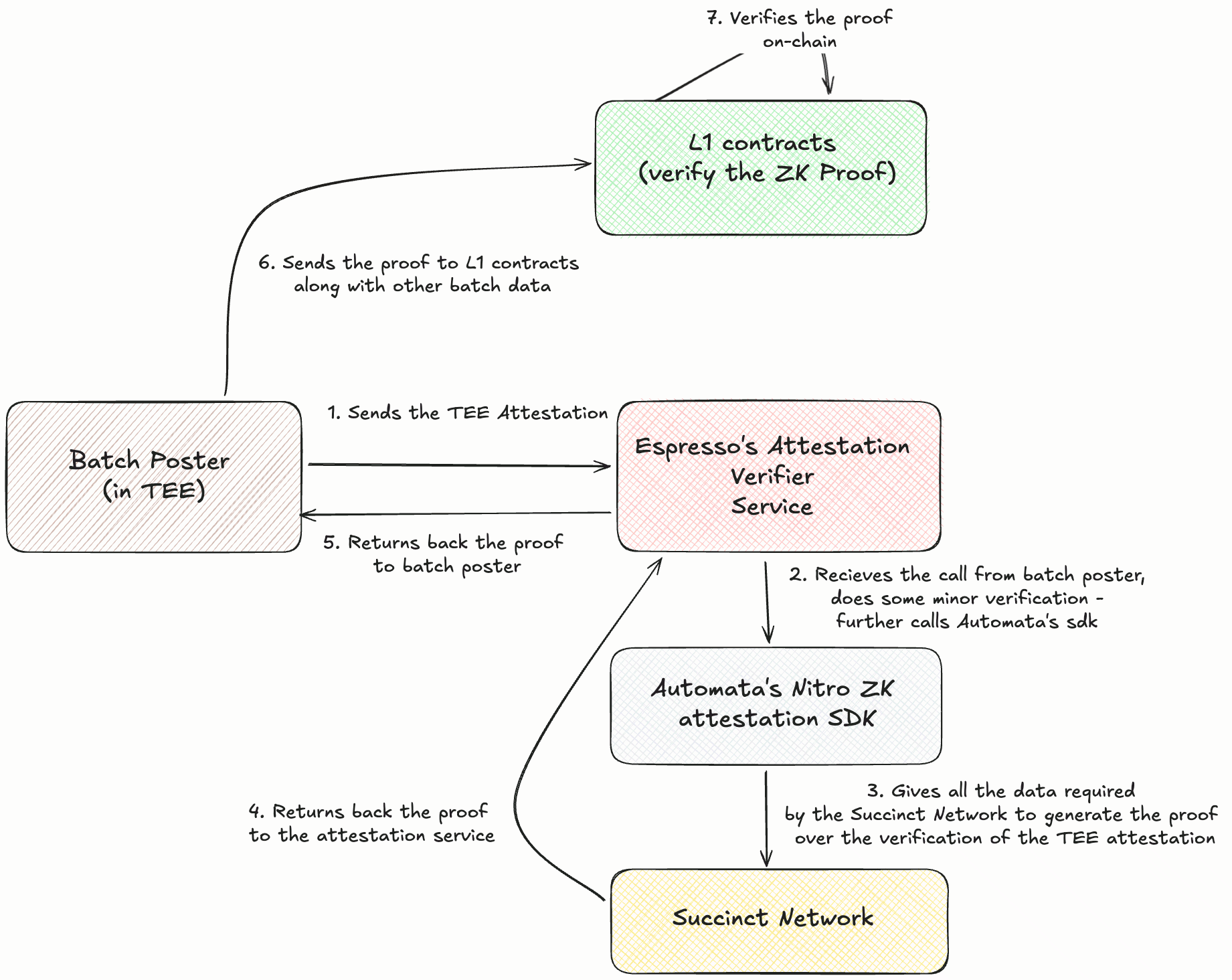
Note
Note: Our previous flow can be found here
Updated Flow:
- The batch poster running inside a TEE creates a TEE attestation and sends it to Espresso’s attestation verifier service.
- The attestation verifier service calls Automata’s Nitro ZK Attestation SDK, which gathers all required inputs and calls the Succinct Network to generate a zero-knowledge proof over the verification of the TEE attestation
- The Succinct Network returns the proof, which Espresso’s Attestation SDK then passes back to the batch poster.
- The batch poster submits the ZK proof to L1 along with other batch data, where it is verified by a set of on-chain contracts.
Requirements & Trust Dependencies
With this new flow, we require the rollups/RaaS providers to have a few new trust dependencies and requirements
Trust Dependencies
- Succinct Network
- Automata’s Nitro ZK Attestation SDK
Requirements
- Rollup/RaaS needs to run Espresso’s Attestation Verifier service
- Succinct Network tokens in-order for the network to generate the ZK Proof. It is estimated to cost around 0.3 PROVE tokens for each request. New request will be made every time there is a new code update or a new restart ( the restart requirement will be removed soon) and batcher needs to generate a new TEE attestation.
On-chain Cost Analysis
Cost analysis based on prices on Jan 8th, 2026.
Base Fee on Ethereum: 0.53 GWEI
Ether Price: 3,091.47USD
Prove token prices: $0.4349 USD
Calculations based on every code update
| Design | On-chain Costs | Additional Costs | Total Cost |
|---|---|---|---|
| AWS Nitro attestation report Verification on-chain | (63 million * 0.53 GWEI) ~ 0.03 Ether ~ 93 USD | None | ~ 93 USD |
| ZK Proof Verification on-chain |
(270k * 0.53 GWEI) | 0.3 PROVE token ~ $0.13 | ~$0.53 USD |
Espresso API
Reference for REST APIs served by Espresso nodes and query services
Modularity
The Espresso API comprises several independent modules serving different purposes and requiring different resources. A given node may serve one, or all, or any combination of these modules, depending on its role in the system and the resources available to it. To see a list of the modules available from a particular node, navigate to the root URL of that node’s API.
In brief, the available API modules are:
- status-api.md: node-specific state and consensus metrics
- catchup-api.md: serves recent consensus state to allow peers to catch up with the network
- availability-api.md: serves data recorded by the Espresso DA layer (see Protocol documentation), such as committed blocks
- node-api.md: complements the availability API by serving eventually consistent data that is not (yet) necessarily agreed upon by all nodes
- state-api.md: serves consensus state derived from finalized blocks
- events-api.md: streams events from HotShot
- submit-api.md: allows users to submit transactions to the public mempool
Content Types
All APIs support JSON and binary formats in both request and response bodies.
- The JSON format is a straightforward serialization of the data types used internally by consensus nodes. In the future, a formal specification will be published, and the API will conform to that specification.
- The binary format is the bincode serialization of consensus data types, prefixed with an 8-byte version header. In the future, this will be replaced with a binary format with better cross-language support, and the data types will be defined by a published schema, rather than generated from code.
In requests and responses, the JSON format is denoted by the MIME type application/json, and the binary format by application/octet-stream. For requests with a body, the content type of the body must be set via the Content-Type header. The desired content type of the response can be controlled via the Accept header of the request. If the Accept header does not preference either format, JSON will be used by default.
Server-Hosted Documentation
All Espresso API servers provide self-hosted API documentation, which makes it easy to see exactly what APIs the server supports, and can be easier to browse than these docs. The root URL of an application, e.g. my-server.xyz, lists the supported API modules and versions. Clicking on any API module, or navigating to the root of that API, e.g. my-server.xyz/status, documents the endpoints available in that module.
Versioning and Stability
A node may serve multiple major versions of a given API at the same time. The desired version can be selected via a URL prefix. For example, my-server.xyz/v0/status/metrics and my-server.xyz/v1/status/metrics both hit the same endpoint, but in different API versions. A URL with no version segment will get a permanent redirect response to the latest supported version. In this case, /status/metrics would redirect to /v1/status/metrics.
Whenever a breaking change is made to an API, a new major version will be created, and the old version will continue to be served for some time, giving clients time to upgrade to the new version whenever it is convenient for them. Note that non-breaking changes, such as adding new endpoints, may be made in place to existing versions.
To see a list of versions of an API supported by a server, visit the root URL of that server.
Version Support
| Version | Status | Comment |
|---|---|---|
| v1 | available on testnet April 15, 2025 | Some APIs are changed and some endpoints added to support proof of stake |
| v0 | latest version |
This guide documents the most recent version v1, but archive API references are available for earlier supported versions.
Types
These types are used in requests and responses across many of the API modules.
Primitives
Integer
We use integer to represent any JSON integer, with a maximum size of at least 2^63 - 1. Of special note, byte arrays are sometimes represented as arrays of integers ([integer]). When the type [integer] is used as a byte array, each integer therein is restricted to the range [0, 255].
Hex
In the following, we use the type hex to indicate a hex-encoded binary string, with 0x prefix.
Base 64
In the following, we use the type base64 to indicate a base64-encoded binary string, using the standard base 64 alphabet with padding.
Tagged Base 64
Some types use an enhanced tagged base 64 encoding, which consists of a prefix identifying the type of the encoded object, a ~, and then a base 64 string using the URL-safe base 64 alphabet without padding. The base 64 string encodes the binary representation of a typed object, plus a checksum. Because the encoding is URL-safe, these strings can be used not only in request and response bodies, but also in URL paths. The checksum allows the server to provide useful errors if a tagged base 64 string is mistyped or corrupted. The tag makes it easy for a human to tell different types of objects apart.
For example, a transaction hash might be encoded like TX~QDuwVkmexu1fWgJbjxshXcGqXku838Pa9cTn0d-v3hZ-, while a block hash could look like BLOCK~00ISpu2jHbXD6z-BwMkwR4ijGdgUSoXLp_2jIStmqBrD.
We use the type tagged<TAG> to indicate a tagged base 64 object with the given tag, as in tagged<TX> or tagged<BLOCK>.
NamespaceTable
{
    "bytes": base64
}
ChainConfig
A chain config determines properties of consensus, such as the base fee for sequencing and the chain ID. To save space, it can be represented either as the full config object (Left variant below) or as a commitment to the chain config (Right variant). The genesis header will always contain the full config, so clients can fetch the full config from genesis and then compare its commitment against any other header.
{
    "chain_config":
        { "Left": { "chain_id": hex, "max_block_size": integer, "base_fee": hex } }
        | { "Right": tagged<CHAIN_CONFIG> }
}
Header
{
    "version": {
        "Version": {
            "major": integer,
            "minor": integer
        }
    },
    "fields": {
        "height": integer,
        "timestamp": integer,
        "l1_head": integer,
        "l1_finalized": null | {
            "number": integer,
            "timestamp": hex,
            "hash": hex
        },
        "payload_commitment": tagged<HASH>,
        "builder_commitment": tagged<BUILDER_COMMITMENT>,
        "ns_table": NamespaceTable,
        "block_merkle_tree_root": tagged<MERKLE_COMM>,
        "fee_merkle_tree_root": tagged<MERKLE_COMM>,
        "reward_merkle_tree_root": tagged<MERKLE_COMM>,
        "fee_info": { "account": hex, "amount": hex },
        "chain_config": ChainConfig
    }
}
Payload
{
    "raw_payload": base64,
    "ns_table": NamespaceTable
}
VidCommon
{
    "V0": {
        "poly_commits": tagged<FIELD>,
        "all_evals_digest": tagged<FIELD>,
        "payload_byte_len": integer,
        "num_storage_nodes": integer,
        "multiplicity": integer
    }
} | {
    "V1": {
        "total_weights": integer,
        "recovery_threshold": integer
    }
}
Leaf
{
    "view_number": integer,
    "justify_qc": QC,
    "next_epoch_justify_qc": null | NextEpochQC,
    "parent_commitment": string,
    "block_header": Header,
    "upgrade_certificate": null | UpgradeCertificate,
    "view_change_evidence": null | ViewChangeEvidence,
    "next_drb_result": null | DrbResult,
    "with_epoch": bool
}
Transaction
{
    "namespace": integer,
    "payload": base64
}
Warning
If using the Rust API, you may notice that
namespaceis represented by au64. However, some internal sub-protocols represent the namespace as au32, and thus the maximum allowable namespace ID is4294967295(2^32 - 1). Larger namespace IDs will be rejected on transaction submission.
MerkleProof
The low-level proof type for a Merklized data structure. The specific format of this type is not currently specified, but it can be deserialized and interpreted in Rust using the MerkleProof type.
NsIndex
The 0-based position of a namespace in a NamespaceTable. The index is a little-endian byte-encoded 4-byte integer, as in [3, 2, 1, 255] (0xff010203).
NsProof
A proof that a certain list of transactions corresponds to a certain namespace in a block.
{
    "V0": {
        "ns_index": NsIndex,
        "ns_payload": base64, // binary encoding of the namespace data
        "ns_proof": {
            "prefix_elems": tagged<FIELD>,
            "suffix_elems": tagged<FIELD>,
            "prefix_bytes": [integer],
            "suffix_bytes": [integer]
        }
    }
} | {
    "V1": {
        "ns_index": NsIndex,
        "ns_payload": [integer],
        "ns_proof": MerkleProof
    }
}
V0.ns_proof is a low-level range proof in the Espresso ADVZ VID scheme. The details of this proof are out of scope of this document, but this JSON object corresponds to the LargeRangeProofType, and can be manipulated in Rust using that type.
Status API
Node-specific state and consensus metrics
This API provides insight into the inner workings of consensus. The metrics are useful for monitoring node health and setting up alerts.
Enabling the Status API
Enable the status API by appending the http and
status module flags to your node’s startup command:
espresso-node [options] -- http -- status [-- other modules...]
Public Access
The API is served over HTTP on the port configured via ESPRESSO_NODE_API_PORT. Node operators
should ensure this port is reachable from the internet so the Espresso team can monitor overall network health and
identify nodes that may need attention.
To verify the API is accessible, replace the URL below with your node’s public IP or domain name and run from an external machine:
# Direct access over HTTP (replace 8080 with your ESPRESSO_NODE_API_PORT):
curl http://203.0.113.10:8080/status/metrics

# If you have a reverse proxy with TLS (recommended for production):
curl https://my-espresso-node.example.com/status/metrics
You should see Prometheus-formatted metrics:
# HELP ...
# TYPE ...
...
Note
The node serves plain HTTP. For production deployments we recommend setting up HTTPS via a reverse proxy.
Monitoring Recommendations
Node Version
The consensus_version metric reports the image tag and git revision your node is running:
consensus_version{desc="20260312",rev="c71063750783484374a5d879da9d320feb32ec80",...} 1
Verify the desc label matches the current release for your network, see
Releases.
Timeouts as Leader
The consensus_number_of_timeouts_as_leader metric tracks views where your node was the leader but failed to propose a
block. Every jump in this counter means a missed proposal and warrants investigation.
Proposal Participation
Operators should also monitor their node’s participation rate via the participation endpoints of another query node, for example the Espresso-hosted query service. These endpoints return per-epoch statistics:
curl https://query.main.net.espresso.network/node/participation/proposal/current
curl https://query.main.net.espresso.network/node/participation/vote/current
Proposal participation covers blocks the validator was elected to propose; vote participation covers votes it cast. To
read a past epoch, replace current with the epoch number, for example /node/participation/proposal/1234. That
segment must be a number, so there is no previous shorthand.
The response is a map of BLS public keys to participation scores. Look up your node’s
staking public key. A healthy node should have a
value very close to 1.0. Values below 0.95 warrant investigation and reaching out to the Espresso team.
A temporary dip lasting up to one epoch is expected if a node was offline or recently restarted (~40,000 blocks / ~1 day on mainnet, ~3,000 blocks on decaf).
Endpoints
GET /status/block-height
The last known block height of the chain.
Returns integer
GET /status/success-rate
The fraction of views since genesis that resulted in a successful block. This equals the block height divided by the number of views completed.
Returns float
GET /status/time-since-last-decide
The elapsed time, in seconds, since consensus last decided on a block. Useful to alert when consensus is stalled or this node has been disconnected from consensus.
Returns integer
GET /status/metrics
Exposes all metrics recorded by consensus in Prometheus format.
Catchup API
Serves recent consensus state to allow peers to catch up with the network
The primary customer of this API is peer consensus nodes who may have recently joined the network or were temporarily disconnected. These nodes need the very latest state, one which hasn’t even been finalized yet, in order to start voting and proposing in consensus.
In HotShot, all state required to participate is represented in the form of Merkle trees or Merkle tries, so this API is able to provide select segments of the state with a proof that will convince the client that the returned segment is accurate, as long as they know the corresponding state commitment.
Types
Account
{
    // Account balance in WEI. Serialized as a hex string so as not to exceed the
    // range of JSON integers.
    "balance": hex,
    // Merkle proof justifying "balance" relative to the state commitment.
    "proof": {
        "account": hex,
        "proof":
            { "Presence": MerkleProof },
          | { "Absence": MerkleProof }
        }
    }
}
Endpoints
GET /catchup/:height/:view/account/:address
Get the balance of the requested fee account in the state from the requested consensus height and view. This is used to fetch the state for unfinalized views, to facilitate rapid catchup. If :view has already been finalized, this endpoint may fail with error 404.
Warning
:heightand:viewmust correspond!:heightis provided to simplify lookups for backends where data is not indexed by view.
Parameters
| Name | Type | Description |
|---|---|---|
height | integer | The block height at which to look up the account balance |
view | integer | The view from which to look up the account balance |
address | hex | The account (Ethereum address) to look up |
Returns Account
POST /catchup/:height/:view/accounts
Bulk version of /catchup/:height/:view/account. The request body should be a JSON array consisting of TaggedBase64-encoded fee accounts.
The response is a FeeMerkleTree containing sub-trees for each of the requested accounts, which is
a more condensed way to represent the union of account proofs for each requested account. Individual
Merkle proofs for each account can be extracted from this tree.
Warning
:heightand:viewmust correspond!:heightis provided to simplify lookups for backends where data is not indexed by view.
Parameters
| Name | Type | Description |
|---|---|---|
height | integer | The block height at which to look up the account balance |
view | integer | The view from which to look up the account balance |
Returns FeeMerkleTree
GET /catchup/:height/:view/blocks
Get the Merkle frontier (path to most recently inserted element) of the accumulator of blocks, from the requested consensus view. This is used to fetch the state for unfinalized views, to facilitate rapid catchup. If :view has already been finalized, this endpoint may fail with error 404.
Warning
:heightand:viewmust correspond!:heightis provided to simplify lookups for backends where data is not indexed by view.
Parameters
| Name | Type | Description |
|---|---|---|
height | integer | The block height at which to look up the frontier |
view | integer | The view from which to look up the frontier |
Returns MerkleProof
GET /catchup/chain-config/:commitment
Get the chain config with the given hash.
Parameters
| Name | Type | Description |
|---|---|---|
commitment | tagged<CHAIN_CONFIG> | The hash of the chain config to look up |
Returns ChainConfig
GET /catchup/:height/leafchain
Get a leaf chain which decides a specified block height. This endpoint can be used for catching up the stake table, where :height is the block height of the epoch root you want to catch up to.
Parameters
| Name | Type | Description |
|---|---|---|
height | integer | The block height decided by the desired leaf chain |
Returns [Leaf]
GET /catchup/:height/:view/reward-account/:address
Get the balance of the requested reward account in the state from the requested consensus height and view. This is used to fetch the state for unfinalized views, to facilitate rapid catchup. If :view has already been finalized, this endpoint may fail with error 404.
Warning
:heightand:viewmust correspond!:heightis provided to simplify lookups for backends where data is not indexed by view.
Parameters
| Name | Type | Description |
|---|---|---|
height | integer | The block height at which to look up the account balance |
view | integer | The view from which to look up the account balance |
address | hex | The account (Ethereum address) to look up |
Returns Account
POST /catchup/:height/:view/reward-accounts
Bulk version of /catchup/:height/:view/reward-account. The request body should be a JSON array consisting of TaggedBase64-encoded fee accounts.
The response is a RewardsMerkleTree containing sub-trees for each of the requested accounts, which is a more condensed way to represent the union of account proofs for each requested account. Individual Merkle proofs for each account can be extracted from this tree.
Warning
:heightand:viewmust correspond!:heightis provided to simplify lookups for backends where data is not indexed by view.
Parameters
| Name | Type | Description |
|---|---|---|
height | integer | The block height at which to look up the account balance |
view | integer | The view from which to look up the account balance |
Returns RewardsMerkleTree
Availability API
Serves data recorded by the Tiramisu DA layer, such as committed blocks
The availability API is the place to get onchain data, like blocks and transactions. It is the primary interface for downstream components like rollups and end users.
The API is designed to be robust and pure. Robust means that if the node hosting the API misses some data, for example from being offline when a certain block was finalized, it will automatically fetch the missing data from a peer, and will eventually fetch and store all finalized data. Pure means that each endpoint is a pure function – with the exception of occasionally returning 404 for missing data, each endpoint will always give the same response given the same parameters.
Due to purity, this API provides no aggregate queries, like block or transaction counts, which might change as missing data is fetched. Likewise, every endpoint takes some specification of the exact point in the chain the client is looking for, like a block height or hash. There is no “latest block” query. Thus, most real-world use cases will need to complement the availability API with use of the node API.
Organization
While this API has many endpoints, don’t be intimidated – there is a method to the madness. The API is organized around collections of different resources, each of which corresponds to blocks and can be indexed by block height or hash.
Resources
- Leaves
- Headers
- Blocks
- Block summaries
- Payloads
- VID common
Indices
Each of these resources can be addressed in the following ways:
<resource>/:height<resource>/hash/:hash<resource>/payload-hash/:payload-hash
Warning
Not all of the indices are implemented for all resources, although in principle they can be. The supported indices are documented below for each endpoint. Future releases will fill in the missing functionality.
Warning
Leaves are currently indexed slightly differently from other resources. See documentation on leaf endpoints. Future versions of this API will merge the concept of a leaf and a header, resolving this discrepancy.
In addition, there are endpoints to fetch a range of each resource (<resource>/:form/:until) and to subscribe to a WebSockets stream (/stream/<resource>/:from).
Types
BlockSummary
{
    "header": Header,
    "hash": tagged<BLOCK>,
    "size": integer,
    "num_transactions": integer
}
BlockResponse
{
    "header": Header,
    "payload": Payload,
    "hash": tagged<BLOCK>,
    "size": integer,
    "num_transactions": integer
}
LeafResponse
{
    "leaf": Leaf,
    "qc": QC,
}
PayloadResponse
{
    "data": Payload,
    "height": integer,
    "size": integer,
    "block_hash": tagged<BLOCK>,
    "hash": tagged<HASH>
}
VidCommonResponse
{
    "common": VidCommon,
    "block_hash": tagged<BLOCK>,
    "payload_hash": tagged<HASH>
}
Endpoints
GET /availability/leaf
Paths
/availability/leaf/:height/availability/leaf/hash/:hash
Parameters
| Name | Type | Description |
|---|---|---|
height | integer | Height of the leaf to fetch |
hash | tagged<COMMIT> | Hash of the leaf to fetch |
Returns LeafResponse
GET /availability/leaf/:from/:until
Retrieve a range of consecutive leaves.
Parameters
| Name | Type | Description |
|---|---|---|
from | integer | Height of the first leaf to fetch |
until | integer | Height just after the last leaf to fetch |
Returns [LeafResponse]
GET /availability/stream/leaves/:height
Note
This is a WebSockets endpoint. The client must be prepared to upgrade the connection to a WebSockets connection, including the proper headers.
Subscribe to a stream of leaves, in order, starting from the given height.
Parameters
| Name | Type | Description |
|---|---|---|
height | integer | Height of the first leaf to yield |
Yields LeafResponse
GET /availability/header
Paths
/availability/header/:height/availability/header/hash/:hash/availability/header/payload-hash/:payload-hash
Parameters
| Name | Type | Description |
|---|---|---|
height | integer | Height of the header to fetch |
hash | tagged<BLOCK> | Hash of the header to fetch |
payload-hash | tagged<HASH> | Hash of the payload of the header to fetch. Note that block payloads are not necessarily unique. If there are multiple blocks whose payload matches this hash, it is unspecified which one is returned1. |
Returns Header
GET /availability/header/:from/:until
Retrieve a range of consecutive headers.
Parameters
| Name | Type | Description |
|---|---|---|
from | integer | Height of the first header to fetch |
until | integer | Height just after the last header to fetch |
Returns [Header]
GET /availability/stream/headers/:height
Note
This is a WebSockets endpoint. The client must be prepared to upgrade the connection to a WebSockets connection, including the proper headers.
Subscribe to a stream of headers, in order, starting from the given height.
Parameters
| Name | Type | Description |
|---|---|---|
height | integer | Height of the first header to yield |
Yields Header
GET /availability/block
Paths
/availability/block/:height/availability/block/hash/:hash/availability/block/payload-hash/:payload-hash
Parameters
| Name | Type | Description |
|---|---|---|
height | integer | Height of the block to fetch |
hash | tagged<BLOCK> | Hash of the block to fetch |
payload-hash | tagged<HASH> | Hash of the payload of the block to fetch. Note that block payloads are not necessarily unique. If there are multiple blocks whose payload matches this hash, it is unspecified which one is returned1. |
Returns BlockResponse
GET /availability/block/:from/:until
Retrieve a range of consecutive blocks.
Parameters
| Name | Type | Description |
|---|---|---|
from | integer | Height of the first block to fetch |
until | integer | Height just after the last block to fetch |
Returns [BlockResponse]
GET /availability/stream/blocks/:height
Note
This is a WebSockets endpoint. The client must be prepared to upgrade the connection to a WebSockets connection, including the proper headers.
Subscribe to a stream of blocks, in order, starting from the given height.
Parameters
| Name | Type | Description |
|---|---|---|
height | integer | Height of the first block to yield |
Yields BlockResponse
GET /availability/block/summary
Paths
/availability/block/summary/:height
Parameters
| Name | Type | Description |
|---|---|---|
height | integer | Height of the block to fetch |
Returns BlockSummary
GET /availability/block/summaries/:from/:until
Retrieve a range of consecutive block summaries.
Parameters
| Name | Type | Description |
|---|---|---|
from | integer | Height of the first block summary to fetch |
until | integer | Height just after the last block summary to fetch |
Returns [BlockSummary]
GET /availability/payload
Paths
/availability/payload/:height/availability/payload/block-hash/:block-hash/availability/payload/hash/:hash
Parameters
| Name | Type | Description |
|---|---|---|
height | integer | Height of the block whose payload should be fetched |
block-hash | tagged<BLOCK> | Hash of the block whose payload should be fetched |
hash | tagged<HASH> | Hash of the payload to fetch. Note that block payloads are not necessarily unique. If there are multiple payloads matching this hash, it is unspecified which one is returned1. |
Returns PayloadResponse
GET /availability/payload/:from/:until
Retrieve a range of consecutive payloads.
Parameters
| Name | Type | Description |
|---|---|---|
from | integer | Height of the first payload to fetch |
until | integer | Height just after the last payload to fetch |
Returns [PayloadResponse]
GET /availability/stream/payloads/:height
Note
This is a WebSockets endpoint. The client must be prepared to upgrade the connection to a WebSockets connection, including the proper headers.
Subscribe to a stream of payloads, in order, starting from the given height.
Parameters
| Name | Type | Description |
|---|---|---|
height | integer | Height of the first payload to yield |
Yields PayloadResponse
GET /availability/vid/common
Paths
/availability/vid/common/:height/availability/vid/common/hash/:hash/availability/vid/common/payload-hash/:payload-hash
Parameters
| Name | Type | Description |
|---|---|---|
height | integer | Height of the block whose VID common data should be fetched |
hash | tagged<BLOCK> | Hash of the block whose VID common data should be fetched |
payload-hash | tagged<HASH> | Hash of the payload of the block whose VID common data should be fetched. Note that block payloads are not necessarily unique. If there are multiple blocks whose payload matches this hash, it is unspecified which one is returned1. |
Returns VidCommonResponse
GET /availability/stream/vid/common/:height
Note
This is a WebSockets endpoint. The client must be prepared to upgrade the connection to a WebSockets connection, including the proper headers.
Subscribe to a stream of VID common objects, in order, starting from the given height.
Parameters
| Name | Type | Description |
|---|---|---|
height | integer | Height of the first VID common to yield |
Yields VidCommonResponse
GET /availability/block/:height/namespace/:namespace
Get the list of transactions in a block from a given namespace, along with a proof that these are only and all such transactions from that block. Note that the proof may be null if transactions is empty, in which case the caller should check the namespace table for the specified block to confirm that :namespace is not present.
Parameters
| Name | Type | Description |
|---|---|---|
height | integer | Height of the block containing the desired namespace |
namespace | integer | ID of the desired namespace |
Returns
{
    "transactions": [Transaction],
    "proof": NsProof | null
}
GET /availability/transaction
Paths
/availability/transaction/:height/:index/availability/transaction/hash/:hash
Parameters
| Name | Type | Description |
|---|---|---|
height | integer | Height of the block containing the desired transaction |
index | integer | 0-based position of the desired transaction in its block |
hash | tagged<TX> | Hash of the desired transaction. Note that transactions are not necessarily unique. If there are multiple transactions matching this hash, it is unspecified which one is returned1. |
Returns
{
    "transaction": Transaction,
    "hash": tagged<TX>,
    "index": integer,
    "proof": TransactionInclusionProof,
    "block_hash": tagged<BLOCK>,
    "block_height": integer
}
The response contains the hash of the transaction, the hash and height of the block that contains it, and its index within that block. It also contains a TransactionInclusionProof, which proves inclusion of this transaction in the block with block_hash. The specific format of this type is not currently specified, but it can be deserialized and interpreted in Rust using the TxInclusionProof type.
GET /availability/limits
Get implementation-defined limits restricting certain requests.
small_object_range_limit: the maximum number of small objects which can be loaded in a single range query. Currently small objects include leaves only. In the future this limit will also apply to headers, block summaries, and VID common, however- loading of headers and block summaries is currently implemented by loading the entire block
- imperfect VID parameter tuning means that VID common can be much larger than it should
large_object_range_limit: the maximum number of large objects which can be loaded in a single range query. Large objects include anything that might contain a full payload or an object proportional in size to a payload. Note that this limit applies to the entire class of objects: we do not check the size of objects while loading to determine which limit to apply. If an object belongs to a class which might contain a large payload, the large object limit always applies.
Returns
{
    "large_object_range_limit": integer,
    "small_object_range_limit": integer
}
GET /state-cert/epoch
Get the light client state update certificate for the given epoch.
The light client state update certificate consists of the list of Schnorr signatures of the light client state at the end of the epoch. This is used to update light client state in the contract so that it have the new stake table information for the next epoch.
| Name | Type | Description |
|---|---|---|
epoch | integer | Epoch number containing the desired state cert |
Returns
{
    "epoch": integer,
    "light_client_state": {
        "viewNum": integer,
        "blockHeight": integer,
        "blockCommRoot": BN256.ScalarField
    },
    "next_stake_table_state": tagged<STAKE_TABLE_STATE>,
    "signatures": [[tagged<SCHNORR_VER_KEY>, tagged<SCHNORR_SIG>]]
}
1 This breaks purity. This will be addressed in a future version of the API.
Node API
Complements the availability API by serving eventually consistent data that is not necessarily agreed upon by all nodes
The availability API provides a pure view of snapshots of the Espresso blockchain at various points in time. Because it strives for robustness and purity, it does not include aggregate statistics like block or transaction counts, which may briefly return incorrect results and will gradually correct themselves as missing data is fetched. The node API does provide this data, making it a useful complement to the availability API.
In other words, while the availability API is a view of the blockchain abstractly, the node API provides information about this node’s view of the chain, at the present moment in time.
Endpoints
GET /node/block-height
Get the height of the chain as known to this node. This is equal to one more than the height of the latest known block. It is not a count of the blocks in this node’s database, as blocks earlier than the latest known block could be missing.
Returns integer
GET /node/transactions/count
Get the number of finalized transactions. This count may be too low if blocks are missing from the database.
Returns integer
GET /node/payloads/total-size
Get the total size, in bytes, of all finalized block payloads. This count may be too low if blocks are missing from the database.
Returns integer
GET /node/vid/share
Get the VID share belonging to this node for a given block.
Paths
/node/vid/share/:height/node/vid/share/hash/:hash/node/vid/share/payload-hash/:payload-hash
Parameters
| Name | Type | Description |
|---|---|---|
height | integer | Height of the block whose VID share should be fetched |
hash | tagged<BLOCK> | Hash of the block whose VID share should be fetched |
payload-hash | tagged<HASH> | Hash of the payload of the block whose VID share should be fetched. Note that block payloads are not necessarily unique. If there are multiple blocks whose payload matches this hash, it is unspecified which one is returned. |
Returns VidShare
The specific format of this type is not currently specified, but it can be deserialized and interpreted in Rust using the VidShare type.
GET /node/sync-status
Get the node’s progress in syncing with the latest state of blockchain.
If the node is fully synced (that is, all the missing counts are 0 and pruned_height is null or 0) other endpoints in this API should give accurate results.
Returns
{
    "missing_blocks": integer,
    "missing_leaves": integer,
    "missing_vid_common": integer,
    "missing_vid_shares": integer,
    "pruned_height": null | integer,
}
GET /node/header/window
Get a range of consecutive headers by timestamp window.
Returns all available headers, in order, whose timestamps fall between :start (inclusive) and :end (exclusive), or between the block indicated by :height or :hash (inclusive) and :end (exclusive). The response also includes one block before the desired window (unless the window includes the genesis block) and one block after the window. This proves to the client that the server has not omitted any blocks whose timestamps fall within the desired window.
It is possible that not all blocks in the desired window are available when this endpoint is called. In that case, whichever blocks are available are included in the response, and next is null to indicate that the response is not complete. The client can then use one of the /from/ forms of this endpoint to fetch the remaining blocks from where the first response left off, once they become available. If no blocks are available, not even prev, this endpoint will return an error.
Paths
/node/header/window/:start/:end/node/header/window/from/:height/:end/node/header/window/from/hash/:hash/:end
Parameters
| Name | Type | Description |
|---|---|---|
start | integer | Timestamp in seconds where the window should start |
end | integer | Timestamp in seconds where the window should end |
height | integer | Block height where the window should start |
hash | tagged<BLOCK> | Block hash where the window should start |
Returns
{
    "window": Header,
    "prev": null | Header,
    "next": null | Header
}
GET /node/stake-table/current , /node/stake-table/:epoch
Get the active stake table for the current epoch or the specified one.
| Name | Type | Description |
|---|---|---|
epoch | integer | The epoch number for which to get the stake table. |
Returns
{
    hex /* address */: {
        "account": hex, // address used to pay fees and collect rewards
        "stake_table_key": tagged<BLS_VER_KEY>,
        "state_ver_key": tagged<SCHNORR_VER_KEY>,
        "stake": integer,
        "commission" integer,
        "delegators": {
            hex /* address */: integer
        }
    }
}
State API
Serves consensus state derived from finalized blocks
All state derived from block data is represented in the form of Merkle trees or Merkle tries, so this API is able to provide select segments of the state with a proof that will convince the client that the returned segment is accurate, as long as they know the corresponding state commitment (part of each block header).
Endpoints
GET /fee-state
Get a Merkle proof proving the balance of a certain fee account in a given snapshot of the state. The element in the returned Merkle proof contains the balance of the requested account, or null if the account has no balance.
Paths
/fee-state/:height/:account/fee-state/commit/:commit/:account
Parameters
| Name | Type | Description |
|---|---|---|
height | integer | Block height of the state snapshot to read from |
commit | tagged<MERKLE_COMM> | Commitment of the state snapshot to read from |
account | hex | Fee account to look up |
Returns MerkleProof
GET /fee-state/block-height
The latest block height for which fee state is available.
Note that this may be less than the block height indicated by other APIs, such as status or node, since the fee state storage is updated asynchronously.
Returns integer
GET /fee-state/fee-balance/latest/:account
Convenience endpoint to get the current balance of an account from a trusted node.
| Name | Type | Description |
|---|---|---|
account | hex | Fee account to look up |
Returns the balance as a plain integer, without proof.
GET /block-state
Get a Merkle proof proving the inclusion of a certain block at a position in the history. The element in the returned Merkle proof contains the commitment of the block at the requested position in history.
Paths
/block-state/:height/:index/block-state/commit/:commit/:index
Parameters
| Name | Type | Description |
|---|---|---|
height | integer | Block height of the state snapshot to read from |
commit | tagged<MERKLE_COMM> | Commitment of the state snapshot to read from |
index | integer | Height of the block to look up |
Returns MerkleProof
GET /block-state/block-height
The latest block height for which block state is available.
Note that this may be less than the block height indicated by other APIs, such as status or node, since the block state storage is updated asynchronously.
Returns integer
Reward State
The reward state API has two versions:
- Protocol V3: Uses reward state v1 with SHA3 hashing (
RewardMerkleTreeV1) - Protocol V4+: Uses reward state v2 with Keccak256 hashing (
RewardMerkleTreeV2)
GET /reward-state
Get a Merkle proof proving the balance of a certain reward account in a given snapshot of the state. The element in the returned Merkle proof contains the balance of the requested account, or null if the account has no balance.
This endpoint returns a V1 Merkle tree proof.
Paths
/reward-state/:height/:account/reward-state/commit/:commit/:account
Parameters
| Name | Type | Description |
|---|---|---|
height | integer | Block height of the state snapshot to read from |
commit | tagged<MERKLE_COMM> | Commitment of the state snapshot to read from |
account | hex | Reward account to look up |
Returns MerkleProof
GET /reward-state/block-height
The latest block height for which reward state is available.
Note that this may be less than the block height indicated by other APIs, such as status or node, since the reward state storage is updated asynchronously.
Returns integer
GET /reward-state/proof/:height/:address
Get the Merkle proof for a reward account at a given block height. Returns a RewardAccountQueryDataV1 type, containing the balance and a RewardAccountProofV1. This proof is based on RewardMerkleTreeV1, which uses the SHA3 hashing algorithm.
Parameters
| Name | Type | Description |
|---|---|---|
height | integer | Block height to get proof for |
address | hex | Account address to get proof for |
Returns RewardAccountQueryDataV1
{
  "balance": "0x...",
  "proof": {
    "account": "0x...",
    "proof": { /* merkle proof */ }
  }
}
RewardAccountQueryDataV1 fields:
| Field | Type | Description |
|---|---|---|
balance | U256 | The reward account balance |
proof | RewardAccountProofV1 | Merkle proof for the account |
RewardAccountProofV1 fields:
| Field | Type | Description |
|---|---|---|
account | Address | The reward account address |
proof | RewardMerkleProofV1 | Merkle proof using SHA3 hashing |
Reward State V2
Reward state v2 is used by consensus protocol V4 and above which uses Keccak256 based Merkle proofs for improved compatibility with Ethereum smart contracts.
GET /reward-state-v2
Get a Merkle proof proving the balance of a certain reward account in a given snapshot of the state. The element in the returned Merkle proof contains the balance of the requested account, or null if the account has no balance.
Paths
/reward-state-v2/:height/:account/reward-state-v2/commit/:commit/:account
Parameters
| Name | Type | Description |
|---|---|---|
height | integer | Block height of the state snapshot to read from |
commit | tagged<MERKLE_COMM> | Commitment of the state snapshot to read from |
account | hex | Reward account to look up |
Returns MerkleProof
GET /reward-state-v2/block-height
The latest block height for which reward state v2 is available.
Note that this may be less than the block height indicated by other APIs, such as status or node, since the reward state storage is updated asynchronously.
Returns integer
GET /reward-state-v2/reward-balance/latest/:address
Get current balance in reward state.
Parameters
| Name | Type | Description |
|---|---|---|
address | hex | Ethereum address in hex format |
Returns
The current reward balance as an integer.
GET /reward-state-v2/reward-balance/:height/:address
Get balance in reward state at a specific height.
Parameters
| Name | Type | Description |
|---|---|---|
height | integer | Block height to query |
address | hex | Ethereum address in hex format |
Returns
The reward balance at the specified height as an integer.
GET /reward-state-v2/proof/:height/:address
Get the Merkle proof for a reward account at a given block height. Returns a RewardAccountQueryDataV2 type, containing the balance and a RewardAccountProofV2. This proof is based on RewardMerkleTreeV2, which uses the Keccak256 hashing algorithm.
Parameters
| Name | Type | Description |
|---|---|---|
height | integer | Block height of proof for |
address | hex | Account address to get proof for |
Returns RewardAccountQueryDataV2
{
  "balance": "0x...",
  "proof": {
    "account": "0x...",
    "proof": {
      "Presence": { /* membership proof */ }
    }
  }
}
RewardAccountQueryDataV2 fields:
| Field | Type | Description |
|---|---|---|
balance | U256 | The reward account balance |
proof | RewardAccountProofV2 | Merkle proof for the account |
RewardAccountProofV2 fields:
| Field | Type | Description |
|---|---|---|
account | Address | The reward account address |
proof | RewardMerkleProofV2 | Merkle proof |
RewardMerkleProofV2 is an enum with two variants:
Presence: Merkle proof demonstrating account membership in the treeAbsence: Merkle proof demonstrating account non-membership in the tree
GET /reward-state-v2/reward-claim-input/:height/:address
Get the reward claim input data formatted for use with Solidity reward claim contracts. This endpoint is only available for consensus protocol V4+.
Parameters
| Name | Type | Description |
|---|---|---|
height | integer | Espresso block height (must match Light Client finalized height) |
address | hex | Account address to generate claim input for |
Returns RewardClaimInput
{
  "lifetime_rewards": "0x...",
  "auth_data": {
    // Authentication data including Merkle proof
  }
}
| Field | Type | Description |
|---|---|---|
lifetime_rewards | U256 | Total lifetime rewards for the account |
auth_data | RewardAuthData | Merkle proof and authentication data for on-chain verification |
- The
heightparameter must match the finalized block height in the Light Client contract - Returns error if the account has zero rewards
- The returned data is formatted to be passed directly to reward claim contract functions
Error
ZeroRewardError: Account has no rewards to claim- Conversion Error: Failed to convert proof to claim input format
Events API
Streams events from HotShot
This API allows a client, not participating in consensus, to follow along with consensus in a trustless manner, by streaming and verifying events produced by consensus. It is especially useful for block builders, who need to maintain their own view of the internal consensus state at all times, so that they can intelligently propose blocks on top of not-yet-finalized proposed parent blocks.
Warning
This API is often served on a different port than other APIs, for reasons that will be resolved in future releases.
Types
LeafInfo
The specific format of this type is not currently specified, but it can be deserialized and interpreted in Rust using the LeafInfo type.
DAProposal
The specific format of this type is not currently specified, but it can be deserialized and interpreted in Rust using the Proposal type.
QuorumProposal
The specific format of this type is not currently specified, but it can be deserialized and interpreted in Rust using the Proposal type.
Endpoints
GET /hotshot-events/events
Note
This is a WebSockets endpoint. The client must be prepared to upgrade the connection to a WebSockets connection, including the proper headers.
Subscribe to consensus events.
Yields
{
    "view_number": integer,
    "event":
        {
            "StartupInfo": {
                "known_node_with_stake": [
                    {
                    }
                ]
            }
        }
      | { "HotshotError": { "error": ... } }
      | { "HotshotTransactions": { "transactions": [Transaction] } }
      | {
            "HotshotDecide": {
                "leaf_chain": [LeafInfo],
                "block_size": null | integer
            }
        }
      | {
            "HotshotDAProposal": {
                "proposal": DAProposal,
                "sender": tagged<BLS_VER_KEY>
            }
        }
      | {
            "HotshotQuorumProposal": {
                "proposal": QuorumProposal,
                "sender": tagged<BLS_VER_KEY>
            }
        }
      | "Unknown"
}
Submit API
Submit transactions to the public mempool
Endpoints
POST /submit/submit
Returns the hash of the transaction if it was successfully submitted. This does not mean the transaction has yet been sequenced. The user can check for inclusion of the transaction using /availability/transaction/hash/:hash from the availability API.
Warning
This endpoint will fail with a 400 status code if the submitted transaction has a
namespaceID larger than 4294967295 (2^32 - 1).
Request Body Transaction
Returns tagged<TX>
Builder API
The following describes the API endpoints a builder needs to support in order to build blocks in Espresso.
Warning
These API endpoints are actively maintained and might change going forward.
GET block_info/availableblocks/:parent_hash/:view_number/:sender/:signature:
This endpoint allows an Espresso node to query a builder for a list of available blocks that the builder can provide, ensuring consistency with the ongoing consensus defined by the specified parent_hash.
Parameters
| Name | Type | Description |
|---|---|---|
parent_hash | TaggedBase64 | The hash of the parent block in the current consensus chain. This parameter ensures that the returned blocks are valid continuations of the existing chain. |
view_number | Integer | View number in Hotshot. |
sender | TaggedBase64 | The address or identifier of the entity making the request (i.e., the Espresso node). |
signature | TaggedBase64 | A cryptographic signature generated by the Espresso node, authenticating the request and proving its authenticity |
Returns
[
    {
        "block_hash": TaggedBase64,
        "block_size": integer,
        "offered_fee": integer,
        "signature": TaggedBase64,
        "sender": TaggedBase64
    }
]
GET block_info/claimblock/:block_hash/:view_number/:sender/:signature:
Upon receiving the metadata about available blocks through the previously mentioned endpoint, the Espresso node will utilize this dedicated endpoint to retrieve the complete and comprehensive content of chosen block. This endpoint will provide the Espresso node with the entirety of the block data, including all transactions, consensus data, and any other pertinent information encapsulated within the block. By leveraging this endpoint, the Espresso node can access and process the complete block content, enabling it to perform its designated functions effectively inside the Hotshot consensus.
Parameters
| Name | Type | Description |
|---|---|---|
block_hash | TaggedBase64 | The hash of the block provided as a response in previous API. |
view_number | Integer | View number in Hotshot. |
sender | TaggedBase64 | The address or identifier of the entity making the request (i.e., the Espresso node). |
signature | TaggedBase64 | A cryptographic signature generated by the Espresso node, authenticating the request and proving its authenticity |
Returns
{
    "block_payload": Payload,
    "metadata": MetaData,
    "signature": TaggedBase64,
    "sender": TaggedBase64
}
GET block_info/claimheaderinput/:block_hash/:view_number/:sender/:signature
This endpoint enables an Espresso node to retrieve the relevant fee information associated with a specific block, facilitating a transparent payout mechanism for the builder responsible for constructing that block.
Note
Note: The
block_hashshould match the one requested in previous API i.eclaim_blockfor consistent fee payoff.
Parameters
| Name | Type | Description |
|---|---|---|
block_hash | TaggedBase64 | The hash of the block provided as a response in first API. |
view_number | Integer | View number in Hotshot. |
sender | TaggedBase64 | The address or identifier of the entity making the request (i.e., the Espresso node). |
signature | TaggedBase64 | A cryptographic signature generated by the Espresso node, authenticating the request and proving its authenticity |
Returns
{
    "vid_commitment": VidCommitment,
    "vid_precompute_data": VidPrecomputeData,
    "fee_signature": TaggedBase64,
    "signature": "TaggedBase64,
    "sender" = TaggedBase64
}
POST /txn_submit/submit
It enables external user to submit directly to builder’s private transactions mempool.
- Returns the hash of the transaction if it was successfully submitted. This does not mean the transaction has yet been sequenced. The user can check for inclusion of the transaction using
/availability/transaction/hash/:hashfrom the availability API.- Request Body
Transaction - Returns
tagged<TX>
- Request Body
POST /txn_submit/batch
It enables external user to submit a list of transactions to builder’s private transactions mempool.
- Returns the corresponding list of transaction hashes if it were successfully submitted. This does not mean the transaction has yet been sequenced. The user can check for inclusion of the transaction using
/availability/transaction/hash/:hashfrom the availability API.- Request Body
Vec<Transaction> - Returns
Vec<tagged<TX>>
- Request Body
GET /txn_submit/status/:transaction_hash
It enables external user to track the status of submitted transactions in short period, old transaction will be pruned if the map doesn’t have enough space.
- Returns the status of the queried transaction commitment if successfully retrieved. The status will be one of the following: “Pending”, “Unknown” or “Rejected” (with a reason message). The status “Sequenced” is not yet supported. While this information can be obtained from the query service or block explorer, transactions with a “Sequenced” status will appear as “Pending” when retrieved. An error will be returned if the request fails due to issues like malformed input, incorrect deserialization, or missing data.
- Request Body
tagged<TX>
- Request Body
Returns
{ "Pending" }
or
{ "Unknown" }
or
{ "Rejected": { "reason": TaggedBase64 } }
or
{ "error": TaggedBase64 }
Earlier Versions
This section contains archive API references for earlier supported versions. Each version includes change notes detailing the differences between it and the subsequent version, as well as a full API reference for that version.
v0
Reference for v0 REST APIs served by Espresso nodes and query services
API v0 was the default API version from genesis until the proof-of-stake upgrade. Proof-of-stake launched on testnet on April 15, 2025 and on Mainnet in March 2026, after which v1 became the default API version. v0 continues to be supported indefinitely; however, certain endpoints will fail when querying for data originating after the proof-of-stake upgrade, and fields of certain types added in the proof-of-stake upgrade are not accessible via this API.
The differences between v0and the subsequent version v1are:
v0lacks new fields which were added to theLeaftype inv1. For leaves created before the proof-of-stake upgrade, the leaf structure without these fields is equivalent to the new structure. However, for leaves created after the proof-of-stake upgrade, it will be impossible to compute accurate commitments or verify consensus artifacts using thev0API.next_epoch_justify_qcnext_drb_resultwith_epoch
v0lacks new fields which were added to theQCtype inv1. For QCs created before the proof-of-stake upgrade, the QC structure without these fields is equivalent to the new structure. However, for QCs created after the proof-of-stake upgrade, it will be impossible to compute accurate commitments or verify consensus artifacts using thev0API.epoch
- The types of VID artifacts (VID shares, VID common, and namespace proofs) are different in
v0andv1. For blocks created before the proof-of-stake upgrade, the VID types are equivalent, and any proofs using these types can still be verified using the information returned by thev0API. However, the new version of the Rust SDK will not be able to deserialize thev0types, and for blocks created after the proof-of-stake upgrade, thev0endpoints will return errors. v0lacks all APIs related to rewards statev0lacks theavailability/state-cert/:epochandcatchup/:height/leafchainAPIs which are necessary for running a consensus client after proof of stakev0lacks the convenience endpointnode/stake-tablefor fetching the latest stake table from a trusted server
Status API
Node-specific state and consensus metrics
This API provides insight into the inner workings of consensus. It is primarily useful to the operator of the node, as many of the metrics provided here make for useful alerts.
Endpoints
GET /status/block-height
The last known block height of the chain.
Returns integer
GET /status/success-rate
The view success rate since genesis. This equals the number of views completed divided by the number of successful views, i.e. the block height.
Returns float
GET /status/time-since-last-decide
The elapsed time, in seconds, since consensus last decided on a block. Useful to alert when consensus is stalled or this node has been disconnected from consensus.
Returns integer
GET /status/metrics
Exposes all metrics recorded by consensus in Prometheus format.
Catchup API
Serves recent consensus state to allow peers to catch up with the network
The primary customer of this API is peer consensus nodes who may have recently joined the network or were temporarily disconnected. These nodes need the very latest state, one which hasn’t even been finalized yet, in order to start voting and proposing in consensus.
In HotShot, all state required to participate is represented in the form of Merkle trees or Merkle tries, so this API is able to provide select segments of the state with a proof that will convince the client that the returned segment is accurate, as long as they know the corresponding state commitment.
Types
Account
{
    // Account balance in WEI. Serialized as a hex string so as not to exceed the
    // range of JSON integers.
    "balance": hex,
    // Merkle proof justifying "balance" relative to the state commitment.
    "proof": {
        "account": hex,
        "proof":
            { "Presence": MerkleProof },
          | { "Absence": MerkleProof }
        }
    }
}
Endpoints
GET /catchup/:height/:view/account/:address
Get the balance of the requested fee account in the state from the requested consensus height and view. This is used to fetch the state for unfinalized views, to facilitate rapid catchup. If :view has already been finalized, this endpoint may fail with error 404.
Warning
:heightand:viewmust correspond!:heightis provided to simplify lookups for backends where data is not indexed by view.
Parameters
| Name | Type | Description |
|---|---|---|
height | integer | The block height at which to look up the account balance |
view | integer | The view from which to look up the account balance |
address | hex | The account (Ethereum address) to look up |
Returns Account
POST /catchup/:height/:view/accounts
Bulk version of /catchup/:height/:view/account. The request body should be a JSON array consisting of TaggedBase64-encoded fee accounts.
The response is a FeeMerkleTree containing sub-trees for each of the requested accounts, which is
a more condensed way to represent the union of account proofs for each requested account. Individual
Merkle proofs for each account can be extracted from this tree.
Warning
:heightand:viewmust correspond!:heightis provided to simplify lookups for backends where data is not indexed by view.
Parameters
| Name | Type | Description |
|---|---|---|
height | integer | The block height at which to look up the account balance |
view | integer | The view from which to look up the account balance |
Returns FeeMerkleTree
GET /catchup/:height/:view/blocks
Get the Merkle frontier (path to most recently inserted element) of the accumulator of blocks, from the requested consensus view. This is used to fetch the state for unfinalized views, to facilitate rapid catchup. If :view has already been finalized, this endpoint may fail with error 404.
Warning
:heightand:viewmust correspond!:heightis provided to simplify lookups for backends where data is not indexed by view.
Parameters
| Name | Type | Description |
|---|---|---|
height | integer | The block height at which to look up the frontier |
view | integer | The view from which to look up the frontier |
Returns MerkleProof
GET /catchup/chain-config/:commitment
Get the chain config with the given hash.
Parameters
| Name | Type | Description |
|---|---|---|
commitment | tagged<CHAIN_CONFIG> | The hash of the chain config to look up |
Returns ChainConfig
Availability API
Serves data recorded by the Tiramisu DA layer, such as committed blocks
The availability API is the place to get onchain data, like blocks and transactions. It is the primary interface for downstream components like rollups and end users.
The API is designed to be robust and pure. Robust means that if the node hosting the API misses some data, for example from being offline when a certain block was finalized, it will automatically fetch the missing data from a peer, and will eventually fetch and store all finalized data. Pure means that each endpoint is a pure function – with the exception of occasionally returning 404 for missing data, each endpoint will always give the same response given the same parameters.
Due to purity, this API provides no aggregate queries, like block or transaction counts, which might change as missing data is fetched. Likewise, every endpoint takes some specification of the exact point in the chain the client is looking for, like a block height or hash. There is no “latest block” query. Thus, most real-world use cases will need to complement the availability API with use of the node API.
Organization
While this API has many endpoints, don’t be intimidated – there is a method to the madness. The API is organized around collections of different resources, each of which corresponds to blocks and can be indexed by block height or hash.
Resources
- Leaves
- Headers
- Blocks
- Block summaries
- Payloads
- VID common
Indices
Each of these resources can be addressed in the following ways:
<resource>/:height<resource>/hash/:hash<resource>/payload-hash/:payload-hash
Warning
Not all of the indices are implemented for all resources, although in principle they can be. The supported indices are documented below for each endpoint. Future releases will fill in the missing functionality.
Warning
Leaves are currently indexed slightly differently from other resources. See documentation on leaf endpoints. Future versions of this API will merge the concept of a leaf and a header, resolving this discrepancy.
In addition, there are endpoints to fetch a range of each resource (<resource>/:form/:until) and to subscribe to a WebSockets stream (/stream/<resource>/:from).
Types
BlockSummary
{
    "header": Header,
    "hash": tagged<BLOCK>,
    "size": integer,
    "num_transactions": integer
}
BlockResponse
{
    "header": Header,
    "payload": Payload,
    "hash": tagged<BLOCK>,
    "size": integer,
    "num_transactions": integer
}
LeafResponse
{
    "leaf": Leaf,
    "qc": QC,
}
PayloadResponse
{
    "data": Payload,
    "height": integer,
    "size": integer,
    "block_hash": tagged<BLOCK>,
    "hash": tagged<HASH>
}
VidCommonResponse
{
    "common": VidCommon,
    "block_hash": tagged<BLOCK>,
    "payload_hash": tagged<HASH>
}
Endpoints
GET /availability/leaf
Paths
/availability/leaf/:height/availability/leaf/hash/:hash
Parameters
| Name | Type | Description |
|---|---|---|
height | integer | Height of the leaf to fetch |
hash | tagged<COMMIT> | Hash of the leaf to fetch |
Returns LeafResponse
GET /availability/leaf/:from/:until
Retrieve a range of consecutive leaves.
Parameters
| Name | Type | Description |
|---|---|---|
from | integer | Height of the first leaf to fetch |
until | integer | Height just after the last leaf to fetch |
Returns [LeafResponse]
GET /availability/stream/leaves/:height
Note
This is a WebSockets endpoint. The client must be prepared to upgrade the connection to a WebSockets connection, including the proper headers.
Subscribe to a stream of leaves, in order, starting from the given height.
Parameters
| Name | Type | Description |
|---|---|---|
height | integer | Height of the first leaf to yield |
Yields LeafResponse
GET /availability/header
Paths
/availability/header/:height/availability/header/hash/:hash/availability/header/payload-hash/:payload-hash
Parameters
| Name | Type | Description |
|---|---|---|
height | integer | Height of the header to fetch |
hash | tagged<BLOCK> | Hash of the header to fetch |
payload-hash | tagged<HASH> | Hash of the payload of the header to fetch. Note that block payloads are not necessarily unique. If there are multiple blocks whose payload matches this hash, it is unspecified which one is returned1. |
Returns Header
GET /availability/header/:from/:until
Retrieve a range of consecutive headers.
Parameters
| Name | Type | Description |
|---|---|---|
from | integer | Height of the first header to fetch |
until | integer | Height just after the last header to fetch |
Returns [Header]
GET /availability/stream/headers/:height
Note
This is a WebSockets endpoint. The client must be prepared to upgrade the connection to a WebSockets connection, including the proper headers.
Subscribe to a stream of headers, in order, starting from the given height.
Parameters
| Name | Type | Description |
|---|---|---|
height | integer | Height of the first header to yield |
Yields Header
GET /availability/block
Paths
/availability/block/:height/availability/block/hash/:hash/availability/block/payload-hash/:payload-hash
Parameters
| Name | Type | Description |
|---|---|---|
height | integer | Height of the block to fetch |
hash | tagged<BLOCK> | Hash of the block to fetch |
payload-hash | tagged<HASH> | Hash of the payload of the block to fetch. Note that block payloads are not necessarily unique. If there are multiple blocks whose payload matches this hash, it is unspecified which one is returned1. |
Returns BlockResponse
GET /availability/block/:from/:until
Retrieve a range of consecutive blocks.
Parameters
| Name | Type | Description |
|---|---|---|
from | integer | Height of the first block to fetch |
until | integer | Height just after the last block to fetch |
Returns [BlockResponse]
GET /availability/stream/blocks/:height
Note
This is a WebSockets endpoint. The client must be prepared to upgrade the connection to a WebSockets connection, including the proper headers.
Subscribe to a stream of blocks, in order, starting from the given height.
Parameters
| Name | Type | Description |
|---|---|---|
height | integer | Height of the first block to yield |
Yields BlockResponse
GET /availability/block/summary
Paths
/availability/block/summary/:height
Parameters
| Name | Type | Description |
|---|---|---|
height | integer | Height of the block to fetch |
Returns BlockSummary
GET /availability/block/summaries/:from/:until
Retrieve a range of consecutive block summaries.
Parameters
| Name | Type | Description |
|---|---|---|
from | integer | Height of the first block summary to fetch |
until | integer | Height just after the last block summary to fetch |
Returns [BlockSummary]
GET /availability/payload
Paths
/availability/payload/:height/availability/payload/block-hash/:block-hash/availability/payload/hash/:hash
Parameters
| Name | Type | Description |
|---|---|---|
height | integer | Height of the block whose payload should be fetched |
block-hash | tagged<BLOCK> | Hash of the block whose payload should be fetched |
hash | tagged<HASH> | Hash of the payload to fetch. Note that block payloads are not necessarily unique. If there are multiple payloads matching this hash, it is unspecified which one is returned1. |
Returns PayloadResponse
GET /availability/payload/:from/:until
Retrieve a range of consecutive payloads.
Parameters
| Name | Type | Description |
|---|---|---|
from | integer | Height of the first payload to fetch |
until | integer | Height just after the last payload to fetch |
Returns [PayloadResponse]
GET /availability/stream/payloads/:height
Note
This is a WebSockets endpoint. The client must be prepared to upgrade the connection to a WebSockets connection, including the proper headers.
Subscribe to a stream of payloads, in order, starting from the given height.
Parameters
| Name | Type | Description |
|---|---|---|
height | integer | Height of the first payload to yield |
Yields PayloadResponse
GET /availability/vid/common
Paths
/availability/vid/common/:height/availability/vid/common/hash/:hash/availability/vid/common/payload-hash/:payload-hash
Parameters
| Name | Type | Description |
|---|---|---|
height | integer | Height of the block whose VID common data should be fetched |
hash | tagged<BLOCK> | Hash of the block whose VID common data should be fetched |
payload-hash | tagged<HASH> | Hash of the payload of the block whose VID common data should be fetched. Note that block payloads are not necessarily unique. If there are multiple blocks whose payload matches this hash, it is unspecified which one is returned1. |
Returns VidCommonResponse
GET /availability/stream/vid/common/:height
Note
This is a WebSockets endpoint. The client must be prepared to upgrade the connection to a WebSockets connection, including the proper headers.
Subscribe to a stream of VID common objects, in order, starting from the given height.
Parameters
| Name | Type | Description |
|---|---|---|
height | integer | Height of the first VID common to yield |
Yields VidCommonResponse
GET /availability/block/:height/namespace/:namespace
Get the list of transactions in a block from a given namespace, along with a proof that these are only and all such transactions from that block. Note that the proof may be null if transactions is empty, in which case the caller should check the namespace table for the specified block to confirm that :namespace is not present.
Parameters
| Name | Type | Description |
|---|---|---|
height | integer | Height of the block containing the desired namespace |
namespace | integer | ID of the desired namespace |
Returns
{
    "transactions": [Transaction],
    "proof": NsProof | null
}
GET /availability/transaction
Paths
/availability/transaction/:height/:index/availability/transaction/hash/:hash
Parameters
| Name | Type | Description |
|---|---|---|
height | integer | Height of the block containing the desired transaction |
index | integer | 0-based position of the desired transaction in its block |
hash | tagged<TX> | Hash of the desired transaction. Note that transactions are not necessarily unique. If there are multiple transactions matching this hash, it is unspecified which one is returned1. |
Returns
{
    "transaction": Transaction,
    "hash": tagged<TX>,
    "index": integer,
    "proof": TransactionInclusionProof,
    "block_hash": tagged<BLOCK>,
    "block_height": integer
}
The response contains the hash of the transaction, the hash and height of the block that contains it, and its index within that block. It also contains a TransactionInclusionProof, which proves inclusion of this transaction in the block with block_hash. The specific format of this type is not currently specified, but it can be deserialized and interpreted in Rust using the TxInclusionProof type.
GET /availability/limits
Get implementation-defined limits restricting certain requests.
small_object_range_limit: the maximum number of small objects which can be loaded in a single range query. Currently small objects include leaves only. In the future this limit will also apply to headers, block summaries, and VID common, however- loading of headers and block summaries is currently implemented by loading the entire block
- imperfect VID parameter tuning means that VID common can be much larger than it should
large_object_range_limit: the maximum number of large objects which can be loaded in a single range query. Large objects include anything that might contain a full payload or an object proportional in size to a payload. Note that this limit applies to the entire class of objects: we do not check the size of objects while loading to determine which limit to apply. If an object belongs to a class which might contain a large payload, the large object limit always applies.
Returns
{
    "large_object_range_limit": integer,
    "small_object_range_limit": integer
}
1 This breaks purity. This will be addressed in a future version of the API.
Node API
Complements the availability API by serving eventually consistent data that is not necessarily agreed upon by all nodes
The availability API provides a pure view of snapshots of the Espresso blockchain at various points in time. Because it strives for robustness and purity, it does not include aggregate statistics like block or transaction counts, which may briefly return incorrect results and will gradually correct themselves as missing data is fetched. The node API does provide this data, making it a useful complement to the availability API.
In other words, while the availability API is a view of the blockchain abstractly, the node API provides information about this node’s view of the chain, at the present moment in time.
Endpoints
GET /node/block-height
Get the height of the chain as known to this node. This is equal to one more than the height of the latest known block. It is not a count of the blocks in this node’s database, as blocks earlier than the latest known block could be missing.
Returns integer
GET /node/transactions/count
Get the number of finalized transactions. This count may be too low if blocks are missing from the database.
Returns integer
GET /node/payloads/total-size
Get the total size, in bytes, of all finalized block payloads. This count may be too low if blocks are missing from the database.
Returns integer
GET /node/vid/share
Get the VID share belonging to this node for a given block.
Paths
/node/vid/share/:height/node/vid/share/hash/:hash/node/vid/share/payload-hash/:payload-hash
Parameters
| Name | Type | Description |
|---|---|---|
height | integer | Height of the block whose VID share should be fetched |
hash | tagged<BLOCK> | Hash of the block whose VID share should be fetched |
payload-hash | tagged<HASH> | Hash of the payload of the block whose VID share should be fetched. Note that block payloads are not necessarily unique. If there are multiple blocks whose payload matches this hash, it is unspecified which one is returned. |
Returns VidShare
The specific format of this type is not currently specified, but it can be deserialized and interpreted in Rust using the VidShare type.
GET /node/sync-status
Get the node’s progress in syncing with the latest state of blockchain.
If the node is fully synced (that is, all the missing counts are 0 and pruned_height is null or 0) other endpoints in this API should give accurate results.
Returns
{
    "missing_blocks": integer,
    "missing_leaves": integer,
    "missing_vid_common": integer,
    "missing_vid_shares": integer,
    "pruned_height": null | integer,
}
GET /node/header/window
Get a range of consecutive headers by timestamp window.
Returns all available headers, in order, whose timestamps fall between :start (inclusive) and :end (exclusive), or between the block indicated by :height or :hash (inclusive) and :end (exclusive). The response also includes one block before the desired window (unless the window includes the genesis block) and one block after the window. This proves to the client that the server has not omitted any blocks whose timestamps fall within the desired window.
It is possible that not all blocks in the desired window are available when this endpoint is called. In that case, whichever blocks are available are included in the response, and next is null to indicate that the response is not complete. The client can then use one of the /from/ forms of this endpoint to fetch the remaining blocks from where the first response left off, once they become available. If no blocks are available, not even prev, this endpoint will return an error.
Paths
/node/header/window/:start/:end/node/header/window/from/:height/:end/node/header/window/from/hash/:hash/:end
Parameters
| Name | Type | Description |
|---|---|---|
start | integer | Timestamp in seconds where the window should start |
end | integer | Timestamp in seconds where the window should end |
height | integer | Block height where the window should start |
hash | tagged<BLOCK> | Block hash where the window should start |
Returns
{
    "window": Header,
    "prev": null | Header,
    "next": null | Header
}
State API
Serves consensus state derived from finalized blocks
All state derived from block data is represented in the form of Merkle trees or Merkle tries, so this API is able to provide select segments of the state with a proof that will convince the client that the returned segment is accurate, as long as they know the corresponding state commitment (part of each block header).
Endpoints
GET /fee-state
Get a Merkle proof proving the balance of a certain fee account in a given snapshot of the state. The element in the returned Merkle proof contains the balance of the requested account, or null if the account has no balance.
Paths
/fee-state/:height/:account/fee-state/commit/:commit/:account
Parameters
| Name | Type | Description |
|---|---|---|
height | integer | Block height of the state snapshot to read from |
commit | tagged<MERKLE_COMM> | Commitment of the state snapshot to read from |
account | hex | Fee account to look up |
Returns MerkleProof
GET /fee-state/block-height
The latest block height for which fee state is available.
Note that this may be less than the block height indicated by other APIs, such as status or node, since the fee state storage is updated asynchronously.
Returns integer
GET /fee-state/fee-balance/latest/:account
Convenience endpoint to get the current balance of an account from a trusted node.
| Name | Type | Description |
|---|---|---|
account | hex | Fee account to look up |
Returns the balance as a plain integer, without proof.
GET /block-state
Get a Merkle proof proving the inclusion of a certain block at a position in the history. The element in the returned Merkle proof contains the commitment of the block at the requested position in history.
Paths
/block-state/:height/:index/block-state/commit/:commit/:index
Parameters
| Name | Type | Description |
|---|---|---|
height | integer | Block height of the state snapshot to read from |
commit | tagged<MERKLE_COMM> | Commitment of the state snapshot to read from |
index | integer | Height of the block to look up |
Returns MerkleProof
GET /block-state/block-height
The latest block height for which block state is available.
Note that this may be less than the block height indicated by other APIs, such as status or node, since the block state storage is updated asynchronously.
Returns integer
Events API
Streams events from HotShot
This API allows a client, not participating in consensus, to follow along with consensus in a trustless manner, by streaming and verifying events produced by consensus. It is especially useful for block builders, who need to maintain their own view of the internal consensus state at all times, so that they can intelligently propose blocks on top of not-yet-finalized proposed parent blocks.
Warning
This API is often served on a different port than other APIs, for reasons that will be resolved in future releases.
Types
LeafInfo
The specific format of this type is not currently specified, but it can be deserialized and interpreted in Rust using the LeafInfo type.
DAProposal
The specific format of this type is not currently specified, but it can be deserialized and interpreted in Rust using the Proposal type.
QuorumProposal
The specific format of this type is not currently specified, but it can be deserialized and interpreted in Rust using the Proposal type.
Endpoints
GET /hotshot-events/events
Note
This is a WebSockets endpoint. The client must be prepared to upgrade the connection to a WebSockets connection, including the proper headers.
Subscribe to consensus events.
Yields
{
    "view_number": integer,
    "event":
        {
            "StartupInfo": {
                "known_node_with_stake": [
                    {
                    }
                ]
            }
        }
      | { "HotshotError": { "error": ... } }
      | { "HotshotTransactions": { "transactions": [Transaction] } }
      | {
            "HotshotDecide": {
                "leaf_chain": [LeafInfo],
                "block_size": null | integer
            }
        }
      | {
            "HotshotDAProposal": {
                "proposal": DAProposal,
                "sender": tagged<BLS_VER_KEY>
            }
        }
      | {
            "HotshotQuorumProposal": {
                "proposal": QuorumProposal,
                "sender": tagged<BLS_VER_KEY>
            }
        }
      | "Unknown"
}
Submit API
Submit transactions to the public mempool
Endpoints
POST /submit/submit
Returns the hash of the transaction if it was successfully submitted. This does not mean the transaction has yet been sequenced. The user can check for inclusion of the transaction using /availability/transaction/hash/:hash from the availability API.
Warning
This endpoint will fail with a 400 status code if the submitted transaction has a
namespaceID larger than 4294967295 (2^32 - 1).
Request Body Transaction
Returns tagged<TX>
Glossary of Key Terms
Core concepts
The terms most relevant to understanding what Espresso is, how it integrates with chains and applications, and what guarantees it provides.
Batch Poster In Arbitrum Nitro and OP Stack integrations, the component responsible for collecting ordered transactions, assembling them into batches, and submitting those batches to the parent chain (e.g., Ethereum or Arbitrum One). In Espresso-integrated chains, the batch poster runs inside a TEE to ensure it only posts batches that have been confirmed by Espresso’s HotShot consensus. Not all Espresso execution environments use a batch poster.
RPC node An Espresso-integrated full node that reads Espresso-confirmed blocks and derives local chain state from them. RPC nodes expose standard EVM-compatible JSON-RPC endpoints, the same interface your application already uses. Applications read Espresso settlement by querying the RPC: balances, receipts, and block data reflect what Espresso has confirmed, without waiting for the parent chain to accept a batch (for Nitro/Orbit integrations that post batches to Ethereum or Arbitrum One). For teams building latency-sensitive applications (trading, bridging, intent settlement), an RPC node closes the gap between what Espresso has settled and what your users can see and act on. See Reading from Espresso. Deployment tooling uses the internal name caff-node-run.
Confirmation The point at which Espresso considers a transaction settled and irreversible. Espresso settlement is produced by decentralized Proof of Stake consensus across the Espresso validator set, secured by the HotShot consensus protocol. Reversing a finalized transaction would require compromising a supermajority of staked $ESP, the same class of security guarantee that backs other major Proof of Stake networks, delivered with fast finality rather than minutes or hours, with the ability to scale to millions of transactions per second. For institutions, Espresso finalization is the moment a transaction can be acted on: a risk system can update margin and release positions across counterparties, a stablecoin issuer can treat a redemption as final and update reserves, and a payment network can release funds to a counterparty. None of these workflows have to wait for parent-chain finality (such as an L1 batch on Ethereum or Arbitrum One), which would otherwise add latency and expose them to stale-data risk.
Data Availability (DA) The guarantee that transaction data has been published and can be retrieved by any party who needs it. DA is distinct from execution: a network can confirm that data is available without executing the transactions it contains. Espresso provides an optional DA layer (EspressoDA) for integrated chains; integrations may also use Ethereum, Celestia, EigenDA, or Avail.
Delegated Proof of Stake A variant of Proof of Stake in which token holders who do not operate validator nodes can assign (“delegate”) their tokens to a validator of their choice. The validator stakes the combined tokens on behalf of delegators and shares block rewards proportionally, minus a commission. Espresso’s Mainnet uses delegated Proof of Stake. See Delegate $ESP to participate, and the staking-cli README for how rewards are distributed.
Epoch A fixed interval of blocks after which the stake table is updated. Changes to validator registrations, delegations, and undelegations take effect at epoch boundaries, not immediately. In Espresso, delegations become active two epochs after being finalized on Ethereum. See the staking-cli README for epoch timing details.
ESP Token The native token of Espresso, used for staking and delegation. Validators and their delegators earn ESP rewards for participating in HotShot consensus and securing the network. The minimum delegation is 1 ESP. See Delegate $ESP to get started.
RPC Node
A lightweight service (Espresso Rollup Node Proxy) that sits in front of a rollup’s existing full node and serves standard EVM JSON-RPC backed by Espresso finality. It runs in front of an unmodified full node, intercepting JSON-RPC requests and resolving an Espresso-specific block tag (default "espresso") to the latest block from the integrated chain finalized by Espresso, so clients integrate by simply pointing their RPC URL at the proxy.
Finality The point at which a transaction’s position in the ledger is considered irreversible. How quickly and securely finality is reached depends on the system:
- L1 chains (e.g. Ethereum): Finality is backed by a large decentralized validator set but takes time. Ethereum’s Casper FFG reaches economic finality in roughly 12–15 minutes.
- Rollups: Finality depends on a batch being posted to and accepted by the parent chain, inheriting the L1’s delay on top of the rollup’s own sequencing time.
- Permissioned or app-specific chains: Finality is often delegated to a trusted operator or a small committee, which is fast but introduces a centralization dependency.
Espresso provides another option: HotShot, Espresso’s BFT consensus protocol, delivers decentralized Proof of Stake finality with fast settlement on Mainnet, with the ability to scale to millions of transactions per second. Unlike Ethereum finality, it doesn’t require waiting through epoch cycles. Unlike rollup finality, it doesn’t require an L1 batch to be posted and accepted. And unlike permissioned chains, it doesn’t rely on a trusted operator: finality is backed by a decentralized validator set where corrupting the result would require controlling at least two-thirds of staked $ESP. See Security model at a glance for how this applies across integration types.
HotShot Espresso’s BFT (Byzantine Fault Tolerant) consensus protocol, running in production on Mainnet. HotShot finalizes blocks submitted by integrated chains and applications, providing settlement guarantees across a decentralized validator set without executing the transactions themselves. It is based on HotStuff and HotStuff-2, designed to scale to thousands of nodes while maintaining fast, optimistically responsive finality on Mainnet, with the ability to scale to millions of transactions per second.
Interoperability The ability for separate chains or applications to exchange state and coordinate activity in a trust-minimized way. Espresso enables interoperability by providing a shared finality layer with state finalized by Espresso that other chains and applications can verify when they need to rely on that settlement. See Protocol documentation for technical integration details.
L1 / L2 L1 (Layer 1) and L2 (Layer 2) describe a common chain architecture. An L2 runs its own execution environment and may post batches to an L1 (such as Ethereum or Arbitrum One) for long-term security. Rollups are the most common L2 design.
Espresso is a decentralized settlement layer for integrated chains and applications. Settlement and finality for their blocks happen through Espresso (HotShot, Proof of Stake), not through the L1. In Nitro and OP Stack integrations, chains may also post batches to a parent chain; that step is separate from Espresso settlement. Counterparties can verify state finalized by Espresso when they need to rely on that settlement. See Configurable Execution Environments.
Namespace A unique identifier that associates a chain or application’s transactions with a specific slot inside an Espresso block. Multiple chains can use Espresso simultaneously, each submitting to its own namespace. The namespace allows each chain’s transactions to be independently verified and retrieved without processing the full block. See EspressoDA for how namespaces work at the data availability layer.
Orbit Chain An Arbitrum Nitro chain deployed using the Orbit framework. Orbit chains can be permissioned or permissionless and settle to Arbitrum One or Ethereum. Espresso’s Nitro integration allows Orbit chains to settle through Espresso for real-time settlement and fast finality by running the batch poster in an SGX TEE.
Proof of Stake A consensus mechanism in which validators are chosen to propose and attest to blocks in proportion to the amount of tokens they have staked as collateral. Honest behavior is incentivized by rewards; dishonest behavior can result in slashing. Espresso uses Proof of Stake (specifically delegated Proof of Stake) to secure HotShot consensus on Mainnet. See Stake Table contract for the onchain implementation.
RaaS (Rollup-as-a-Service) A category of infrastructure providers that deploy and operate rollup chains on behalf of other teams, handling node operation, monitoring, and upgrades. Caldera is the primary RaaS provider for Espresso-integrated chains. Orbit chains can integrate with Espresso directly or through a RaaS provider. See Live on Espresso for the current list of integrated chains.
Rollup A blockchain that executes transactions off-chain and posts a compressed record of those transactions to a parent chain (L1) for security anchoring. Rollups inherit the parent chain’s security while achieving higher throughput. Optimistic rollups assume batches are valid and allow fraud challenges; ZK rollups attach cryptographic validity proofs to each batch. See Configurable Execution Environments.
Sequencer The component responsible for collecting user transactions, ordering them, and producing blocks. In many integrated chains today, the sequencer is a single centralized operator, which introduces a trust dependency on that operator’s ordering decisions. Espresso does not replace the sequencer. Instead, it provides decentralized settlement and finality for the blocks a chain’s own sequencer produces, ensuring those blocks cannot be retroactively reordered without consensus-level corruption.
Settlement The point at which a chain’s state is recorded with finality and made readable by other systems, so that counterparties, auditors, and applications can rely on it. The strength of settlement depends on what backs it: a single sequencer’s soft confirmation can be revoked by that operator and is not auditable as final, while a decentralized validator network’s confirmation cannot be revoked without compromising a supermajority of stake. Espresso acts as a decentralized settlement layer for integrated chains and applications: their finalized blocks are anchored to Espresso’s Proof of Stake consensus, and the resulting state can be verified by other chains and applications that need to rely on that settlement. Chains that also anchor to an L1 such as Ethereum can continue to do so; Espresso adds real-time settlement and fast finality on top, with the ability to scale to millions of transactions per second.
TEE (Trusted Execution Environment) A secure hardware enclave (such as Intel SGX or AMD SEV) that provides three guarantees: code integrity (only the expected code runs inside the enclave), data confidentiality (the enclave’s state cannot be inspected or tampered with, even by the machine’s operator), and remote attestation (anyone can verify the enclave is running the correct code). Espresso uses TEEs in batch posters to ensure that only Espresso-confirmed transactions are posted to the parent chain. See Using TEE with Nitro.
ZK Proof (Zero-Knowledge Proof) A cryptographic method that allows one party to prove to another that a statement is true without revealing any underlying information beyond the truth of the statement itself. In the rollup context, ZK proofs are used to prove that a batch of transactions was executed correctly, enabling immediate finality on the parent chain without a fraud-proof window.
HotShot consensus internals
Lower-level protocol vocabulary used inside HotShot consensus and EspressoDA. Most readers won’t need these; they’re documented here for protocol engineers, auditors, and node operators. See Protocol documentation for the full reference.
Commitment Proposal A proposal on a block commitment. A block can only be applied to the chain if consensus on the commitment proposal is reached. A commitment proposal is used as follows:
- A (consensus) leader, upon receiving a DAC for this view or sufficient quorum votes for the previous view, will construct a commitment proposal and multicast it to replicas. The commitment proposal will contain the block commitment, view number, height, justify QC, and the proposer ID.
- A node, after receiving the commitment proposal, if also gets either the DAC or the DA proposal, will validate the set and send the quorum vote back to the leader.
See Protocol documentation for the full consensus flow.
Data Availability Certificate (DAC) A certificate that the proposed data is available to a quorum of distinct parties in the random small data availability (DA) committee. A DA leader, after receiving a sufficient number of votes on its DA proposal, assembles the votes into an optimistic DAC. See EspressoDA.
Data Availability Layer Storage nodes that guarantee the availability and retrievability of transaction raw data and are in charge of the eventual dissemination of the full data across the network. See EspressoDA.
Data Availability Proposal A proposal on a block for data availability. Consensus on a data availability proposal ensures that enough parties have the block data. The DA proposal consists of the block and the corresponding view number. See EspressoDA.
Data Availability Vote (DA Vote) A node vote on the data commitment, indicating the receipt of either a DA proposal or a valid VID share. The vote contains the justify QC commitment, view number, block commitment, signature, and vote token. See EspressoDA.
Data Retrievability Certificate A certificate that valid VID shares are available to a quorum of replicas. This ensures the liveness and data availability of the HotShot protocol even if the random small DA committee is bribed by an adversary. A DA leader assembles the retrievability certificate after receiving enough votes from the entire node/replica set. See EspressoDA.
Quorum Vote A vote on the commitment proposal representing the status of the node/replica’s decision on the proposal.
Yes Vote: is sent if the replica successfully verifies the commitment proposal. It consists of the justify QC commitment, view number, leaf commitment, signature, and vote token.
No Vote: indicates the replica’s rejection. A no vote has the same contents as a yes vote.
Timeout Vote: means the replica cannot decide due to timeout. Therefore, it does not include the leaf commitment as the yes or no vote does, but has all the other fields.
The node is not only signing on the data that is voted on but also the vote type, preventing a dishonest node from altering the vote. E.g., it is impossible to use the signature associated with a no vote to create a yes vote. See Protocol documentation.
Note
Want to learn more? Get in touch with the Espresso team →